CapCut is popular because it makes video editing simple, but some features require a paid plan. If you want an open-source option, OpenCut is worth a look. It is a browser-based video editor designed for basic editing without a complicated workflow.
OpenCut’s source code is available on GitHub under the MIT license. You can also try the browser editor at opencut.app.
What can you do with OpenCut?
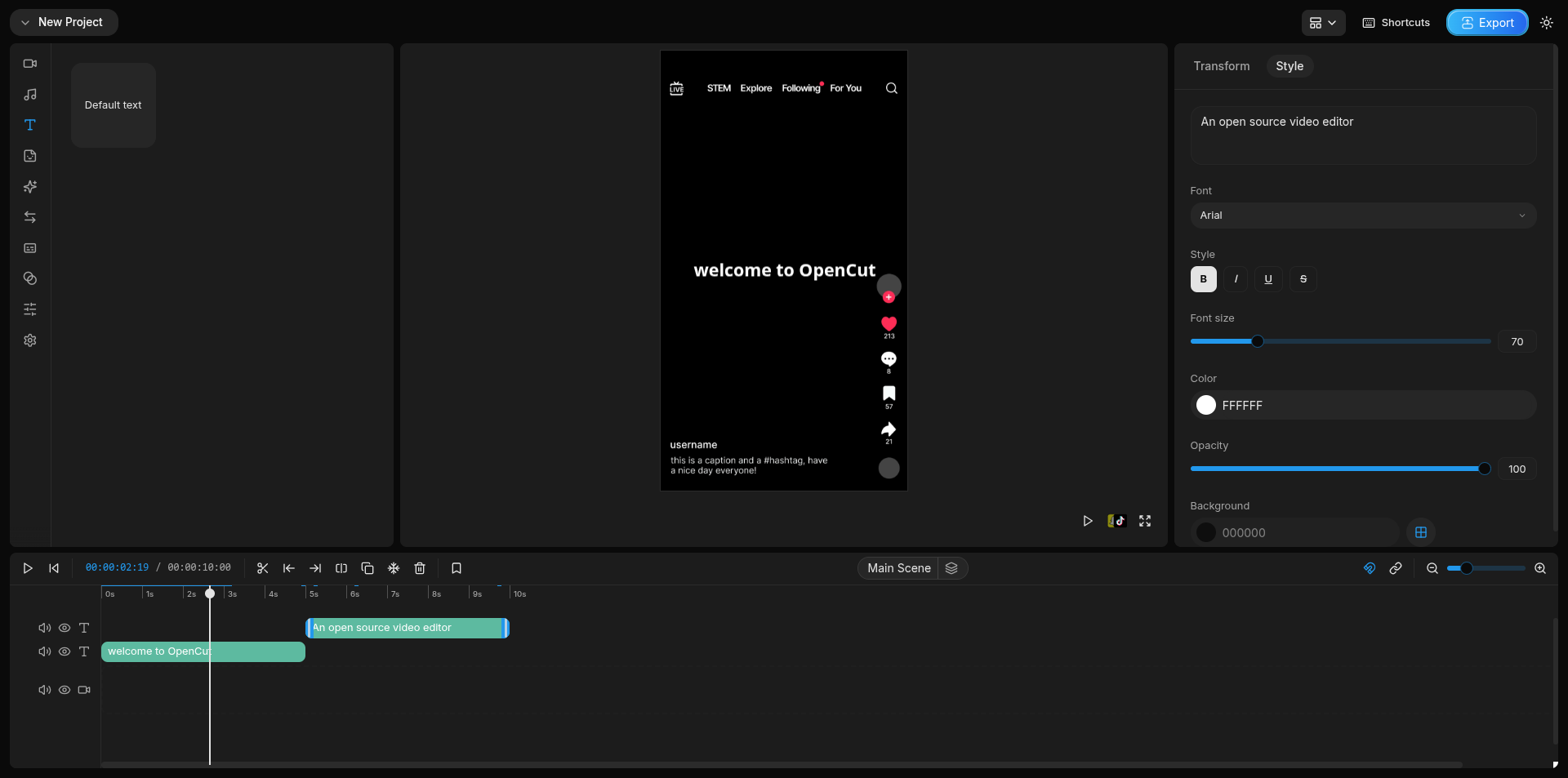
OpenCut uses a timeline interface with a preview window, media panel and editing controls. It is intended for everyday work such as trimming clips, arranging scenes and adding text or audio.
- Import video, audio and images into a project.
- Arrange and trim clips on the timeline.
- Add text overlays, adjust typography and position elements in the preview.
- Adjust audio volume and playback speed.
- Work with masks, keyframe animation and basic effects.
- Import transcript files for captions and export edited videos.
These functions are documented in the project’s release notes. As the editor is still evolving, some functions may change or behave differently depending on the build.
How to get started
- Open OpenCut Projects in a supported desktop browser.
- Create a project, then import your video or audio files.
- Drag your media to the timeline and make your cuts.
- Add text or other elements, preview the result, then use the export control.

Open source, with some limitations
One reason to consider OpenCut is privacy. The project says that your video files stay on your device during browser editing. This may appeal to users who prefer not to upload personal footage to an online editor.
However, OpenCut is not yet a complete replacement for every CapCut feature. The developers are rebuilding the project around a Rust core. The new architecture is planned to support desktop and mobile applications, plugins, an editor API, a Model Context Protocol (MCP) server for AI agents, and headless rendering. Those items are development plans, not features to assume are already available.
The version currently linked from the website is OpenCut Classic. Its GitHub repository was archived in May 2026, while the rewrite continues in the main OpenCut repository. Keep this distinction in mind before building a long-term editing workflow around it.
Where to download or try OpenCut
Try online: https://opencut.app/
Main GitHub repository: https://github.com/OpenCut-app/OpenCut
Classic source code: https://github.com/OpenCut-app/opencut-classic
For quick edits and short videos, OpenCut is an interesting free alternative to test. For important projects, check its current limitations and export results before relying on it.