
I’ve put my latest project on GitHub: renogybt-emulator, a Python library and command-line tool that emulates the Bluetooth interface exposed by Renogy BT-1 and BT-2 modules connected to an MPPT solar charge controller.
The aim is to make it easier to develop and test solar-monitoring software without needing a physical controller, solar panels or batteries on the desk.
How it works
The BT-1 and BT-2 modules provide Bluetooth Low Energy (BLE) access to Renogy equipment, using RS232 and RS485 respectively on the controller side. My emulator runs on a Linux computer with a BLE adapter and presents the Bluetooth services and simulated controller data that a compatible client expects.
Underneath, it implements the BLE GATT services and characteristics used for communication, together with a Modbus RTU responder. A client sends a request over Bluetooth, and the emulator replies with values from its simulated register bank. Those values include battery voltage, charging current, solar power, temperatures and load status.
This lets a monitoring application connect to an emulated device and exercise its normal communication path.
A day of solar charging in a few minutes
There are two operating modes:
- Static mode serves a fixed set of readings from a JSON or INI configuration file. Saved changes are picked up on the next Modbus poll, so you can change the simulated conditions while the emulator is running.
- Cycle mode rotates through nighttime, early morning, noon and late afternoon at a configurable interval.
The included 24V gel-battery preset moves from no solar generation at night to MPPT charging in the morning and at noon, then float charging in the late afternoon. For example, the noon preset reports 545W of solar power and a battery voltage of 28.4V.
That gives developers a repeatable way to check how a dashboard, logger or automation responds as readings change, without waiting for the actual sun to move across the sky.
Compatibility so far
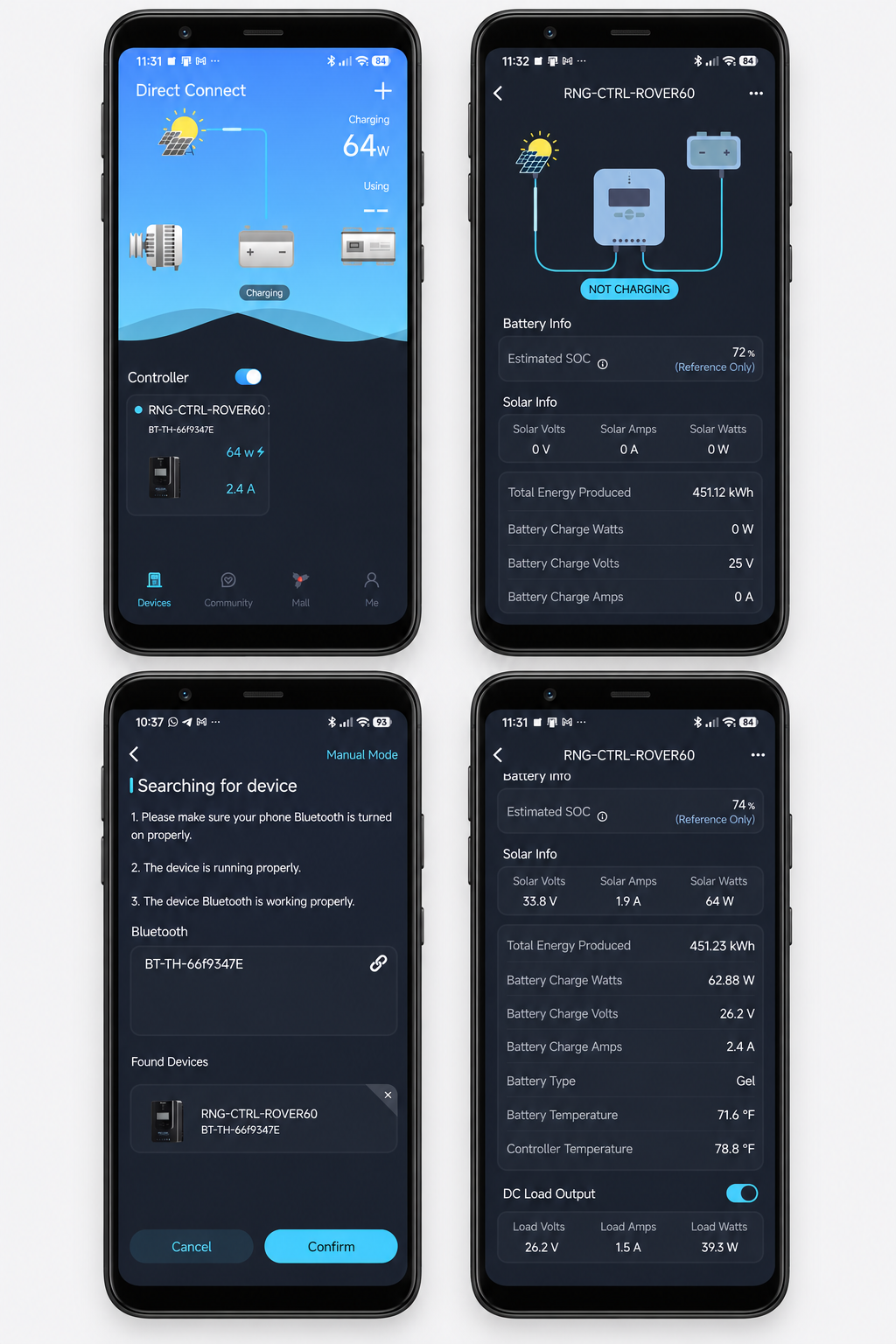
The project documents successful over-the-air testing with both the official Renogy mobile app and renogy-bt, emulating a Renogy Rover MPPT controller (RNG-CTRL-ROVER60). This covers live readings, parameter reads, historical daily summaries and changes between simulated operating states.
You can see the app discovering the emulator and displaying its readings in the screenshots in the README. The Rover setup is the verified example; compatibility with other devices and clients needs testing.
Potential uses include testing MQTT and Home Assistant telemetry pipelines, PVOutput loggers, and custom mobile or desktop monitoring applications.
Trying it out
The documented setup uses Linux, Python 3.8 or newer, BlueZ and a BLE-capable Bluetooth adapter. The repository includes installation instructions, configuration examples and a prebuilt Python wheel.
After installing the package in the repository’s virtual environment and preparing the Bluetooth adapter as described in the setup guide, you can run the four-state example with:
sudo .venv/bin/renogybt-emulator \
  -c configs/rover_24v_gel_states.json \
  --mode cycle --state-interval 30s -v
This switches operating states every 30 seconds. The interval and initial state can be changed from the command line.
The project was inspired by Cyril Sebastian’s renogy-bt and is released under the GNU GPL v3. It is an independent project and is not an official Renogy product or endorsed by Renogy.
Get the source code and documentation on GitHub. If you try it with your own client, bug reports with the configuration, debug logs and client details would be useful.