
Sometimes I need to check a Linux server when I’m away from my laptop. For small jobs, an Android SSH client is enough. LobiShell, developed by Lobianco Home Lab, is one option worth looking at.
It runs SSH sessions from an Android phone and also supports Mosh, SCP file transfers, port forwarding and SSH key management. These are useful features when you manage more than one Linux machine.
Advantages: LobiShell supports putty based private key format.
Connecting to your servers
LobiShell lets you save server connections and manage identities. A typical SSH connection needs the server address, SSH port, username and a password or private key. Once connected, you can use the terminal for commands such as:
uptime
free -h
df -h
docker ps
systemctl status nginx
The saved connections screen makes it easier to move between several machines without re-entering their details.
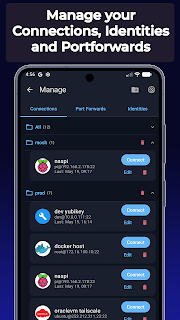
Finding devices on your network
LobiShell includes a network scanner that can help find devices on a local network. This is handy when you have several servers, small PCs or other machines in a homelab. You should still verify the host’s SSH fingerprint before trusting a new connection.
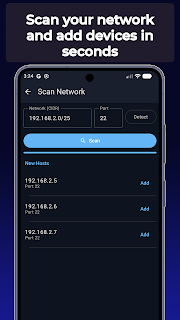
SSH, Mosh and file transfers
Regular SSH works well on a stable connection. LobiShell also supports Mosh, which is designed to cope better with intermittent connections and network changes. Mosh requires server-side setup, so it is not a drop-in replacement on every host.
SCP support lets you upload or download files, while SSH port forwarding can provide access to an internal service through an encrypted connection. For example, that can be useful when a web interface is restricted to the server’s private network.
Authentication and saved commands
The Identity Store manages SSH keys and passwords. LobiShell also advertises FIDO2 authentication with compatible hardware security keys. It has command snippets, too, so commands you frequently run can be saved instead of typed each time.
For sensitive servers, I would still use key-based login, verify host keys, and avoid exposing SSH directly to the public internet when a VPN is available.
Terminal appearance and backups
There are settings for colours, fonts and interface layout. That matters more than it sounds on a small touchscreen, especially when you have to read logs or work in a terminal for a while.
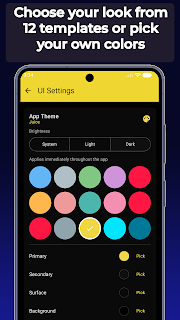
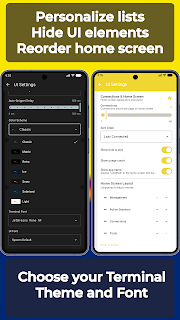
For moving settings between devices, LobiShell supports WebDAV synchronization, including compatible services such as Nextcloud. It also supports local peer-to-peer synchronization and exportable backups, with optional AES-256-GCM encryption.
LobiShell as SSH Client
If you only open an SSH terminal once in a while, a simple client may be sufficient. LobiShell becomes more interesting if you manage several servers and want saved identities, snippets, file transfers and synchronization in the same app.
The limitations are mostly those of working on a phone. Long commands and detailed configuration work are still easier with a keyboard and larger screen. But for checking a service, reading logs or restarting a container, it is a practical tool to keep installed.
Download: LobiShell on Google Play.
App details and screenshots: Google Play listing by Lobianco Home Lab. Features may change with future releases.
My previous experience with remote terminal tools showed significant latency when connecting via this method.