
This serves as a continuity from my previous post, I got myself a new and flexible Printer – HP Officejet 5680 All in One.
HP Officejet All-in-One Under Ubuntu
Its all seems rather easy at the way I left off, the printer is fully functioning by just plugging it to my Ubuntu pc, the scanner works well without I having to do anything special, the phone is fully functioning (yeah it is included with the printer) and I am able to send and receive fax without a hitch, something that I cant do without installing 350MB of companion application (half of it was crapware) under WIndows Vista.
Everything worked, what left to do?
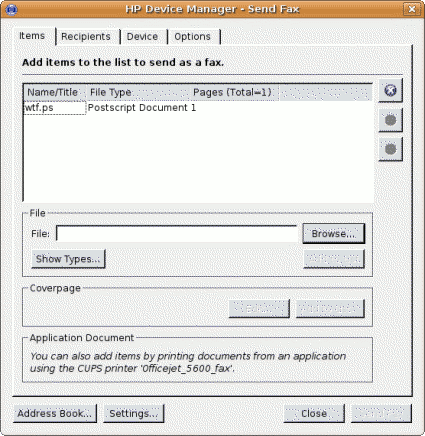
What left to do is figuring out how can I send fax directly from Ubuntu (or other Linux base operating system) using only digital files (*.txt, *.pdf, *.ps, *.jpeg), so I don’t have to print those files and fax them one by one anymore.
HP Linux Imaging and Printing project
Through googling, I found that Hewlett Packard (HP) has published open source software tool to deal with their printers. Free and Open Source drivers and printer-specific application directly from manufacturer, which is very cool!
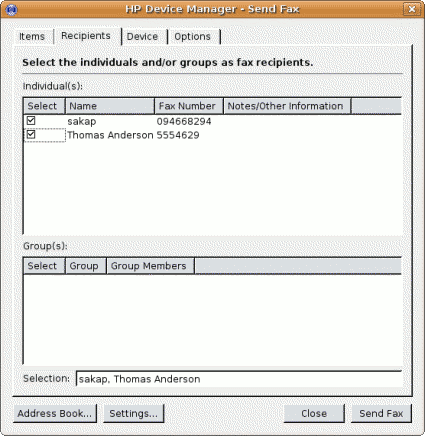
Fortunately Ubuntu already installed HPLIP tools by default with CUPS in my machine. The next step that I should take is to run ‘hp-setup’ as root to configure my printer port and run the ‘hp-sendfax’ application to send the faxes.
Both of these tool requires python-qt3 package which is available from Ubuntu software repository.
Now I can fax my pdf documents directly without having to print them first, a huge saving over ink and paper cost.
Conclusion
If you are planning to get a new printer, then I would suggest you get a HP printer. Not only because HP printers are reliable, but they also comes with Free and Open Source drivers and applications for the Linux based operating system. Well that’s a good reason to get HP printers.
Please visit HPLIP project website for more information about HP printers support under Linux based operating system.
[tags]hp,hewlett packard,printer,linux,opensource,ubuntu,foss,drivers,hardware,scanner,officejet[/tags]
Hey! This is kind of off topic but I need some advice from an established blog. Is it difficult to set up your own blog? I’m not very techincal but I can figure things out pretty fast. I’m thinking about setting up my own but I’m not sure where to start. Do you have any points or suggestions? Thanks
I really liked your article. Keep up the good work.
Successfully installed, but cannot fax pdf files. A specific error message says the pdf type is not supported.
Canon is the best in printers i am with it all the way.
is the effect from my pc
If you’re looking into cheap bubble jet printers, then get a Canon. But from my past experience, canon bubble jet printers kinda unreliable in office/production environment, maybe its only great for light printing job.
Go and get HP printers, they are the coolest!
Yaa, buy HP. Don’t buy Canon if you intend to use on GNU/Linux, Canon sucks big time!
Thanks for sharing this nice articles.