
After my first printer reached its end of life status (meaning that it has become too expensive to maintain it), I decided to buy a new printer. I haven’t bought a new printer for almost 6 years, I think I want to spend on a reliable and flexible printer.
After two weeks of window shopping, I decided to get the HP Officejet 5680 series, because I really wanted to have an ‘office look’ for my desk+workstation (yeah, I’m thinking of running my own business seriously).
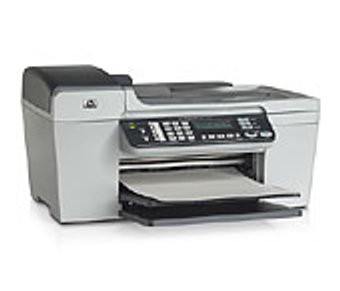
Among its features are :
- 20 page per-minute printing speed (draft mode)
- Photo/transparency printing capabilities
- Flatbed Scanner
- Copier capabilities (enlarge, reduce size)
- Fax capabilities (33.6kbps max speed)
- Fax Junk number banning
- Phone (with Caller-ID)
To summarize it, HP Officejet printer has all feature that I need to start my own SOHO business with functionalities that one expected to run day-to-day task. Best of all, the printer (CUPS) and scanner (sane) works well on Ubuntu (Feisty Fawn), w00t!
I’ve tested most of the feature of this little gizmo and is impressed with its performance, If you ever want to start a small-business like me, I would recommend you to get one too!
 Recommended Product
Now you can do it all-print, all-print, phone, fax, copy and scan — from this compact, versatile all-in-one solution from HP. Create professional presentations and brochures with laser-quality black text, plus optional 6-ink and 4,800 optimized dpi color when you print and copy color documents. Send important faxes quickly and eliminate unwanted faxes using junk-fax barrier. Conveniently copy, scan and fax multiple pages with 25-sheet auto document feeder.
[tags]officejet,hp,printer,scanner,ubuntu,linux,debian,fax[/tags]
This might be a weird query, however I’m a vegetarian, so am trying to find printer toner that do not contain some animal suffering. I gather that a lot of compatible toner cartridges contain either parts which are tried out with monkeys, or are manufactured from animal products. Are there any toners which are completely man-made?
hi, i stumbled upon your site while searching for review on this hp officejet printer. wow, looks like the all-in-one machine works wonders for you. btw, i would like to know how often do you need to replace your ink? i heard that hp inks cost more…
I’m using canon pixma ip1000, it works partially using proprietary linux turboprint software. Really a pain in the ass.
Thanks for the tips!
toydi,
the Lexmark and HP Officejet 4xxx printer+scanner series is a good option.
Both priced at around RM220 – RM300 (estimated)
The Officejet printing and scanning is supported under linux )
Only printing is supported by the Lexmark brand
Canon Pixma series are also affordable (RM250) but I don’t have any information about Linux support (havent tried it personally)
Your best option is HP printers since they are very well supported under GNU/Linux (hackers’ printer probably?)
Looks nice. I am thinking of getting a more economic printer (best if has scanning feature) to replace my tough old printer. Any suggestion? (of course, must run well on linux ;-)
no komen, sbb penah test HP Officejet 5680 saja
papit.,
kalo printer hp yang all in one 380 tu boleh ke dengan ubuntu ?
kat ofis aku pakai printer tu,
tapi aku belum try lagi kat ubuntu