How to add Linux Swap file if you don’t have Swap Partition

Picture this, you’re running a lot of process that consumes a lot of memory that even your 2GB RAM is running out faster than you can blink your eye. Suddenly your machine slows down to a crawl, then it begin to hang, and all you can do is pray that you wont lose any valuable data should one of the process be killed.

You realised now that you should have allocate more space to that dwarfish 100MB swap partition, seems like it is too late as you need to repartition your hard disk to resize the swap partition to avoid this problem when running memory intensive program. All is lost…

Enter the Swap file…

Actually you can substitute a swap partition with swap files if you need more swap. What you need to do is create an empty file with the size of the swap that you preferred (for example 500MB) and add this information to your fstab.

How to add more Linux Swap with Swap File

Assuming you want to put it in “/”, Create an empty 500MB file
$ sudo dd if=/dev/zero of=/swap.img bs=1024k count=512

Format it as a swap file
$ sudo mkswap /swap.img

Add it to your running Linux system
$ sudo swapon /swap.img

Optionally you can add /swap.img to fstab for automatic swap activation.

$ sudo gedit /etc/fstab

Add this line at the end of the file
/swap.img none swap sw 0 0

Run “free -m” command to verify that you’ve added the newly created swap to your Linux based operating system.

Hope that helps!

[tags]linux,ubuntu,debian,opensource,open source,fstab,swap[/tags]

How to open Office 2007 OpenXML in OpenOffice.org

As you probably know, the latest release of Microsoft Office 2007 uses OpenXML as its default document format. While it is similar to OpenDocument (ODF), it is not currently supported by OpenOffice (in contrast to previous *.doc MS Office binary format).

Workaround for OpenXML files
The first alternative is to download Novell’s version of OpenOffice.org and install Novell OpenXML translator add-ins which enables OpenOffice to open Microsoft’s OpenXML files.

Another alternative is to use docx2doc service to convert OpenXML files to the previous Office 2000 doc format. The service costs USD2 per conversion, and you only need to pay upon successful conversion.

The final and most obvious alternative is to use (or ask somebody with) Office 2007 for converting OpenXML files back to the old Microsoft Office format (*.doc, *.ppt, etc), or use odf-converter add-ins for Microsoft Office to convert OpenXML files.

These are method currently known to me for opening OpenXML in GNU/Linux operating system, please suggest other alternative if you know one.

p/s : Hang on tight, the official OpenOffice.org project may implement OpenXML support in future release, until then, you may want to tell people to avoid sending you document files in OpenXML format.

Credit to Najmi for mentioning some of the solutions

[tags]openoffice,openxml,openoffice.org,microsoft office,docx,office 2007,microsoft[/tags]

DOSBox: How to play DOS games in Ubuntu Linux

This post will show you how to play old DOS games using DOSBox emulator under GNU/Linux operating system. This post assumes that you’re:

  • Familiar with DOS and Linux command shell
  • Have a DOS game on-hand to test the emulator
  • Already installed DOSBox in Linux Operating system

First unzip/copy the DOS game in a suitable directory (preferable your home directory),

Continue reading “DOSBox: How to play DOS games in Ubuntu Linux”

How to use SVN for beginners

surface from Linux by Examples has written two ‘getting started for SVN’ articles that I find it interesting and useful for beginners.

The article covers important SVN operation (checkout,diff,update,import, check in) necessary for managing a software project.

Here’s the link to the article :

What is SVN (Subversion)
SVN or subversion is an open source tool used for revision control system similar to CVS. It is widely use by popular open source project such as Apache, KDE, Gnome, Python and Samba as their version control program.

Open Source repository site like SourceForge and Google Code Project Hosting provides SVN hosting for free and open source project.

Further Reading
You can find more information about SVN (or Subversion) and maintaining open source software by reading these books:

Visit SVN (Subversion) Official website for more information about the system.

Recommended Reading

Why newbies still use outdated Red Hat Linux 9 ?

I’m writing this because I found out that many Linux newbie still prefer to use Red Hat Linux 9 compared to Fedora Core distribution.

Red Hat Linux 9 has been released in 2003, and between that year and at the time of this writing, Red Hat Linux 9 has been superseded by almost 6 newer releases (Fedora Core 1 – Fedora Core 6, Fedora 7 if you want to count that too)

Red Hat Linux 9 has been long abandoned by Red Hat when it discontinued its support in April 2004 (3 years ago) in favor of Community maintained Fedora Core line (now Fedora) .

To show you that how much technology has changed since its release, Red Hat 9 includes linux kernel 2.4.20, mozilla browser 1.2.1, openoffice 1.0.2 as opposed to the latest distribution which includes linux kernel 2.6.19, (or 2.4.34, if you count the 2.4 branches) mozilla 1.8.x.

One might wonder how many security holes left unfixed when Red Hat stopped providing security patches to the operating system since April 2004 (three years ago).

What makes people (especially by newbies) still use Red Hat Linux 9 ?

  • Red Hat Linux is the most popular Linux distribution during late 1990s and early 2000
  • Red Hat made a terrible rebranding move, it rebrands Red Hat Linux to a completely new name Fedora Core.
  • There are still lots of older “Linux for beginner” books that make reference to Red Hat Linux (7.0,7.1,7.3,8.0), this left an impression to newbies that Red Hat Linux 9 is the latest ‘Linux’ release (old book stock with free RH9 CDs is the main culprit)
  • Newbies trust the content in the books 100% without taking account that computer software books has an ‘unofficial expiry date’, they should have done more research through the internet.

Implication of using Red Hat Linux 9

  • People will get the wrong impression about Linux, based on outdated technology
    Drivers support is not up to date with the current hardware (not much wifi support, unstable drivers)
  • Old software which is buggy and crash prone
  • Outdated Server softwares with tons of security vulnerabilities or even with outdated configuration file.
  • Support websites which do not exists anymore, people will get lost without proper documentation
  • No software updates support.
  • Broken software due to changes in communication protocol (gaim msn, yahoo messenger, up2date, etc)
  • Primitive software (that do not conforms with the latest trend) that may cause data loss

So please ditch the idea of using Red Hat 9 as your first distro and use latest Linux distro release for your own good, things changed a lot since RH9 been released.

norh9.png

Say no to Red Hat 9 :p

[tags]red hat, red hat linux,redhat,linux,debian,yum,ubuntu,kernel,distro[/tags]

AptOnCD: apt-get Repository on DVD/CD – Ubuntu/Debian

Those who are familiar with Debian-based system with know a thing or two about apt-get.

apt-get is a wonderful tool that simplifies package management in Debian and Ubuntu derived Linux distro, be it software installation, security updates, upgrades, software removal and searches, apt-get does wonders in daily computer management.

However some linux distro (Ubuntu, obviously) relies heavily on internet connection to access its repository. This sometimes impractical to computer that is not always connected to the internet.

One alternative to that solution is to get the repositories on CD/DVD. However packages included in there may not suit your needs and might be redundant.

Luckily there’s AptonCD, a GUI application that helps you create removable repository on CD/DVD using packages you’ve downloaded.

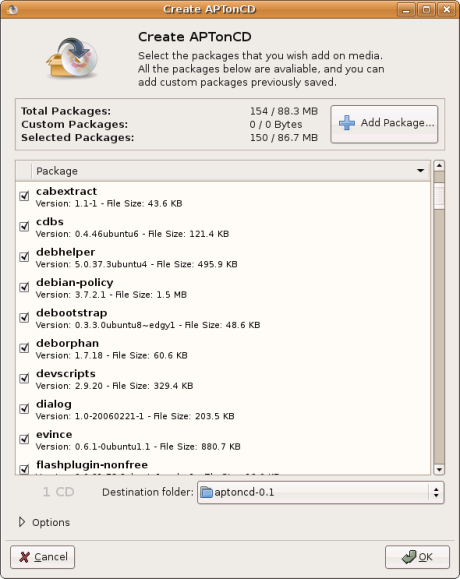
AptOnCD, enables you to select specific package that you want to put in removable repository (DVD/CD).

Once created, the DVD can act as a repository itself and you can install software from it using apt-get normally.

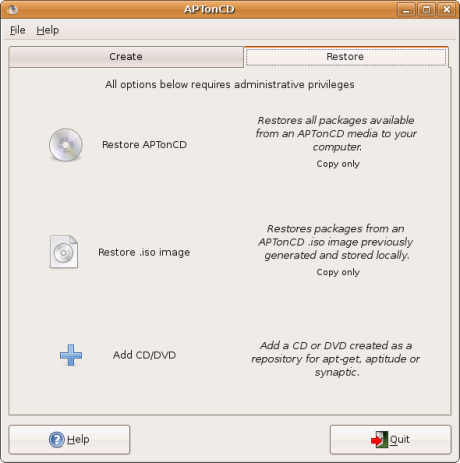
apt-get2.pngapt-get1.png
AptOnCD also has feature that can restore/copy all the packages on the target computer, this means you can ‘preload’ the computer with packages from apt-get before you start using it. This can save
your time from having to insert the repository CD/DVD when you want to install a software.

Currently AptOnCD is tested and available for Ubuntu and Debian Linux distribution and can be downloaded here : http://aptoncd.sourceforge.net/download.html

[tags]apt-get,ubuntu,debian,mirrors,repository,synaptic[/tags]

nbsp&;

By using VoIP calling service, you can reduce international calling costs and even start your own VoIP business as a VoIP reseller.