How to open Microsoft OpenXML docx documents in OpenOffice

As of this time of this writing, the OpenOffice.org package included with Ubuntu Festy Fawn, Ubuntu Gutsy Gibbon and Debian Etch still does not support opening Microsoft Office OpenXML (docx) document format.

Though the use of docx files are HIGHLY DISCOURAGED, it is still important for us to be able to read document in this format in-case if somebody forwarded docx files to us.

Here are some easy steps to follow in order to enable OpenOffice.org to read OpenXML docx files :

  • Download odf_filter.tar.bz2 file, and unzip it
  • The archive contains 4 additional files, MOOXFilter_cpp.xcu, MOOXTypeDetection.xcu, OdfConverter and README.txt
  • Follow instructions in README.txt and copy the 3 files into Openoffice installation directory as outlined below


sudo cp OdfConverter /usr/lib/openoffice/program/

sudo cp MOOXFilter_cpp.xcu

  • usr/lib/openoffice/share/registry/modules/org/openoffice/TypeDetection/Filter/

    sudo cp MOOXTypeDetection.xcu /usr/lib/openoffice/share/registry/modules/org/openoffice/TypeDetection/Types/
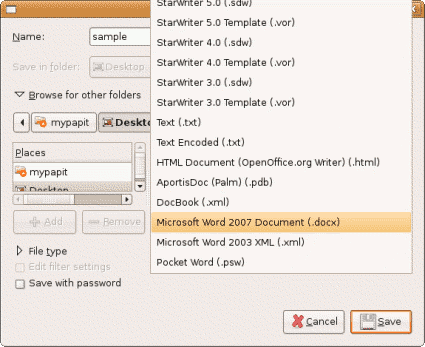
  • openoffice_docx.png

    After that, your Openoffice.org installation should be able to read/open Microsoft Office 2007 OpenXML docx file without any problems.

    Drawbacks
    This trick only works on Document (docx) files but not on Presentation (pptx) and Spreadsheet files (xslx).

    Original source – OpenOffice. OpenXML Translator

    [tags]docx,openxml,openoffice,feisty,feisty fawn,gutsy,gutsy gibbon,openoffice.org,microsoft,office,microsoft office[/tags]
    How to write into NTFS partition in Ubuntu

    As disk storage capacity increases over time, more and more Microsoft Windows user prefer to choose NTFS over FAT32 as their primary filesystem as the latter is inefficient in handling large storage capacity.

    Unfortunately by default, Ubuntu only mounts NTFS volume as read-only, preventing users from transferring files between their Linux and Windows partitions.

    How to mount writable NTFS partitions
    However now you can easily mount writable NTFS partitions easily with ntfs-3g filesystem driver. Here’s how to do it under Ubuntu.

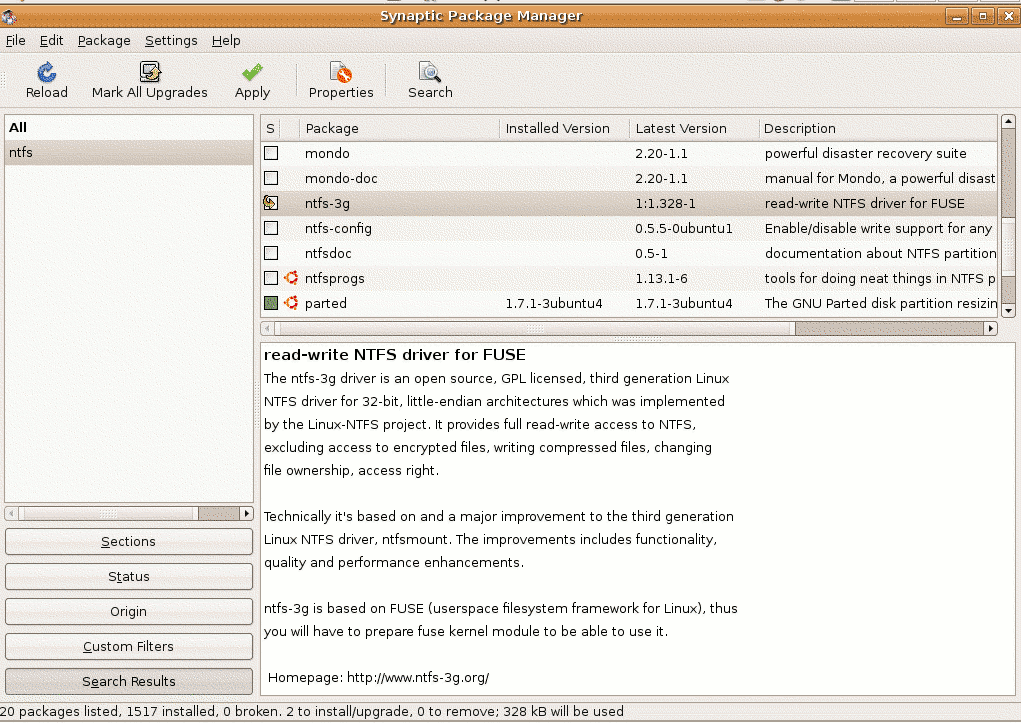
    ntfs3gtn.png
    1. First from the Desktop, go to System->Administration->Synaptic Package Manager. Search for ntfs-3g and install it. Close synaptic once it finished with installation.
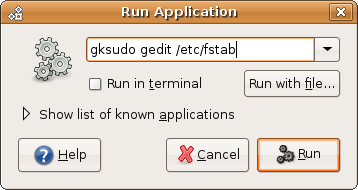
    2. The next step would involve editing /etc/fstab file to use ntfs-3g filesystem driver. From the Desktop, press ALT-F2, type “gksudo gedit /etc/fstab”
      runapp.png

    3. Find lines with ‘ntfs’ and replace it with ‘ntfs-3g’ and save the file
    4. Remount all ntfs partitions to test the modification, the easiest way to do it is to reboot the computer and try copying file into ntfs partition using the default Gnome file browser (Nautilus). You’re done!

    [tags]ntfs,filesystem,windows,opensource, linux, ubuntu, gutsy, feisty,feisty fawn, gutsy gibbon,open source[/tags]

    Debian AMD64 is not limited to AMD machines only

    mypapit debian logo

    Debian AMD64 label for its version of x86 64bit platform operating system often leads to misunderstanding that the installer only supports AMD CPU only. In fact the label was meant to support Intel based x86-64 bit CPU as well (such as the Core Duo processor) in addition of AMD machines.

    Why Debian use ‘AMD64’ ?
    The source of confusion traces back when AMD being the first to design the instruction set for the 64bit version of x86 CPUs (for Athlon 64) back in 2002. Back then Intel hasn’t produced 64bit CPU yet making AMD the sole vendor for 64bit x86 CPU. The Debian project elected to support this architecture with the name AMD64.

    Does Debian AMD64 works on Intel Core 2 Duo CPU ?
    To make the story short, Intel then produces its own x86 64bit line of CPU base on AMD design. Since there are similarities, so both AMD64 and EM64T (Intel x86 64bit) shares instruction set design practically Debian AMD64 bit works on Intel CPU too (that includes Core 2 Duo CPU)

    The confusion persists as Debian (and previously Ubuntu), still uses the AMD64 to identify with x86-64 platform which most other GNU/Linux distro doesnt (Fedora, Red Hat, Kanotix, Cent OS). In this case, I would prefer Debian to change its AMD64 labelling to ‘x86-64’ in order to refer to 64bit x86 based machines.

    Conclusion
    Debian still stuck with the old AMD64 labelling despite x86-64 is not limited to AMD CPU only and if you are wondering which version of Debian to install on your Intel Core 2 Duo computer, then please choose AMD64 with confidence.

    [tags]debian,ubuntu,amd64,intel,amd,feisty fawn, gutsy gibbon[/tags]

    Ubuntu Feisty Fawn does not work on Compaq Presario v3521

    I’m supposed to post this post last month while the issue was still hot, but it seems that this post has been evading me for quite some time until now. Last month a friend of ours decided to get his first laptop, after browsing the internet and satisfied with our peers’ recommendation, he settled on Compaq Presario v3521 which is a relatively new model that supports SATA2.

    However the joy of getting a new laptop soon fades away when he finally found out that Ubuntu does not support that particular model! The Ubuntu installer either froze up during the LiveCD booting screen or the installation dialog doesn’t detect any hard disk attached to the laptop.

    After testing it with various Linux distro including Fedora, Debian, Red Hat Enterprise Linux, Solaris (ok that wasnt a GNU Linux distribution but close), It is safe to conclude that the freely available Linux distro does not support the laptop’s hardware driver. The installer will either hang, does not detect the hard disk/dvd drive or prompts for a driver CD.

    Turns out to be Compaq Presario V3521 isn’t supported out from the box by Microsoft Windows XP and Vista either! According to the friend, he has no problem installing Solaris 10 and RHEL 5 Server on the laptop either. It seems the laptop requires the use of proprietary driver in order to work its hardware.

    After some tweaking involved, he decided to install/use Debian 64bit on the laptop using network install, luckily besides the bumpy installation process, every other aspect of the hardware is working with the right drivers in 64bit mode.

    So for all of you out there, please watch out for Compaq Presario v3521 model, it might not be for those with a faint heart.

    p/s: It true, though Ubuntu seems to be easy enough to use, it might not be the best solution for you. It still has some rough edges, particularly with x86-64bit platform.

    [tags]ubuntu,feisty fawn,compaq,presario,laptop,notebook,debian,red hat, fedora[/tags]

    How to Start Application Automatically in Ubuntu (Startup Program)

    Here’s the way to configure Ubuntu to autostart your favorite application upon startup (like Microsoft Windows ‘Startup’ folder). This how to assume you are using the default GNOME windows manager.

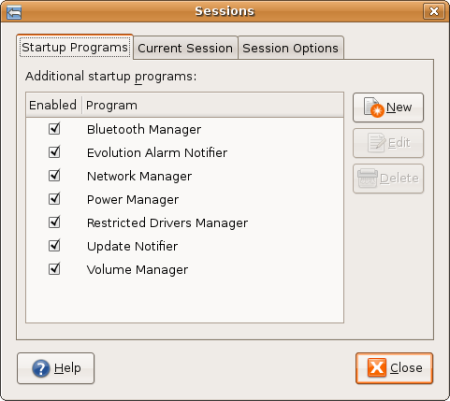
    • From the Desktop, Go to System > Preferences > Session,
    • Select Startup Programs, click “New”, and type in the command of your favourite application. Close the tab.
    • The application selected in the Startup Program dialog should automatically starts the next time you logged in your computer.
    • Mohammad Hafiz mypapit best

      Why do you need Startup Programs ?
      For convenience purposes. with Startup programs, you don’t have to manually launch your favourite application each time you logged into your Desktop environment which can become very laborious.

      This is very handy if you have a list of application that you need to start each time you log in to your Desktop such as Gaim/Pidgin, Ekiga, Feedreader and/or some application that you can’t live without.

      With Startup program, you can save your time from having to start these applications manually and save yourself from forgetting to start essential application each time you boot up your computer.

      [tags]ubuntu,debian,open source,opensource,feisty fawn, gutsy gibbon[/tags]

    How to get fastest Ubuntu apt-get repository server with Synaptic

    Downloading software from repositories can be a long and daunting task especially when you are downloading from a repository server which is far from your location.

    It even can turn out to be an annoying experience when your downloads keeps timing out because of the bad connection between you and the mirror server. Thus it is crucial for us to find the closest/fastest software repository in order to speed up the installation and upgrade process.

    In this post I’ll show you how to get the fastest/closest repository server automatically using Synaptic. Here’s how :

    First you need to start up Synaptic. Then go to Settings->Repositories.

    synaptic1.png

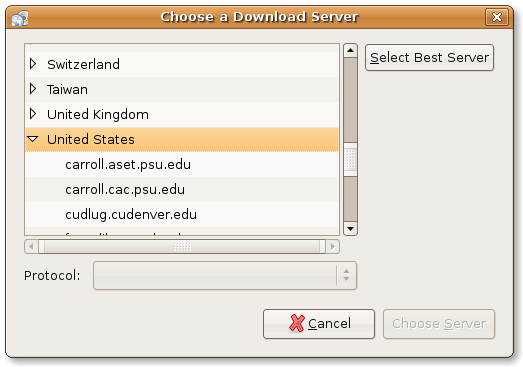
    Click the Download From section, and Select ‘Other

    synaptic2.png

    Click “Select Best Server” button to enable synaptic to find the best and fastest repository server for you.

    synaptic3.png

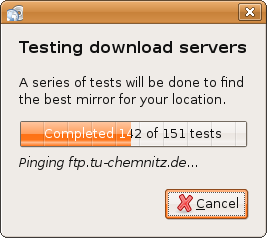
    Synaptic will perform automated pinging, and It will select the fastest server based on its calculation. Its nice and easy!

    [tags]ubuntu, debian, apt-get, repository, deb, repositories, synaptic,feisty,feisty fawn[/tags]