Update WordPress blog using Drivel in Ubuntu Linux

Today I want to introduce you to a wonderful desktop blog client in GNU Linux, Drivel.

Drivel is one of many desktop blogging clients available under GNU Linux. It started as a LiveJournal desktop blogging client and now has expanded to support other blogging platform as well such as Advogato, Blogger xmlrpc, Movabletype, Drupal,WordPress, and blog that uses ATOM (like the new Blogger).

Using Drivel to update your WordPress blog is easy, all you need to do is to start up your Drivel client, and choose MovableType as your blog platform.

drivel linux mypapit

From there, you put in your WordPress username and password. Put in your WordPress address in your “Server Address” field, and append it with /xmlrpc.php like this “http://your_wordpress.com/xmlrpc.php”.

After that, writing blog entry from Drivel is relatively easy. All you need to do is just type :)

Drivel is an easy blogging client to use and does not require you to know much about HTML to use it, it has a build in function to insert images, link and basic font formatting.

One interesting thing to note is, Drivel (through Movabletype protocol) supports category, this makes it different from other blogging client under Linux which is based on the older Blogger xml-rpc protocol which does not support category. However currently Drivel only support posting to one category per entry.

Why use a Desktop Blogging Client ?
Most people use desktop blogging client because it saves the time to actually log into your blogging client and selecting New Post before they can begin posting new entries.

Desktop blogging client saves you the time on the web interface, and let you concentrates on the writing the entry itself. Updating and Saving post is also faster when you use a desktop blogging client.

As a summary, Drivel is a nice Desktop blogging application to have around, it is small, easy to use and relatively fast. Simply put, Drivel does the job well for a simple blogging client.

[tags]livejournal, blogger, wordpress, drivel, linux, ubuntu, open source[/tags]

A WordPress HTML Exploit discovered, please patch it now!

Security focus has published information regarding WordPress HTML Injection Vulnerability which may allow attackers to inject PHP code straight into your WordPress blog.

This can lead the attackers do nasty things such as deleting your post, defacing your blog, dropping your entire post (read: delete all your post !) and other dangerous attack. This particular vulnerability affects all WordPress release from 1.2.1 to 2.0.5, WordPress 2.0.6 (currently in RC2) is not affected by this vulnerability.

WordPress bloggers are advised to apply patch released from WordPress team in order to secure their blog from malicious users.

Applying the patch is simple, all you need to do is download the zip archive from WordPress Trac, unzip it and upload wp-admin folder to your WordPress host, overwriting the old template.php file.

Thanks to Faizi for blogging about this.

[Source]

[tags]wordpress, open source, blogger, blogs, blogging, blog, security,exploits[/tags]

Howto Convert FLV (Youtube, Google Video) files to AVI in Linux

This howto will show you the shortest way to convert flv (flash video) files to AVI using open source mencoder. To perform the conversion, you just need to type :

mencoder -oac copy -ovc lavc -o video.avi video.flv

What is FLV files?
FLV (flash video files) is a format for delivering video through the internet, it is currently being use by the popular Youtube video sharing service and Google Video. It is possible to obtain this file by using other open source tools such as youtube-dl or from an online youtube downloader VideoDL.org

You can convert the FLV files into other format too. In order to do that, make sure you have all the necessary codecs to perform the conversion. If you’re in doubt, install w32codecs, add this line in your repository to enable w32codecs installation (assuming you use Ubuntu Edgy Eft).


deb http://packages.freecontrib.org/ubuntu/plf/ edgy free non-free
deb-src http://packages.freecontrib.org/ubuntu/plf/ edgy free non-free

Now you can use Linux as to do your video encoding stuff without much hassle.
[source]

[tags]linux, mencoder,flv,youtube,ubuntu,flash,encoding,ripping[/tags]

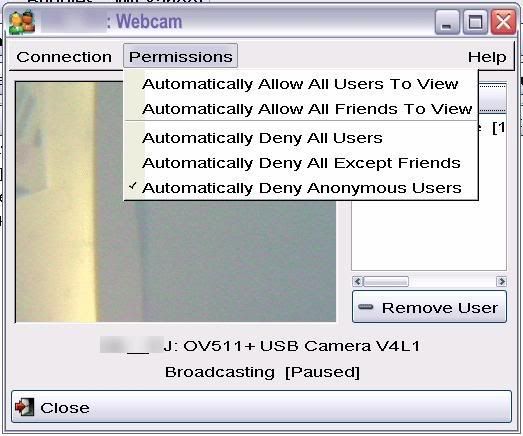
Gyach Enhanced Yahoo Messenger with Webcam and Voice support for Linux

Ditch gaim if you happen to use Linux and Yahoo messenger on your desktop. Gyach Enhanced is an open source Yahoo Messenger client that support most of the official Yahoo Messenger features out from the box including Webcam support and Voice Chat.

Unlike any other 3rd Party Yahoo Messenger Client, Gyach Enhanced only supports Yahoo Messenger protocol and available for GNU/Linux operating system only.

Among features supported by Gyach Enhanced :

  • Webcam (Receive and Broadcast)
  • Voice Chat
  • Address Book
  • Yahoo Chat
  • Yahoo Mail Alert
  • Yahoo News Alert
  • Mobile Messenger Buddy Group
  • ‘Invisible’ support
  • Spam Protection
  • Themable Smileys


Continue reading “Gyach Enhanced Yahoo Messenger with Webcam and Voice support for Linux”

tremulous – addictive open source FPS game

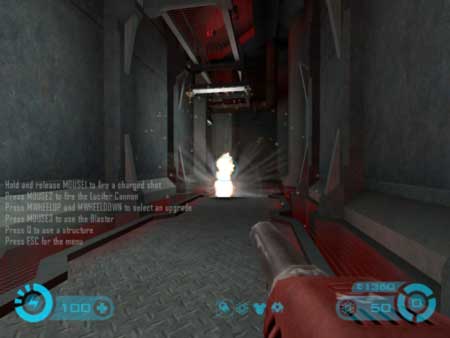
These past few days I’ve been hooked up playing Tremulous, an open source First Person Shooter (FPS) game. The objective of the game is to protect your team’s base and eliminate the enemy base. You can choose one of the two sides, either as member of human team or as an alien species.

trem1.jpg
trem2.jpg
trem3.jpg

Each side has it own unique abilities; the humans have long-range weaponry and the aliens have powerful melee attack and high body hitpoints The game uses GNU/GPL Quake III engine and only requires modest 3D hardware acceleration.

Tremulous is indeed a fun and addictive game, those who want play tremulous with me can look me up in Tremulous Basic Server #1 through #3 (low pings for me).

Download tremulous at : http://tremulous.net available for Windows and GNU/Linux operating system

[tags]games,quake,tremulous,quake 3, open source,FPS,linux,windows[/tags]

The OpenCD 4.0 has been released

opencd4.png

TheOpenCD project has just announced the release of OpenCD 4.0. Softwares featured on OpenCD 4.0 includes :

  • OpenOffice 2.0.4
  • PDFCreator 0.9.3
  • GIMP 2.2.13
  • Azureus 2.5.0.0
  • Mozilla Firefox 2.0
  • 7-Zip 4.23

TheOpenCD is a collection of Free and Open Source Software that runs on Microsoft Windows. It aims to provide high quality and well tested software that is free from restrictive license for people to use.

Hopefully by the time openjdk is ready, TheOpenCD will include a precompiled Java Runtime runtime too for running open source Java programs such as Azureus.

[tags]open source, free software, foss, opencd, firefox[/tags]