
Among the main cause for loosing digital photographs are corrupted filesystems, and accidental SD card formatting. These photographs are still recoverable using photo recovery softwares available on the internet.
However, a quick survey on the internet reveals that most of the commercially available photo recovery software are either too expensive or is not available for Linux users.
How to Recover photo files with Photorec
Enter Photorec, a free and open source file recovery software from CGSecurity. As the name implies, photorec was originally developed to recover photo files from flash/memory card.
It has since been expanded to support more file types covering popular document files (doc,xls,mdb), archives (zip,rar,gz,bz2,tar) and multimedia files (mp3,wav,avi,mpeg).
Here’s how to recover your lost files using Photorec :
Assuming you are using Ubuntu Linux, install photorec using by running “apt-get install testdisk”.
Other operating system users might want to download photorec here – TestDisk download
Insert SD Card/MMC and execute photorec by typing “sudo photorec”.
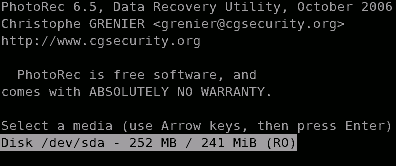
Select SD Card device you wish to recover from Photorec startup screen.
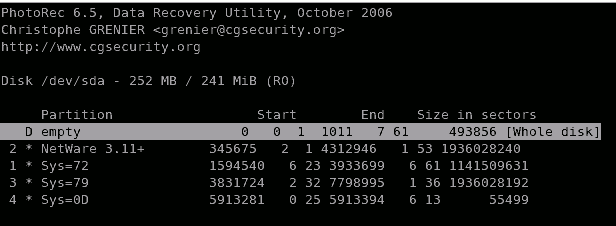
Depending on SD Card/MMC configuration, you may be presented with the next screen. In any case, select “Whole Disk” option.
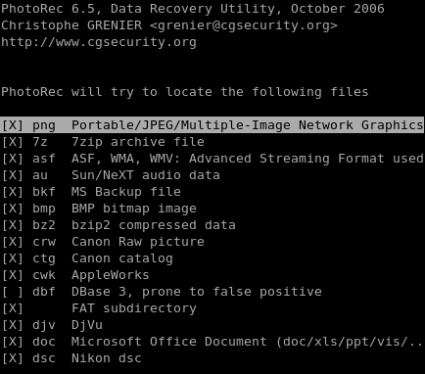
Select the types of file you wish to be recovered, in this case we will only be interested in recovering photo files.
Photorec will ask you for the location to store recovered files, it is advisable to put recovered files on separate disk (not partition) than the one being recovered.
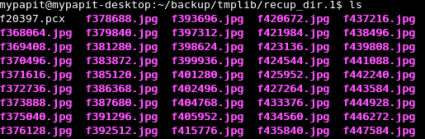
The application will scan the entire SD Card/MMC for recoverable files and rescue it if possible. As an example, here’s the list of photographs that I recovered from a two years old faulty SD Card.
Summary
Photorec is a powerful files recovery software which is useful for rescuing lost files from corrupted filesystem/disk. It uses is not only limited to recovering photo files from SD card, but can also be extended to recover other types of files and media as well.
Photorec reads file header directly from storage device, which makes it flexible as it can recover files from any type of filesystem. Photorec is also available for Microsoft Windows, Mac OS X and BSD operating system.
[tags]photorec,photo,recovery,data recovery,linux,opensource,ubuntu,feisty,gutsy,camera,photo,photos,digital camera[/tags]
Thank you very much. You just saved my day. I have just recovered my photos from an SD card wich was formated to ext2 (it was FAT). PhotoRec was able to recover my fotos even after the format change. Awesome!
By the way, this is a perfect example of the beauty of FOSS and the evil of the Two Steves – Jobs and Ballmer.
Wasn’t exactly like the directions, BUT… It WORKED. You f-ing ROCK!!!! Accidental deletion by a 9 year old saved 500+ photos and video from a 2 week vacation in Spain. Thanks for sharing.
it’s a real joy.photorec returned me my happy moments.can’t express my feelings in words.awesome …….. thanks a lot .
This software is good, similar to above mention there is also Photo recovery software I would like to share which apple site Mac Photo Recovery instantly without acquiring any technical knowledge.
http://www.apple.com/downloads/macosx/system_disk_utilities/photorecoveryfordigitalmedia.html
Thanks a million, recovered my precious pics. N also thatx to Christophe GRENIER who made this code.
Vj
Sweet! This works a treat! I mistakenly scrubbed my camera’s SD card- which contained the last couple of months of our 11 month daughter’s progress…..!! Thanks to photorec- my wife might have divorced me over that!!
Kenneth: thank you so much for your tip. Made this work perfectly :)
i lost my photo,could u tel me where do i recovery my photo back in KL Shop. my SD memory card got virus.The photo is meaningful to me.thanks helping.pls left a contact to me in KL. i have nothing knowledge in pc.
8’s really greattttttttt…….thanks photorec… it helps me a lot
Thanks. It recovered my trip to Punsk/Punskas and Sejny..
I just want to say a big ‘Thanks!’ for sharing this! 139 photos recovered in a few seconds!
Andrei
Thank you so much! Perfect. PhotoRec saved me from depression. Surely made my day!
Finalmente chegou o que todos esperavam…
A tecnologia da Tv Digital via internet chegou para lhe proporcionar assistir canais ao vivo em seu computador.
452 canais de Tv Digital transmitidos 24h por dia Ao Vivo, sem taxas de assinatura ou mensalidades
http://www.tvdigitalnopc.com.br
Thankful that Google brought me here. Saved my friend’s photos on his SD card. Thanks to you and to whoever programmed photorec.
Thanks so much! Worked like a charm and was very easy to use.
Everything seems to be working really well, but when i recovered my MOV movie files, I double click them to play but an error comes up and says “Disconnected: OK”.
Anybody have any help?
Thank you sooooo much for this post! lost pics of my daughter’s 9th b-day at disneyworld when tried to copy photos off of a second camera into same folder using f-spot. Photorec recovered ALL of them. Thank you! Thank you! Thank you! Thank you!
If you have problems with your memory card in 80% of all cases the controller of your card is damaged and no software or card reader can help. You must separate the memory chip and dump the raw data to recover your data, look here: CF xD SD MMC memory card/stick photo recovery
Worked perfectly after following Kenneth Sundqvist’s advice. Thanks!!
This is awesome — thanks for putting in the work to make this process clear, easy, and opensource.
In case of your card not being found by Photorec, which happened to me, you’ll have to find out which device it is in “/dev/”.
You can do this by comparing /dev/ with and without the card inserted into your card reader.
In my case I got these:
mmcblk0 (Whole card)
mmcblk0p1 (Partition on card)
As it says you should select the whole card, so then you do:
$ photorec /dev/[name of whole card device]
Just recovered a bunch of photos from a card I formatted before I was ready. Thanks to your page, I got most of them back! Much appreciated!
hi,
i m using Ubuntu Hardy and i followed your instructions to the T, but it seems photorec does not recognize my minisd which i inserted into card reader and connected to a usb port. LSUSB shows the card reader….how do i get my miniSD detected?
Please help!
Sorry…for clarification, a disk image was made of the SD card.
At first, Photorec did not recognize the SD card drive. I made a disk image using Disk Utilities on my Mac, launched the dmg onto my desktop, then ran Photorec again…it worked great!
Greath!!! this photorec rules simple and easy to use.
Thanks, photorec really helped me. The only disadvantage – it refuses to work at terminal smaller than 25 lines. I’d to switch to fullscreen and hide menu bar on my Eee PC.
thanks photorec. you just saved my day. thank you thank you thank you.i tried handyrecovery, doctorrecovery(i think) and everything and they either dont work or they require to be purchased. this is the best!!!!!!!!!
I was politely asked by a harbour master or whatever to remove some pictures taken of some industries. Who wins now hah? Mwahahaah
Thanks for the post, photorec is at work as I write. :)
Hey, little question, when I have my SD card plugged it does not show in the selectable devices when I fire up PhotoRec, it is mounted into the /media/ items, how do change the mountpoint of my card? I am running Ubuntu Gutsy
thanks
w00t, menarik ni!
Debian pun ada :)