Connecting TMNet Streamyx Broadband while using Ubuntu
|
|
I write this because people have been sending me questions regarding how to connect streamyx broadband service on Ubuntu Linux. IMHO, this thing happened for two reasons
- Ubuntu has been shipping GNU/Linux for free
- Ubuntu doesn’t provide obvious way to connect to broadband
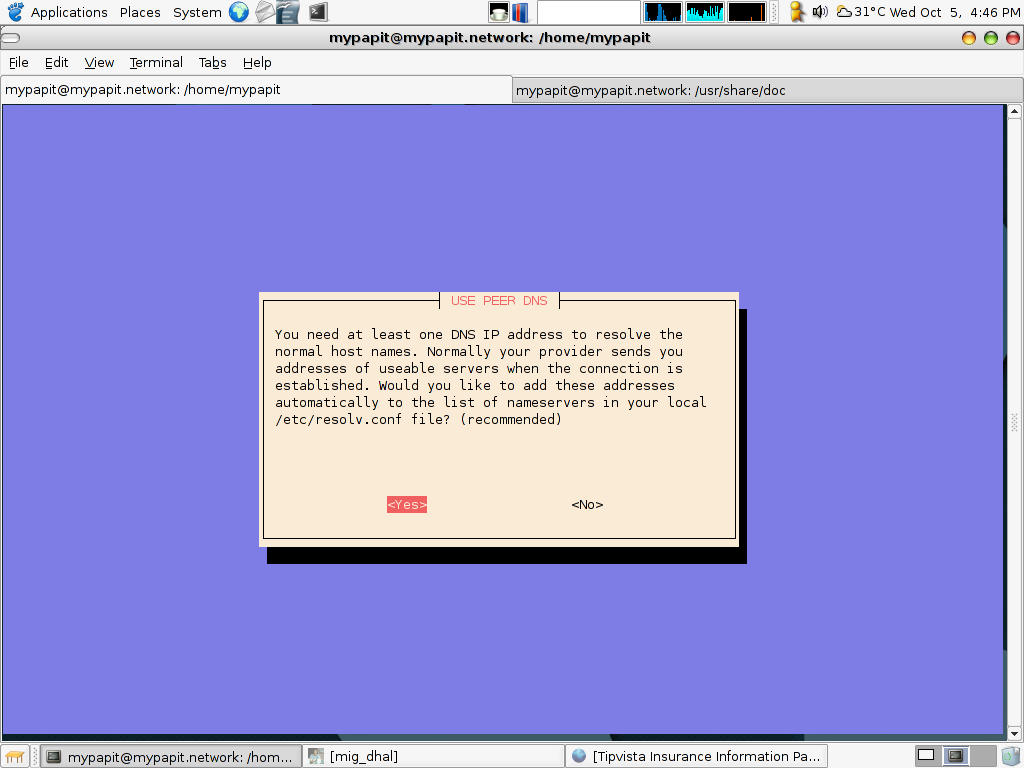
OK now, just cross your finger, open a gnome-terminal, and type :
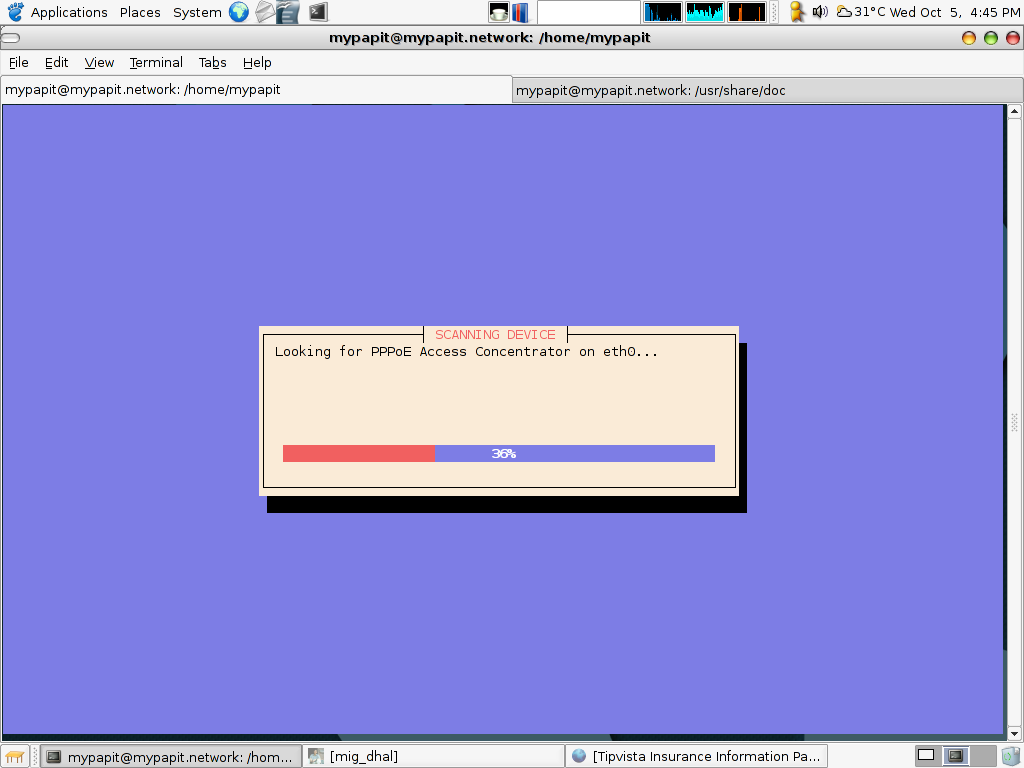
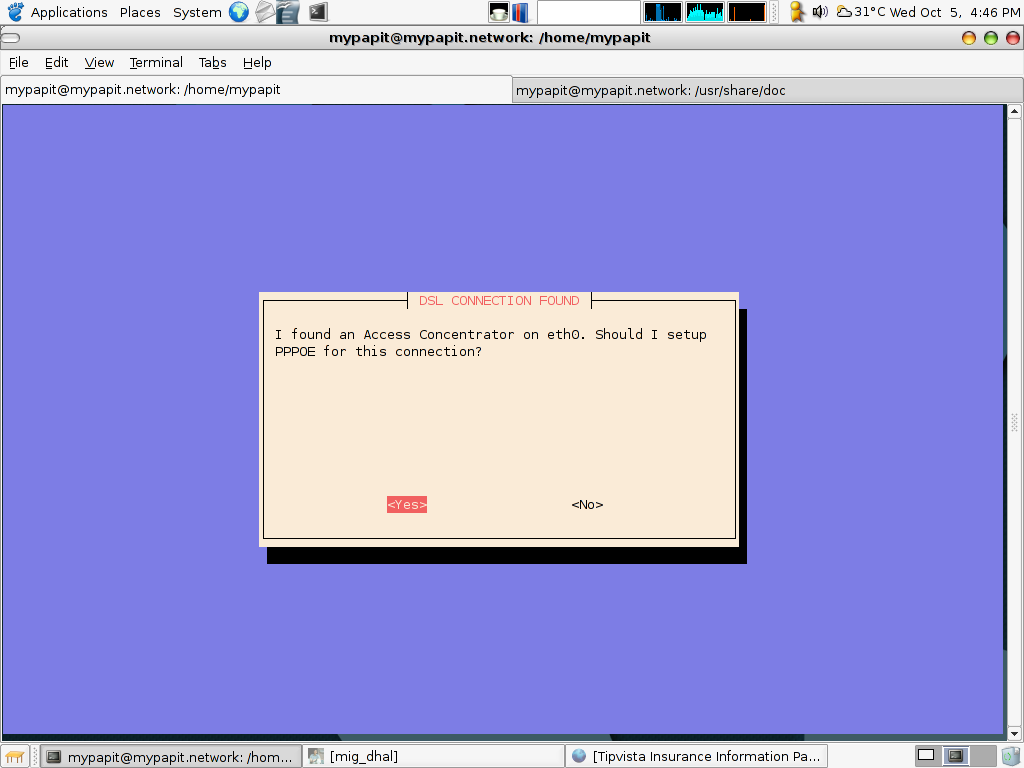
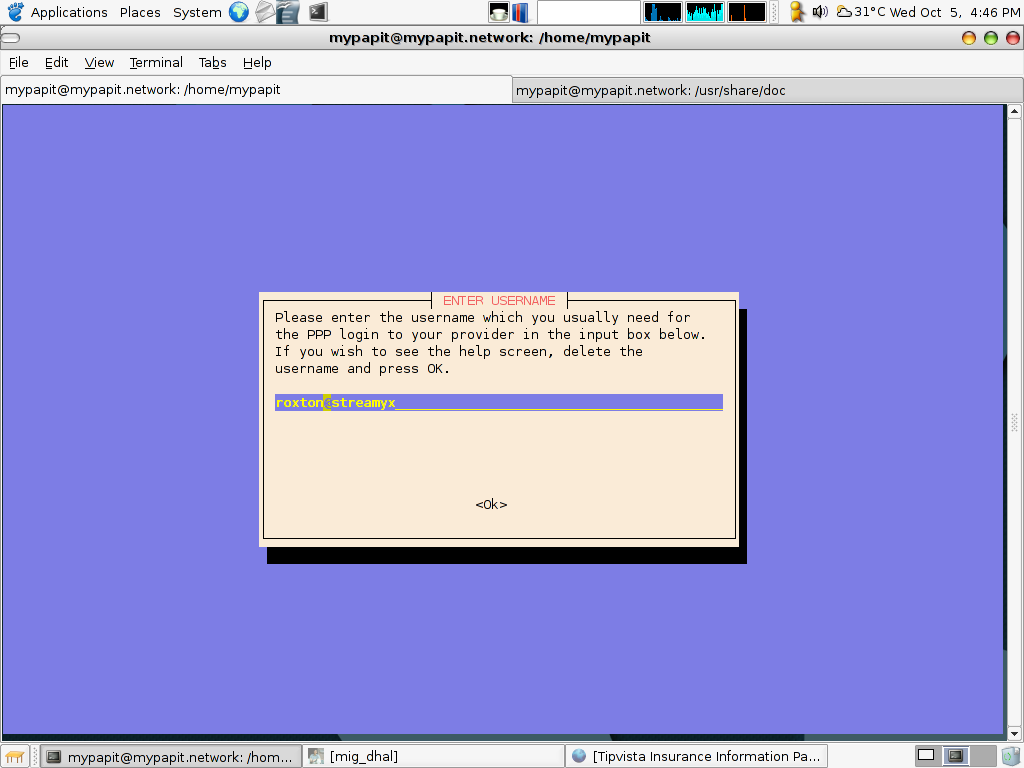
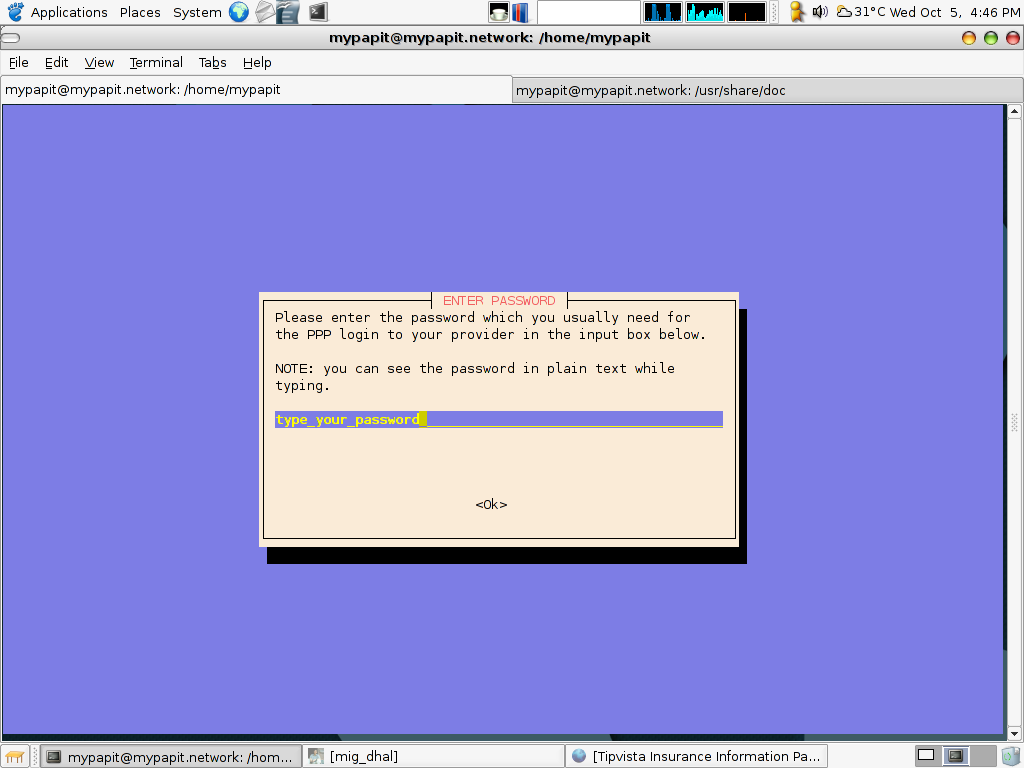
$ sudo pppoeconf
and follow the step-by-step screenshot! Heh, i’m not being lazy to type the rest of the guide, I just don’t know how to write a proper one!
Keep updated with the latest posts, be a part of over 1,000 subscribers! :
Subscribe to your email
You might also want to read...
- Grrr TMNet suspended my Streamyx account!
- How to connect to ADSL Broadband Internet from Ubuntu
- How to connect to Streamyx with DLink 2640-T wireless router
- Chile has better internet service than Malaysia
- Dilema Pelanggan Kecewa IV
- I’m tempoarily out of resourse
- Inside My Linux DLink G-604T Broadband Modem/Router


November 21st, 2005 at 12:35 pm
Nice guide, I have tried Ubuntu too. However main drawback is that I haven’t got broadband yet, hence the apt-get took hours. Now I’m considering to get broadband, can you recomment a modem that will work in ubuntu? Thanks.
November 21st, 2005 at 7:18 pm
rromie,
Any broadband modem will work with Ubuntu (and the rest of GNU/Linux, FreeBSD, etc), as long as it is not a USB broadband modem.
Pick a modem that use RJ45 connector, the one that plugged right to the network card, and you’ll be fine :)
If you dont have a network card, then you better get a network card, typical price is RM25-RM45 (generic rtl-8139 type)
November 28th, 2005 at 4:14 pm
thanx for the guide! nnt aku nak try utk pc aku yg ader streamyx nnt..
anyways, leh ker guner kalu try ikut live cd?
December 14th, 2005 at 4:03 pm
azmie, bleh je guna ikut livecd
December 20th, 2005 at 2:07 am
[...] Connecting TMNet Streamyx Broadband while using Ubuntu [...]
January 30th, 2006 at 5:38 pm
thanks man, it works like charms :D
June 18th, 2006 at 7:07 pm
[...] Help – Search – Members – Calendar Full Version: Pppoe Streamyx ITTutor.net > Ruang Komputer > Rangkaian / Networking multiplexer May 22 2006, 04:15 PM Assalamualaikum, aku ni bab opensource aku surrender.. tengah belajar merangkak.. tp since pc aku windows dah weng, aku nak try guna live knoppix 3.7 la. masalahnye, aku x leh nak configure untuk connect ke streamyx. aku pakai aztech dsl600e, dan connect hanya satu pc. aku dah ikut dia punye wizard, dah buat semua tu tp still x bleh nak surf.. selepas step by step wizard tu, ada apa lagi yang aku kena buat? aku dah cuba search kat internet tp still x selesaikan masalah aku. lagi pening pale ade la.. aku jumpe macam2 command yang diaorang mintak untuk aku test.. ada sesapa bleh tolong? terima kasih bebanyak apit Jun 14 2006, 06:20 PM QUOTEHome –> Quick ConfigurationATM Interface : 0Operation Mode : EnabledEncapsulation : PPPoE LLCVPI : 0VCI : 35Bridge : DisabledIGMP : DisabledIP Adress : 0.0.0.0Subnet Mask : 0.0.0.0Use DHCP : EnabledDefault route : EnabledGateway IP Address : 0.0.0.0Username : zam4ever@streamyxPassword : ********Use DNS: EnablePrimary DNS : 202.188.0.133Secondary DNS : 202.188.1.5Click submit.How to save the current configuration?1. Admin –> Commit & Reboot2. "Commit"3. "Reboot aku dh buat mcm zam sruh tuh..mase setup kat cc member aku aritu jadi jer..tapi bile buat kat office aku lak, xdpat ke internet..kat web panel tu tulis alredy connect to dsl..lampu dsl =green, lan = green blinking, diagnos=off, power = greencamner nk buat lg nie?aku guna zte zxdsl..ade beza ke firmware baru dgn yg lama? cik.papit Jun 15 2006, 03:03 AM QUOTE(multiplexer @ May 22 2006, 04:15 PM) Assalamualaikum, aku ni bab opensource aku surrender.. tengah belajar merangkak.. tp since pc aku windows dah weng, aku nak try guna live knoppix 3.7 la. masalahnye, aku x leh nak configure untuk connect ke streamyx. aku pakai aztech dsl600e, dan connect hanya satu pc. aku dah ikut dia punye wizard, dah buat semua tu tp still x bleh nak surf.. selepas step by step wizard tu, ada apa lagi yang aku kena buat? aku dah cuba search kat internet tp still x selesaikan masalah aku. lagi pening pale ade la.. aku jumpe macam2 command yang diaorang mintak untuk aku test.. ada sesapa bleh tolong? terima kasih bebanyakCuba Try tgk howto tu, http://blog.mypapit.net/2005/10/connecting…ing-ubuntu.html This is a “lo-fi” version of our main content. To view the full version with more information, formatting and images, please click here. Invision Power Board © 2001-2006 Invision Power Services, Inc. [...]
October 29th, 2006 at 5:20 pm
boleh tak tolong ajar macam mana nak pakai internet guna ubuntu. aku guna streamyx.macam mana
nak setting. terima kasih
December 2nd, 2006 at 1:46 pm
bang, sy ikut guide abg kat atas, tp slalu terputus2..
tengah online je disconnect..
slalu kene “pon” kat terminal, baru bole online balik..
abg tau tak nape..
*sy newbie dlm Linux, skang pakai ubuntu 5.06
December 29th, 2006 at 5:50 pm
allo papit…
pkai ubuntu pn leh connect streamyx yerk?
apa kata kalo pkai suse ke,fedora ke,red hat 9 ke?
amacam?bleh ke?
aku dh try tp tak b’jaya la pit…
December 31st, 2006 at 2:55 am
great tutorials… i just got my copy of ubuntu yesterday… haha…
btw.. thanks for dropping by at my site. =) cheerz~
June 18th, 2007 at 7:52 pm
[...] Earlier version of the post : Connecting TMNet Streamyx Broadband while using Ubuntu [...]
June 18th, 2007 at 8:55 pm
[...] Earlier version of the post : Connecting TMNet Streamyx Broadband while using Ubuntu [...]
April 15th, 2008 at 3:06 pm
how can i connect to internet by debian?
May 16th, 2008 at 9:21 pm
Geng macam mana nak set outgoing Email through evolution mail, asyik dok diplay Error
June 6th, 2009 at 9:43 am
slm,
aq type sudo pppoeconf
pastu kie kuar [sudo] password username:
tpi aq nk taip password x bley
tkn key huruf x nk kuar
camne ek?
thanks