tremulous – addictive open source FPS game

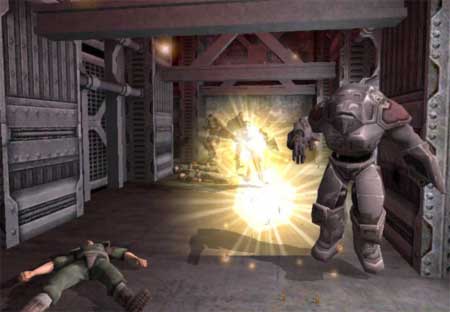
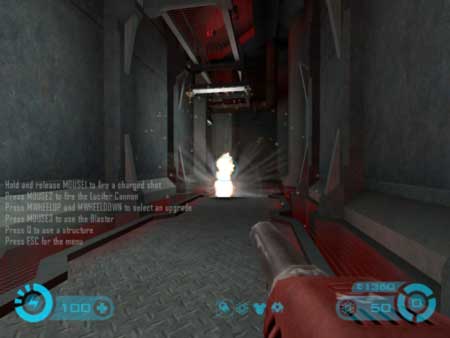
These past few days I’ve been hooked up playing Tremulous, an open source First Person Shooter (FPS) game. The objective of the game is to protect your team’s base and eliminate the enemy base. You can choose one of the two sides, either as member of human team or as an alien species.
trem1.jpg
trem2.jpg
trem3.jpg

Each side has it own unique abilities; the humans have long-range weaponry and the aliens have powerful melee attack and high body hitpoints The game uses GNU/GPL Quake III engine and only requires modest 3D hardware acceleration.

Tremulous is indeed a fun and addictive game, those who want play tremulous with me can look me up in Tremulous Basic Server #1 through #3 (low pings for me).

Download tremulous at : http://tremulous.net available for Windows and GNU/Linux operating system

[tags]games,quake,tremulous,quake 3, open source,FPS,linux,windows[/tags]

The OpenCD 4.0 has been released

opencd4.png

TheOpenCD project has just announced the release of OpenCD 4.0. Softwares featured on OpenCD 4.0 includes :

  • OpenOffice 2.0.4
  • PDFCreator 0.9.3
  • GIMP 2.2.13
  • Azureus 2.5.0.0
  • Mozilla Firefox 2.0
  • 7-Zip 4.23

TheOpenCD is a collection of Free and Open Source Software that runs on Microsoft Windows. It aims to provide high quality and well tested software that is free from restrictive license for people to use.

Hopefully by the time openjdk is ready, TheOpenCD will include a precompiled Java Runtime runtime too for running open source Java programs such as Azureus.

[tags]open source, free software, foss, opencd, firefox[/tags]

How to setup OpenDNS using Ubuntu

opendns.gif

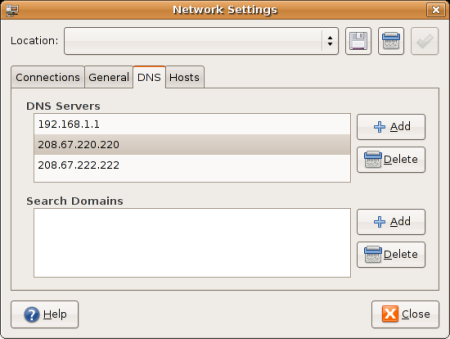
Here’s is the step to setup OpenDNS for your Ubuntu desktop :

  • From Desktop, goto System and Administration
  • Select Networking, a dialog will appear
  • Select DNS tab
  • Click Add and put the OpenDNS ipaddress
  • Click close and you’re done!

Here’s the screenshot of the dialog


What is OpenDNS ?

OpenDNS is a free DNS resolution service provided as an alternative to to using your Internet service provider’s DNS servers. One of the advantage using OpenDNS is its intercepts phishing attempts, when a user tries to visit a phishing site. The list of phishing website is constantly updated from Phishtank which is also run by OpenDNS.

I personally use OpenDNS when my ISP DNS service seems to fail at times, though some people speculate that OpenDNS resolution might be slow compared to my ISP’s, but personally, I hardly notice any delays at all. Read about OpenDNS at its website or from wikipedia entry.
[tags]opendns,ubuntu,dns.linux[/tags]

Ubuntu 6.06 LTS (Dapper) vs Ubuntu Edgy Eft

One of my blog readers ask me personally about which Ubuntu distribution that he should use, whether its Ubuntu 6.06 LTS or the latest release, Edgy Eft. As for my personal opinion, it depends on your own use.

Dapper Drake is a Long Term Support (LTS) release, supported by Canonical and Ubuntu Community for at least 5 years.? This means that Dapper Drake would receive more frequent security updates than Edgy Eft.

Edgy Eft on the other hand focussed more on providing the latest and bleeding edge software on your computer, it also have software and security updates as Dapper Drake, but it is only guaranteed for at least within the six month of Ubuntu release cycle.

After that you have to either upgrade it to the latest release or you have to patch/update the system by yourself. If you can see the differences, LTS emphasis more on stability and long term? support while the normal release emphasis on providing the latest release of software but with limited time support.

To sumarise it, LTS is suitable for those who like having a stable operating system with minimal maintenance effort, while the normal release is for those who like to keep updated with the latest software release, despite having to upgrade them each time a new release is announced to keep updated with security patches.

[tags]ubuntu,dapper drake,dapper,edgy eft,edgy[/tags]

Putting up Ubuntu favicon.ico

After being annoyed looking at all those 404 messages when IE tries to access this website /favicon.ico, i finally decided to put one up.

For those who don’t know, favicon.ico is that small (typically 16×16) icon that appeared beside the address bar. Since my blog is mostly centered around Ubuntu, I’ve chosen to put up an Ubuntu logo.

How to put up favicon.ico

Find a nice icon in png or ico format , make sure it look nice at 16×16, upload it on your website.

Put this line on your header (between <head> tags)

<link rel="icon" type="image/x-icon" href="/favicon.ico" />

If you’re using a png image, replace type with “image/png”. I haven’t personally test this with Internet Explorer much, but I doubt Internet Explorer doesnt support other icon format than .ico.

If that’s the case, you might benefit from png2ico

You can download the ubuntu favicon.ico here.

Find more information about favicon

[tags]favicon,png,ubuntu,firefox,browsers,web[/tags]

Photorec – Recover files from corrupted Hard Disk (filesystem) with Linux

Today I want to introduce you to Photorec, one of the open source data recovery software available in Linux. Photorec was designed to recover lost files including video, documents and archives from Hard Disks,CDRom and lost photos from Digital camera memory card.

Originally written to recover lost pictures (hence the name), PhotoRec now supports recovering more than 80 files types including zip, bz2, rar, 7z tar, microsoft office files (*.doc,*.ppt, *.xls), jpg, pdf, html, midi,mp3,wav and many more.

PhotoRec ignores filesystems and read raw data directly from block devices, this makes Photorec works well with various filesystem including fat32,fat16,HFS+, NTFS, ext2/3.

PhotoRec is known to not work very well with ReiserFS however.

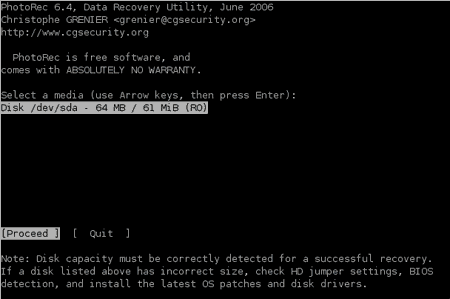
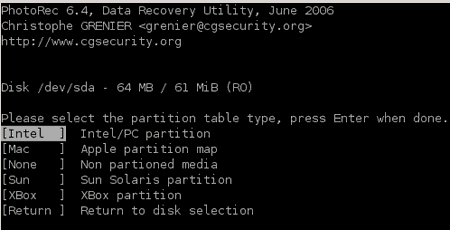
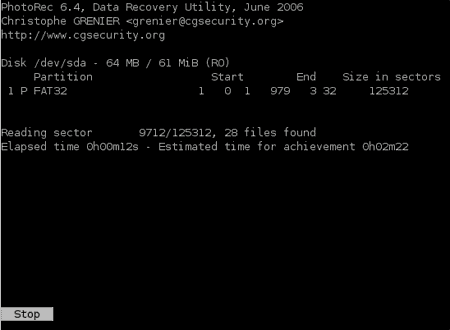
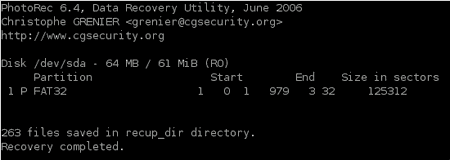
Here’s the screenshot of PhotoRec in action (which i uses it to test my corrupted MMC) :

From the screenshot, you can see that PhotoRec is able to recover 263 files from my MMC.

PhotoRec is safe to use, it will never attempt to write to the drive or memory support you are about to recover lost data from. All recovered file is stored in your /home directory and not withing the recovered disk itself, thus preserving the data contained within it.

For ubuntu users, you may find PhotoRec listed under the ‘testdisk’ package in Universe repository.

You can find out more about PhotoRec and testdisk at : http://www.cgsecurity.org/wiki/PhotoRec

[tags]data recovery,linux,ubuntu,recovery,hard disk data recovery,data-recovery,photorec[/tags]