The Next Ubuntu 8.04 release announced, Hardy Heron

The next Ubuntu release after the upcoming Gutsy Gibbon was announced in the Ubuntu Fridge yesterday.

Schedule to be released sometimes next year, Ubuntu 8.04 (Hardy Heron) will be the next release with Long Term Support (LTS) after Dapper Drake. This means Hardy Heron server installations will be supported up to 2013 after it release date on April 2008.

Please refer to the Ubuntu Wiki page for Ubuntu 8.04 (Hardy Heron) release schedule

[tags]ubuntu,gutsy gibbon,dapper drake,dapper,linux,debian,open source[/tags]

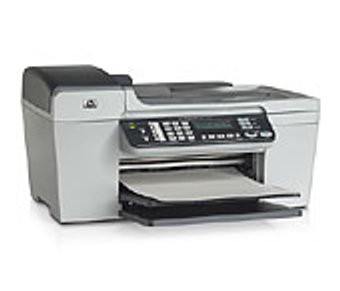
I got myself a new and flexible Printer – HP Officejet 5680 All in One !

After my first printer reached its end of life status (meaning that it has become too expensive to maintain it), I decided to buy a new printer. I haven’t bought a new printer for almost 6 years, I think I want to spend on a reliable and flexible printer.

After two weeks of window shopping, I decided to get the HP Officejet 5680 series, because I really wanted to have an ‘office look’ for my desk+workstation (yeah, I’m thinking of running my own business seriously).

officejet5680.jpg

Among its features are :

  • 20 page per-minute printing speed (draft mode)
  • Photo/transparency printing capabilities
  • Flatbed Scanner
  • Copier capabilities (enlarge, reduce size)
  • Fax capabilities (33.6kbps max speed)
  • Fax Junk number banning
  • Phone (with Caller-ID)

To summarize it, HP Officejet printer has all feature that I need to start my own SOHO business with functionalities that one expected to run day-to-day task. Best of all, the printer (CUPS) and scanner (sane) works well on Ubuntu (Feisty Fawn), w00t!

I’ve tested most of the feature of this little gizmo and is impressed with its performance, If you ever want to start a small-business like me, I would recommend you to get one too!
Recommended Product
Now you can do it all-print, all-print, phone, fax, copy and scan — from this compact, versatile all-in-one solution from HP. Create professional presentations and brochures with laser-quality black text, plus optional 6-ink and 4,800 optimized dpi color when you print and copy color documents. Send important faxes quickly and eliminate unwanted faxes using junk-fax barrier. Conveniently copy, scan and fax multiple pages with 25-sheet auto document feeder.

[tags]officejet,hp,printer,scanner,ubuntu,linux,debian,fax[/tags]

Ubuntu Gutsy Gibbon going to include GUI Xorg.conf configurator

Great news for Ubuntu Linux users, now you don’t have to manually edit Xorg.conf file to change the graphic card and display driver perimeter.

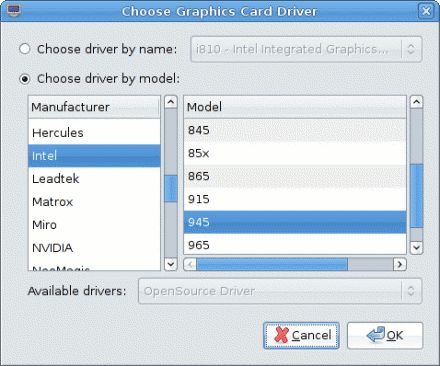
Ubuntu 7.10 (Gutsy Gibbon) is going to include a GUI configurator which aims to make it simpler for users to configure X Windows. The new configuration panel also has a ‘fallback’ feature which guards against X Windows failure to start after tweaking its config.

Here are screenshots of Xorg.conf configurator running on Ubuntu Gutsy

Xorg Ubuntu mypapit

Xorg Ubuntu mypapit #2

[tags]ubuntu,gutsy,gutsy gibbon,xorg,xwindows,opensource,linux,x11[/tags]

Local Malaysian – Ubuntu Package Repository Mirror

kaeru has published the URL of Malaysian Ubuntu Package mirror for faster Ubuntu installation for local users.

To use it, configure your synaptic (or edit /etc/apt/sources.list) to include this line :


deb http://mirror.inigo-tech.com/ubuntu/ feisty feisty-backports universe multiverse

The repository also includes updates for previous release of Ubuntu including Edgy Eft (6.10), Dapper Drake (6.06), and the upcoming Ubuntu release Gutsy Gibbon (7.10). Try it out!

[tags]ubuntu,repository,apt-get,synaptic,feisty,feisty fawn,malaysia[/tags]

Debian AMD64 is not limited to AMD machines only

mypapit debian logo

Debian AMD64 label for its version of x86 64bit platform operating system often leads to misunderstanding that the installer only supports AMD CPU only. In fact the label was meant to support Intel based x86-64 bit CPU as well (such as the Core Duo processor) in addition of AMD machines.

Why Debian use ‘AMD64’ ?
The source of confusion traces back when AMD being the first to design the instruction set for the 64bit version of x86 CPUs (for Athlon 64) back in 2002. Back then Intel hasn’t produced 64bit CPU yet making AMD the sole vendor for 64bit x86 CPU. The Debian project elected to support this architecture with the name AMD64.

Does Debian AMD64 works on Intel Core 2 Duo CPU ?
To make the story short, Intel then produces its own x86 64bit line of CPU base on AMD design. Since there are similarities, so both AMD64 and EM64T (Intel x86 64bit) shares instruction set design practically Debian AMD64 bit works on Intel CPU too (that includes Core 2 Duo CPU)

The confusion persists as Debian (and previously Ubuntu), still uses the AMD64 to identify with x86-64 platform which most other GNU/Linux distro doesnt (Fedora, Red Hat, Kanotix, Cent OS). In this case, I would prefer Debian to change its AMD64 labelling to ‘x86-64’ in order to refer to 64bit x86 based machines.

Conclusion
Debian still stuck with the old AMD64 labelling despite x86-64 is not limited to AMD CPU only and if you are wondering which version of Debian to install on your Intel Core 2 Duo computer, then please choose AMD64 with confidence.

[tags]debian,ubuntu,amd64,intel,amd,feisty fawn, gutsy gibbon[/tags]

Ubuntu Feisty Fawn does not work on Compaq Presario v3521

I’m supposed to post this post last month while the issue was still hot, but it seems that this post has been evading me for quite some time until now. Last month a friend of ours decided to get his first laptop, after browsing the internet and satisfied with our peers’ recommendation, he settled on Compaq Presario v3521 which is a relatively new model that supports SATA2.

However the joy of getting a new laptop soon fades away when he finally found out that Ubuntu does not support that particular model! The Ubuntu installer either froze up during the LiveCD booting screen or the installation dialog doesn’t detect any hard disk attached to the laptop.

After testing it with various Linux distro including Fedora, Debian, Red Hat Enterprise Linux, Solaris (ok that wasnt a GNU Linux distribution but close), It is safe to conclude that the freely available Linux distro does not support the laptop’s hardware driver. The installer will either hang, does not detect the hard disk/dvd drive or prompts for a driver CD.

Turns out to be Compaq Presario V3521 isn’t supported out from the box by Microsoft Windows XP and Vista either! According to the friend, he has no problem installing Solaris 10 and RHEL 5 Server on the laptop either. It seems the laptop requires the use of proprietary driver in order to work its hardware.

After some tweaking involved, he decided to install/use Debian 64bit on the laptop using network install, luckily besides the bumpy installation process, every other aspect of the hardware is working with the right drivers in 64bit mode.

So for all of you out there, please watch out for Compaq Presario v3521 model, it might not be for those with a faint heart.

p/s: It true, though Ubuntu seems to be easy enough to use, it might not be the best solution for you. It still has some rough edges, particularly with x86-64bit platform.

[tags]ubuntu,feisty fawn,compaq,presario,laptop,notebook,debian,red hat, fedora[/tags]