HP Officejet 5680 – How to Send Fax from Ubuntu Linux Computer

This serves as a continuity from my previous post, I got myself a new and flexible Printer – HP Officejet 5680 All in One.

HP Officejet All-in-One Under Ubuntu
Its all seems rather easy at the way I left off, the printer is fully functioning by just plugging it to my Ubuntu pc, the scanner works well without I having to do anything special, the phone is fully functioning (yeah it is included with the printer) and I am able to send and receive fax without a hitch, something that I cant do without installing 350MB of companion application (half of it was crapware) under WIndows Vista.

Everything worked, what left to do?
What left to do is figuring out how can I send fax directly from Ubuntu (or other Linux base operating system) using only digital files (*.txt, *.pdf, *.ps, *.jpeg), so I don’t have to print those files and fax them one by one anymore.

HP Linux Imaging and Printing project
Through googling, I found that Hewlett Packard (HP) has published open source software tool to deal with their printers. Free and Open Source drivers and printer-specific application directly from manufacturer, which is very cool!

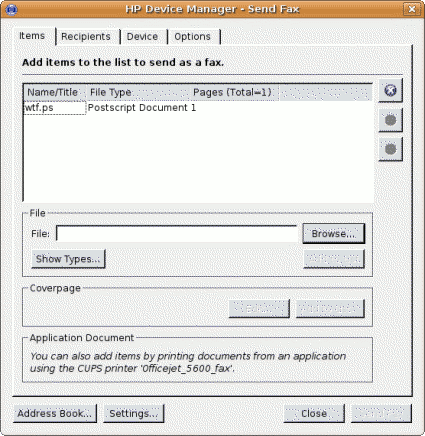
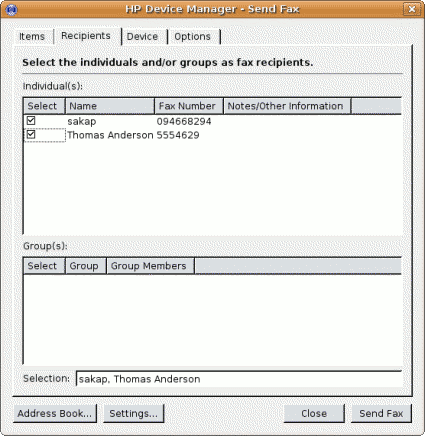
Fortunately Ubuntu already installed HPLIP tools by default with CUPS in my machine. The next step that I should take is to run ‘hp-setup’ as root to configure my printer port and run the ‘hp-sendfax’ application to send the faxes.

Both of these tool requires python-qt3 package which is available from Ubuntu software repository.

Now I can fax my pdf documents directly without having to print them first, a huge saving over ink and paper cost.

hpfax11.png

hp2.png

Conclusion
If you are planning to get a new printer, then I would suggest you get a HP printer. Not only because HP printers are reliable, but they also comes with Free and Open Source drivers and applications for the Linux based operating system. Well that’s a good reason to get HP printers.

Please visit HPLIP project website for more information about HP printers support under Linux based operating system.

[tags]hp,hewlett packard,printer,linux,opensource,ubuntu,foss,drivers,hardware,scanner,officejet[/tags]

Introducing Ubuntu solar system Yahoo Pipes!

Like to keep updated with the latest news from Ubuntu community ? Then I suggest you subscribed to Ubuntu Solar System Feeds available from Yahoo Pipes!

The pipe is a collection of various planet Ubuntu feeds including planet Ubuntu, Ubuntu Women, Ubuntu Brasil, Ubuntu-fr, and Ubuntu-nl. All feeds published through the pipe are presented in English language so you don’t need to worry about language barrier here.

If you’re a kind of person who likes to read the rants and ramblings of the Ubuntu community, then I suggest you subscribe it here : Ubuntu solar system

[tags]ubuntu,debian,linux,open source,feeds,news[/tags]

New Features in Mypapit GNU Linux

It’s July again! Seems everywhere people are talking about iPhone and Transformers the Movie. I would have things to say about the current events too, but I better save it for my personal blog which I’ve yet to create.

Since Mypapit GNU/Linux blog has been around for more than two years, I would like to introduce some new changes to increase the quality of the blog, which are :

  1. Popular Articles of the Month – I’ll list 3 to 5 most popular articles of the month starting June 2007
  2. Mobile Phone, PDA, GPS updates will be posted on Mobile Programming Pit
  3. Personal Updates will be posted on my personal blog – to be announced later (it will be on a .my domain)

Any suggestion ?
You may forward you suggestion or article request directly to me using my contact form

I hope you would enjoy these improvements as I enjoy introducing them, cheers
[tags]announcement, mypapit[/tags]

Cybersquatting Disclaimer

I’ve noticed a couple of websites tries to namesquat my blog name in order to profit from quick traffic. The operator(s) of this website obviously choose a semi-porn theme to attract quick visitors for their website and profit directly from pornographic materials. The website seems to publish their pornographic content in the member section (free registration required) of their blog.

Rest assured that I’m in no way connected with those websites that uses a play on my website name (pipit,mypipit, etc) as I believe that it is illegal to profit from such sites from the spiritual (religious) point of view.

Therefore, I decided to publish a list of my official domain to counter misunderstandings arises from the action of this squatters. Here’s the list of my official domains

  • mypapit.net (I use this domain since 2001)
  • mypapit.com (I’ve parked this domain for control purposes)
  • mobilepit.com (my phone programming site)

Please be advised that I do not have direct connection aside from the above mentioned domain name. Therefore I do not take responsibility on the action of other websites which uses my ‘official’ website name.

npaper.jpg

PS : It’s funny that the website operator have the guts of hosting semi-pornographic website locally and publishing their bank account on the same website for the sake of quick traffic and money, It’s even funnier when I discovered the website operator uses Bank Islam to accept payment for advertising in his website, talk about irony.

PPS : one of the website has toned down its pornographic content , but the matter still worth my disclaimer

PPPS : I’ve spoken to the website operator over YM, the operator implied that he purposely choose the name for namesquatting purpose.

[tags]disclaimer,namesquatting,cybersquatting,domain,domain name[/tags]