Viruses from Blogs

As if getting computer viruses in your email wasn?t bad enough, now you can also get a computer virus when you visit a blog.

Hackers are setting up fake blogs which, when visited, infect machines with keylogging software or viruses. Filtering firm Websense says that these hackers then send out email or instant messages that link to the
blog, hoping to lure the unsuspecting.

The worst part? These hazardous programs can get past traditional security measures because of the nature of the attack.

p/s: Wonders what would these crackers do when they get their hands on the upcoming “Longhorn” built-in RSS Reader API? A lot of blogs use RSS you know, hmmm….

My Network card broke down!

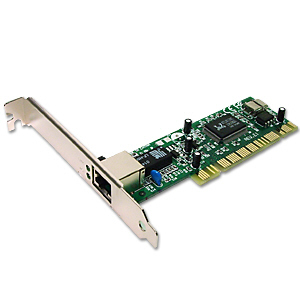
My RTL-8139 based NIC card broke down today ! It broke down, just after one day I finished screenshoting my Fedora Core 4 Desktop for Internet Connection Sharing Guide.

The interesting part is, the RTL-8139 managed to bring down my Fedora Core 4 while spiralling down to it’s demise. I get a screenful of unexplained error message during the boot-up process, not knowing what when wrong at first time.

RTL-8139

Luckily i know a trick or two, i boot up my trusty home-brew KrazhBoX just to found out that an error has occured while the Linux kernel was initializing a PCI card. Which later turns out to be RTL-8139 Ethernet Card. I found this out by doing “cat /proc/pci” in my KrazhBoX.

So to counter the problem, I had to replace my Network card with a new one and reconfigure the Fedora Core 4 distro.

Reminds me to speed up my update on my home-brew KrazhBoX rescue Linux project to use 2.6.12 kernel.

RTL-8139 is the common chip used in PCI LAN card in Malaysia. If you bought a generic PCI Ethernet card, it’s most probably ship with RTL-8139 chip.

Mypapit Blog Alternative URL

Dear blog readers,

For ease of surfing, you can reach this blog by using either of these URL

  1. http://blog.mypapit.net/
  2. http://ppsplit.sf.net/mypapit/

I’ve taken steps not to cloak the url to make it search engine friendly.
Hope that my blog url are easily remembered for all of you outside there!

Tips: Use RSS feeds when you can, it can save you a lot of time! Mozilla Firefox have Live Bookmark feature that enable you to check my blog’s headline quickly.

Series 60 Nokia will have enhanced Java support

According to the news I read from http://geekzone.co.nz, Nokia have made an annoucement that it’s Java-enabled Series 60 phone will include CDC (Connected Device Configuration) for the Java platform. This is a significant leap for the phone industry, because all of mobile available to the market today only supported CLDC.

According to the website, the introduction of enhanced configuration (CDC) in smartphones will drive opportunities for significant improvements in remote management of mobile devices and creating new business opportunities for Java platform software developers in the mobile middleware market.

New developer tools corresponding to the next generation Java platform for Series 60 will be made available in 2nd half 2005 by Nokia’s global developer support program, Forum Nokia.

w000h000, new SDK and smartphone for me to hack

p/s : Actually, i’ve been waiting for quite some time to get my hand into one of CDC enable-device. This is the time i’m waitin’ for…

Finally we bought a friendly scanner

mypapit Canon LiDE 20 Scanner

Since there are so many people at my house need to use scanner for day-to-day stuff (actually only my sister). So we decided to get a Home/SoHo scanner, and naturally i’m the one who got to choose.

Browsing through few stores and places in Alor Star, finally i came across this entry-level SoHo Canon LiDE-20 model. It priced about RM220 at one computer shop at one shopping complex, but i decided to pass it down and bought the similar model in another place which doesn’t require high-maintenance bills, and it only cost my father RM195.

For starters, the scanner’s operation is straight forward. Once you installed the required software drivers in Windows XP the scanner is hot to be use (ok, nothing special about that, it’s normal with M$ Windows). But for a small price to pay, this scanner really roxx! It’s quick, responsive and have intelligent cropping feature that automatically separate items that i scanned together (to save time of course).

The scanner is slick and slim, and it features 3 button “Scan”, “Copy” and “Email”, and those buttons are configureable in it’s accompanying software driver which I promptly modified the “Email” button to do OCR.

After having fun setting up the scanner for my sister, only then i remembered, “Oh my god, how about Linux? I haven’t check the compatibility list before buying this out!”.

Fortunately, most (and i do mean most) of the USB devices now in Linux are just plug-and-play. It’s kinda hard to find USB devices without drivers in Linux nowadays. The Canon LiDE 20 is supported in Linux as I boot them! Well, at least on FC4 and Mandriva 10.2.

The scanner driver from The Sane Project works nicely, and theres no difference at all whether you scan your documents from M$ Windows or GNU/Linux.

For those who are interested in getting new hardware for your Linux pc I think the link below would be some help. Remember choose only hardware which have Linux driver with it, talk with your pocket :

1. Scanner Database
2. Digital Camera-PTP Mode, Mass Storage is always supported.
3. Webcam
4. WiFi
5. Bluetooth
6. Sound Cards
7. Network card
8. Most of Nvidia and ATI Graphic Cards (for 3D Gaming)
9. Almost all USB Mass Storage Device (Pendrive, HDD)

If you are lazy enough to check one, by one, then i suggest you to drop by Mandriva Hardware Compatibility Database. Check whether your hardware is supported by Linux. cheers…

Note : Some of the item of this list (notably no 4,7,8,9) are outdated, please be advised. Other item are maintained by their respective driver project.


Recommended Product
The CanoScan LiDE 20 USB flatbed scanner is one of the world’s most compact flatbeds, yet it offers big performance and big savings. Just over an inch high, it packs all the features you need to scan images, copy documents, and e-mail your favorite photos, all with one-touch operation.

Pocket PC may now have Java 1.5.0 supports

ThunderHawk PocketPC

News sources from the net revealed that the latest ThunderHawk Pocket PC 2.1 from BitStream will have Java 1.5.0 support. The PocketPC reportedly includes Java 1.5.0 full-desktop capabilities so that applets behave exactly the same on mobile devices as they do on desktop devices.

Previously PocketPC users have to be content with 3rd party JVM or the feature-limited JVM PersonalJava from Sun, both of them lacks the richness and robustness of a fully-featured Java(tm) Platform implementations

The company claim that robust Java support support was one of the top requests from both ThunderHawk subscribers and enterprise clients.

p/s :
Come to think of it, how many times have you encountered web page loaded with java applets nowadays? In 2005 alone, i’ve only encountered only one or two such webpage among hundreds of them that i surfed. The point is, in my point of view, java applets is scarce late these days. They may be cool in the late 90’s, but now it’s hard to find one page that even use a java applet.