
AptOnCD: apt-get Repository on DVD/CD - Ubuntu/Debian


Those who are familiar with Debian-based system with know a thing or two about apt-get.

apt-get is a wonderful tool that simplifies package management in Debian and Ubuntu derived Linux distro, be it software installation, security updates, upgrades, software removal and searches, apt-get does wonders in daily computer management.

However some linux distro (Ubuntu, obviously) relies heavily on internet connection to access its repository. This sometimes impractical to computer that is not always connected to the internet.

One alternative to that solution is to get the repositories on CD/DVD. However packages included in there may not suit your needs and might be redundant.

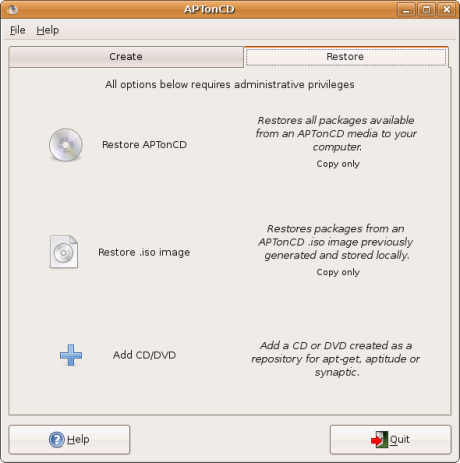
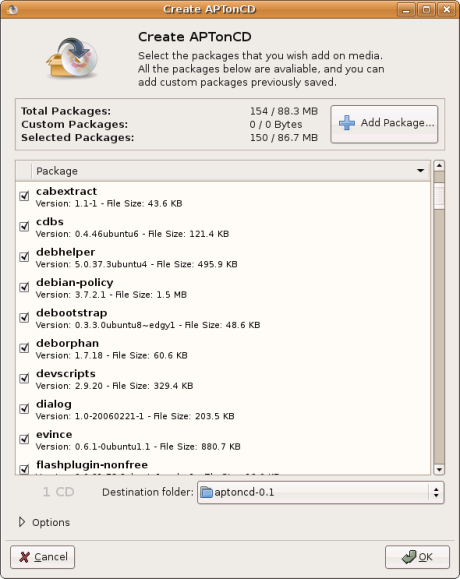
Luckily there's AptonCD, a GUI application that helps you create removable repository on CD/DVD using packages you've downloaded.

AptOnCD, enables you to select specific package that you want to put in removable repository (DVD/CD).

Once created, the DVD can act as a repository itself and you can install software from it using apt-get normally.
apt-get2.pngapt-get1.png
AptOnCD also has feature that can restore/copy all the packages on the target computer, this means you can 'preload' the computer with packages from apt-get before you start using it. This can save
your time from having to insert the repository CD/DVD when you want to install a software.

Currently AptOnCD is tested and available for Ubuntu and Debian Linux distribution and can be downloaded here : http://aptoncd.sourceforge.net/download.html

Tags: , , , , ,

nbsp&;

By using VoIP calling service, you can reduce international calling costs and even start your own VoIP business as a VoIP reseller.

Bookmark this article These icons link to social bookmarking sites where readers can share and discover new web pages.
  • digg
  • YahooMyWeb
  • NewsVine
  • Netvouz
  • Reddit
  • Spurl
  • Furl
  • del.icio.us
  • StumbleUpon
  • Technorati
  • TwitThis

Keep updated with this website! : Subscribe to your email

Recommended Reading

11 smashing comments for this post.

  1. The Malaysian Blogosphere Said:

    for a guide to add the DVD on Feisty Fawn repository list. You can also read the guide in Indonesian language from http://wiki.ubuntu-id.org/DistribusiDvdReposUbuntu Alternatively, you can create a customized Repository CD/DVD that suit your needs using AptOnCD utility to be used on a computer which does not have a high speed internet connection. -Hope that would help Tags: ubuntu, feisty fawn, feisty, debian Original post by mypapit and software by Elliott Back

  2. wahlau's online hut | collection of wahlau's what-so-ever online... Said:

    Mohammad Hafiz bin Ismail: AptOnCD: apt-get Repository on DVD/CD - Ubuntu/Debian Low Kian Seong: Ghost rider suxs !!! Ditesh Kumar: In The Beginning Was the Command Line Mohd Izhar Firdaus: SonyEricsson k320i Ditesh Kumar: Registering to be a voter in Malaysia

  3. uzyn Said:

    Very nice. I’ve never known such app existed. This would be very helpful to me.

  4. Planète Béranger: AptOnCD is needed! Said:

    [...] Mar 27200715:58 GMTAptOnCD is needed! .01$A few minutes ago, I noticed in a forum a question about "Ubuntu updates with no internet connection": «I assume I’m going to have to build or mirror one or more repositories to CD, but I haven’t yet found any instructions for doing this.»Uh-uh. I just noticed a few days ago that Tuxmachines added the third pointer to AptOnCD.And of course it works with anything APT and DEB-based, not only Ubuntu!So, here’s what I posted in the forum (apart from "the hard way, man apt-cdrom") — the 3 links:Nov. 06, 2006, LinuxHelp: AptonCD - Create a backup of all the packages you have installed using apt-getNov. 27, 2006, DebianAdmin: Create backup of all packages using APTonCD in UbuntuMarch 20, 2007, MyPapit: AptOnCD: apt-get Repository on DVD/CD - Ubuntu/DebianThe Ubunteros have failed to give it the proper attention — currently, only Feisty has it in "universe".  [Français]  [Deutsch]  [Nederlands]  [Español]  [Português]  [Italiano]0 (+0) comments so far      [view/add comments]       [permalink] [...]

  5. creating DVD for extra repositories, how? - Ubuntu Forums Said:

    [...] Re: creating DVD for extra repositories, how? I have never done it, but I found a few things which will hopefully help: http://aptoncd.sourceforge.net/ http://blog.mypapit.net/2007/03/put-…ntudebian.html http://ubuntuforums.org/showthread.php?t=255128 __________________ .stop war & .embrace love [...]

  6. Ubuntu日本語フォーラム / Ubuntu徹底入門付属DVDについて質問とお願いです Said:

    [...] レポジトリを選んでDVDに焼いてしまうのであれば以下のような記事を参考にしてください。http://blog.mypapit.net/2007/03/put-apt … ebian.htmlhttp://www.howtoforge.com/dvd_images_of … positories Ubuntunのセキュリティ対策 オフライン   [...]

  7. Ubuntu Feisty Fawn Repository on DVD : mypapit gnu/linux blog Said:

    [...] Alternatively, you can create a customized Repository CD/DVD that suit your needs using AptOnCD utility to be used on a computer which does not have a high speed internet connection. [...]

  8. Добавить свой deb в iso Said:

    [...] http://blog.mypapit.net/2007/03/put-apt-get-repository-on-dvdcd-ubuntudebian.html [...]

  9. freda Said:

    DiskClerk - Help you to manage your entire collection( cds, dvds, mp3, games, movies, books, softwares…), search and sort your collection in any way you want

    more information: http://www.qweas.com/download/video_dvd/movie_organizers/diskclerk.htm

  10. Goa-india » Items by mypapit Said:

    [...] Alternatively, you can create a customized Repository CD/DVD that suit your needs using AptOnCD utility to be used on a computer which does not have a high speed internet connection. [...]

  11. Saving download programs - Forums Said:

    [...] Re: Saving download programs There is no single magic command that will know what you want exactly, so no, you cannot just execute some command and get the system with all the software you had previously installed –or try aptoncd (load a CD dvd with packages list and can restore from that http://blog.mypapit.net/2007/03/put-…ntudebian.html –the original apt methods.. http://www.debian.org/doc/manuals/ap…basico.en.html Quote: [...]

Leave a Comment

Subscribe by email

Enter your Email