
I think many of you who has installed Ubuntu, must hava encountered a login screen before you actually can use the Ubuntu desktop.
It maybe not a big deal for those who don’t mind having to login first before using the operating system because of security reasons or if the pc is shared between multiple users.
But some might find it inconvenience if they had to login each time after booting to use their operating system. However there’s a way to enable automatic login to your desktop and completely bypass the login screen.
Here’s how to do it :
- First go to System,Administration. Select Login Window
- A dialog will appear, Select Security Tab
- Check Enable Automatic Login, then select the name of the default user
- You’re done, the next time your Ubuntu boots, you will be automatically be logged in as the default user.
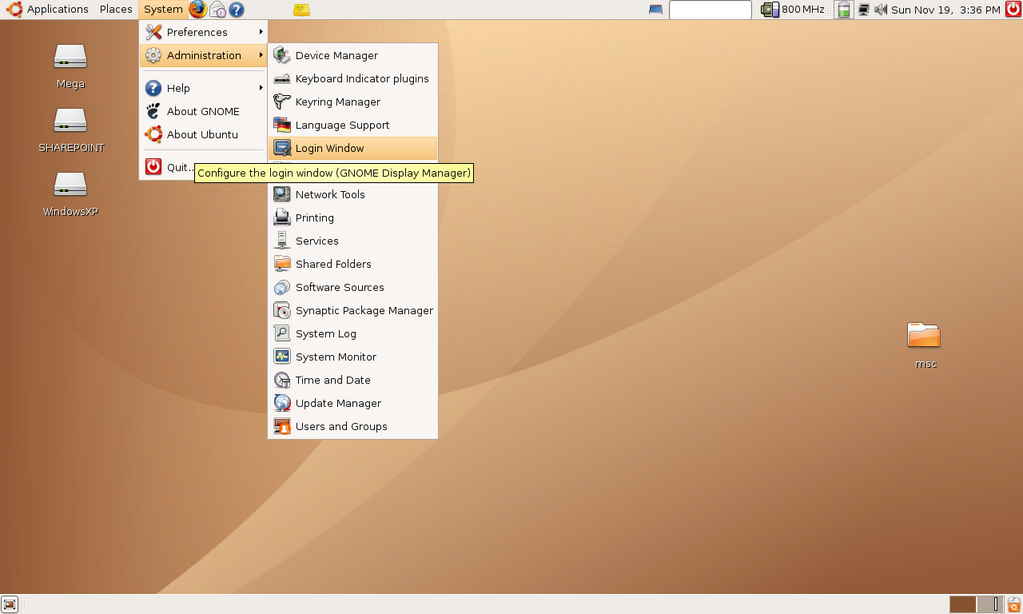
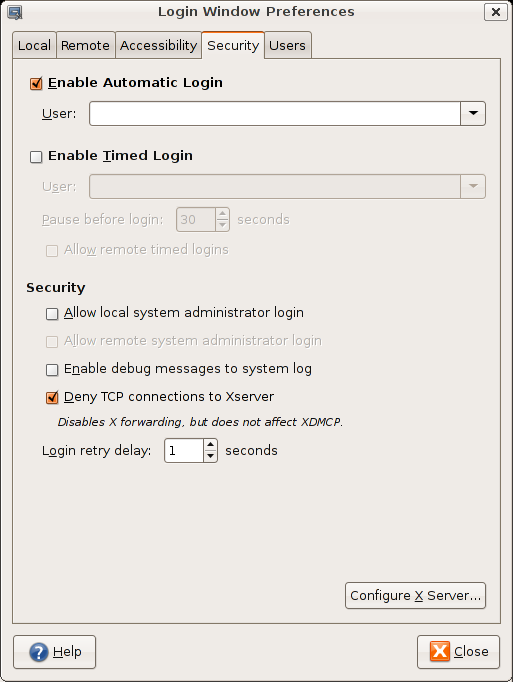
This setup is ideal if you’re not sharing the computer with anybody else and the default users selected is not listed as one of the sudoers.
It is also convenience if you want to allow people to automatically log on into your pc as a ‘guest’ users without administrator privileges.
[tags]ubuntu,dapper,edgy eft,gnome,debian,linux[/tags]
this tip worked great:
http://ubuntuforums.org/showpost.php?p=4736313&postcount=42
hey – this worked great – though it asks for a password for the default keyring for WiFi – any way to bypass this and have it automatically connect to my router?
can you set this from command prompt… I was logged into x and set it to do random logins… now I can’t get past login. I login, and then it reloads a random login page.