How to connect to Streamyx with DLink 2640-T wireless router

I found in my website log, apparently somebody trying to find out how to connect to Streamyx broadband using the latest DLink 2640T. Since I own one, I decided to share my settings to enable you to connect to Streamyx.

  1. First point your favorite browser to http://192.168.1.1/, enter your username and password (default: admin | admin)
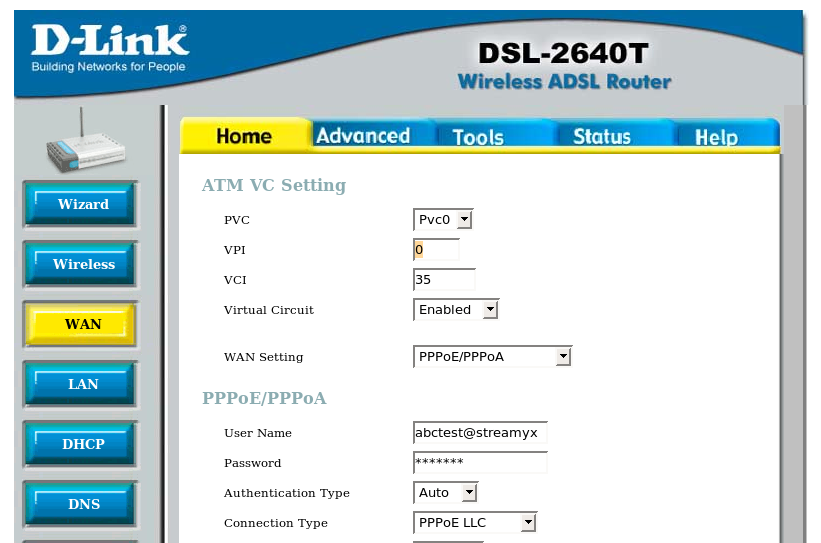
  2. Web configuration user interface will be displayed, click WAN
  3. Change the VPI value from ‘8’ to ‘0’
  4. Enter your Streamyx username and password below
  5. Finally go to Tools->System. Click “Save and Reboot” there to save your changes.

Screenshot
Dlink 2640-T Streamyx

Your Dlink wireless router should be able to connect to Streamyx broadband services now.

[tags]streamyx,dlink,broadband,linux[/tags]

How to install Skype on Ubuntu

Skype is perhaps the most popular client to make calls from your computer to any phone lines in the world. With SkypeIn subscription, you can even get an international phone number for everybody to call you, a completely neat way for your friend in overseas to call you with cheap rates. Although Skype is a proprietary software which uses a non-open protocol, some people would find it useful as it enables them to make international call with cheaper rate via SkypeOut.

Installing Skype on Ubuntu (or Debian)
This how to will show you how to install a Skype client in Ubuntu & Debian base operating system.

  1. First of all you need to start up Synaptic Package manager. Go to System->Synaptic Administration->Synaptic Package Manager,
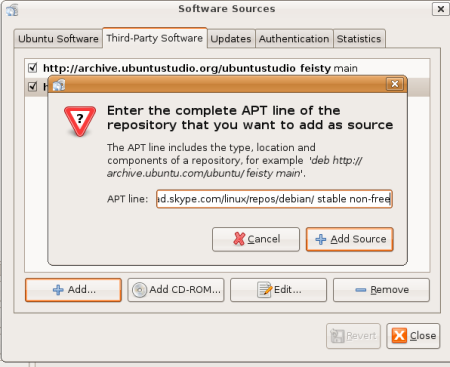
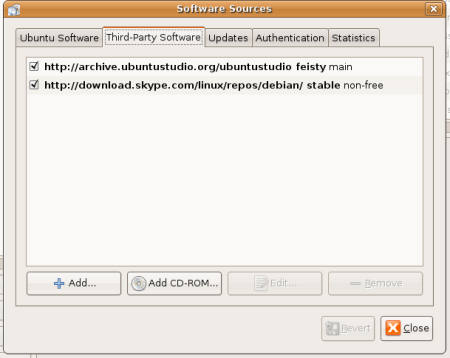
  2. From Synaptic, go to Settings->Repositories. Click on Third Party Software Tab. Click Add, and put on this line :
    deb http://download.skype.com/linux/repos/debian/ stable non-free

    Click Add Sources.

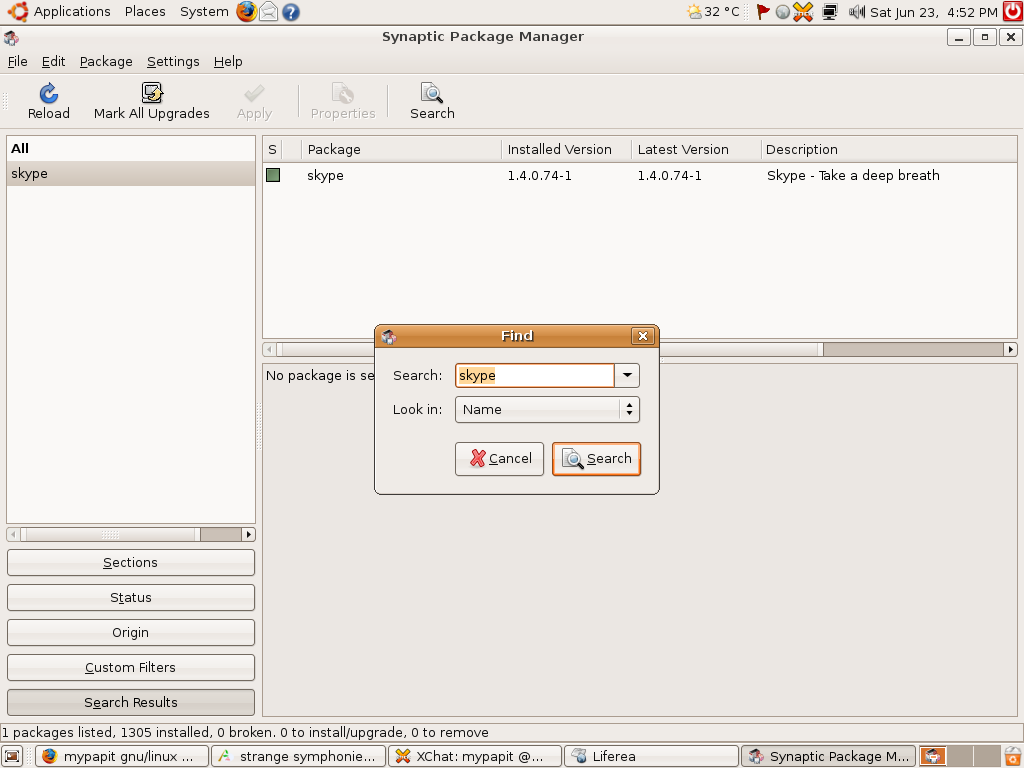
  3. Click Close, and Click ‘Reload’ at the top of Synaptic. Now you can search for Skype, and install it from Synaptic.

skype3tn.png

skype1tn.png
skype2tn.png

Hope that will help you to install Skype on your Linux operating system. Alternatively, If you’re a fan of open source software and open standards, then you might want to look into Ekiga (formerly GnomeMeeting), cheerio!

[tags]skype,voip,ubuntu,feisty fawn,linux,messenger[/tags]

Pidgin 2.0.0 (formerly gaim) Instant Messenger finally released

After a long wait — Pidgin 2.0.0 (formerly Gaim) was finally released on May 4, 2007. The latest (and the first) release of Pidgin spotted an all new purplish artwork which is radically different from Gaim default look.

The Pidgin project website also receive a similar face lift, which feature the new Finch mascot-logo. This mark the departure from its previous image which has to be rebranded due to legal issues surrounding the Gaim name.

pidgin_logo.gif

For the uninitiated, Pidgin is a multi-platform instant messenger client (mostly popular in Ubuntu distro as the default IM application) which supports a number of IM protocol including yahoo, msn, aim, jabber, google talk, iChat and IRC.

The multi-protocol Pidgin 2.0.0 IM can be downloaded from it’s official website

Update : Ubuntu (Feisty Fawn) Pidgin binary package is now available on GetDeb

[tags]pidgin,im,gaim,instant messenger,ym,yahoo messenger,msn messenger,open source[/tags]

RFC 2324: Hyper Text Coffee Pot Control Protocol

Wonder how I missed this this peculiar RFC, RFC 2324 : Hyper Text Coffee Pot Control Protocol. It was brought out by Toydi a while ago when we were having discussion about REST implementation.

The RFC provides specification for a protocol based on HTTP, which can be use to send signal to a coffee maker appliance which can help people make coffee.

Clearly this is intended as a joke, but it is a well-written RFC which has all the details necessary to build HTCP-compliant coffee maker.

and according to this wikipedia entry, is indeed has been implemented on Emacs and Mozilla browser (through 3rd party patches).

Other Humorous RFC ?
HTCPCP is an example of a well written RFC which is intended as an April Fool’s joke, but it is not the only one produced, please refer here : http://en.wikipedia.org/wiki/April_1st_RFC for a list of RFC written specifically for April Fool’s day.

[tags]humor, funny,internet,rfc[/tags]

How to secure your SSH server

I came across this interesting post about how to secure your SSH without changing the SSH listening port.

Things that the post author suggested are :

  1. Enforce the use of secure and hard to guess password
  2. Disable login by password, use Public Key Authentication for greater security.
  3. Allow SSH connection from trusted network only.
  4. Implement Port Knockinghttp://www.linuxjournal.com/article/6811
  5. Use iptables RECENT match to filter SSH scanners

Personally I’ve enabled public-key authentication and SSH scanner filter to secure my server at the advice of my friend from a local security firm. Although, I haven’t tried the port knocking method yet, it seems interesting to know that ‘secret port knocking’ pattern also exists in computer security (remember ali baba?)

Hopefully this post will serve as a reminder to myself and those who read them, ah oh, most of this post content are lifted shamelessly from False sense of security

[tags]ssh,iptables,ubuntu,debian,security, port knocking,nmap, security scanners,exploit[/tags]

http://blog.drinsama.de/erich/en/linux/2007021502-false-sense-of-security