How to setup Tor and Privoxy in Ubuntu Feisty Fawn

Tor is a free implementation of anonymity network which protects your privacy over the internet. Tor enable this by providing virtual tunnel to internet application through SOCKS interface. This post will show you how to setup and use Tor to connect to internet anonymously.

  1. First of all you need to install tor and privoxy package

    apt-get install tor
    apt-get install privoxy
  2. Then you need to edit privoxy config file for some quick setup,
    gksudo gedit /etc/privoxy/config
  3. You need to comment “logfile logfile” line and add this line at the end of the file
    forward-socks4a/localhost:9050 .
  4. Save the file and restart privoxy service.
    sudo /etc/init.d/privoxy restart
  5. You should be able to connect through Tor by using application which supports SOCK 4a/SOCK 5 interface with port 9050.

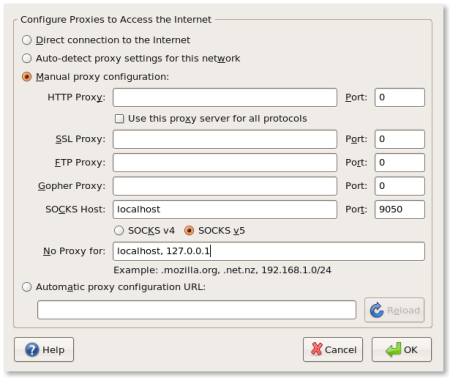
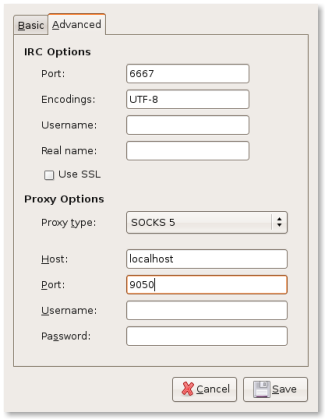
Here’s a screenshot of Mozilla Firefox and Gaim setup to use Tor
firefox.png

gaim.png

You can access those screen through Edit->Preference->Advanced->Network->Settings in Mozilla Firefox and Account->Advance Tab in Gaim/Pidgin. Other application which supports SOCK 5 can be configured similarly to connect through Tor (including Xchat irc client and other internet browser)

Other Operating System
Tor (and Privoxy) is also supported on other operating system including Windows, Mac OS and other Unix-like operating system. Please refer to Tor Download page for instructions to use tor on those system

[tags]tor,ubuntu,proxy,feisty fawn,debian[/tags]

How to use FTP filesystem on Ubuntu using CurlFtpFS

Some web hosting company do not offer shell access (SSH or Telnet) to your shared hosting account for security reasons, making it a bit harder for you to do regular file maintenance for your web account. Although the use of regular FTP client is adequate for most cases, some people still prefer to manipulate files directly using standard Unix tools (probably because of old habits).

Fortunately, there’s CurlFtpFS which allow you to mount remote ftp account as a standard filesystem on your Linux operating system.

Using CurlFtpFS
First of all you need to install CurlFtpFS, which in case of Ubuntu or Debian based operating system is to run ‘sudo apt-get install curlftpfs‘.

Alternatively, you can use Synaptic to install CurlFtpFS.

Assuming you’ve successfully installed curlftpfs, all you need to do in order to mount ftp locally is to to run these commands.

mkdir hostr
sudo curlftpfs -o allow_other ftp://user:pass@ftp.example.com host

user:pass is the username and password to log into ftp account.

After that, you can change your working directory to the mount-point and use the regular unix utilities to work on the files that normally accessible on the FTP protocol. After you’re done, you can unmount it by running the usual “sudo umount [mountpoint]” command

Using CurlFtpFS in fstab
You can add curlftpfs to fstab for automatic mounting by using this line :

curlftpfs#user:pass@ftp.example.com /mnt/host fuse rw,uid=500,user,noauto 0 0

Note: Please refer to CurlFtpFS website for further reference.

Thanks for reading this post, hopefully this will get you started to use curlftpfs FTP based filesystem in your Linux operating system.

[tags]filesystem,linux,debian,ubuntu,curl,fuse,mount,unix[/tags]

How to install Java Runtime and JDK in Ubuntu Linux

Installing Java Runtime and JDK has been made easy since Ubuntu Feisty Fawn since multiverse and universe package has been made available by default. This short how to, covers an easy way to install Sun Java environment in your Ubuntu operating system.

Installing Java Runtime

$ sudo apt-get install sun-java6-jre

Installing Java Software Development Kit (JDK)

$ sudo apt-get install sun-java6-jdk

Alternatively you can choose to install previous Sun Java version on your machine by replacing ‘sun-java6’ with ‘sun-java5’ for Java 1.5, or by installing ‘j2sdk1.4’ package for Java 1.4.

That’s all, you should be able to run Java applets using your favorite browser or run Java application by now.

[tags]java,jdk,linux,debian,ubuntu,apt-get[/tags]

How to Rip MP3 using Sound Juicer (Ubuntu Tips)

Ubuntu comes with a default CD ripping utility called Sound Juicer that lets you convert Audio CD tracks into digital music format. However Sound Juicer only able to rip Audio CDs into OGG format by default. Most people that familiar with MP3 format might find this as a drawback because MP3 ripping option is not available because of its patented status.

However in the spirit of ‘freedom’ in the free and open source, I’d like to show you how to enable MP3 ripping capability in Sound Juicer

Enable MP3 CD Ripping
This guide assume that you’re using the latest release of Ubuntu (Feisty Fawn).

  • Firstly you need to install and gstreamer0.10-plugins-ugly-multiverse
  • Then start Sound Juicer application, and select Edit->Preference
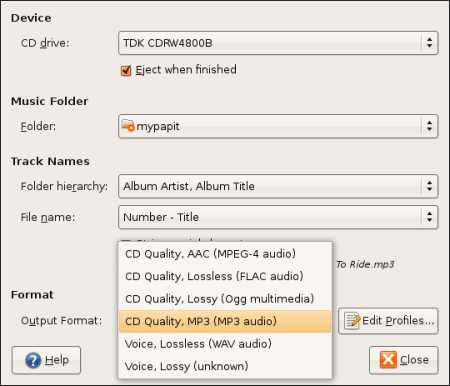
  • You should be able to see that MP3 option has been enabled in Sound Juicer
sj.jpg

The default bitrate setting for MP3 is 160Kbps, you can change MP3 encoding parameters by clicking “Edit Profiles” option in the application, and that’s it! You are ready to rip CDs to MP3 format!

[tags]mp3,ubuntu,feisty,feisty fawn,ripping,gstreamer,debian,encoder,cd ripper[/tags]

How to install Ubuntu Studio (7.04) Ardour Theme

Ubuntu Studio was finally out and you can see its screenshot from Howtoforge’s : Installing Ubuntu Studio 7.04 – Linux For The Creative. Ubuntu Studio features the new Ardour 2 dark theme which seems slick and stylish when combined with the applications available in the distribution.


However you don’t need to go through the hassle of obtaining Ubuntu Studio just to get its theme as Andi Darmawan has written an easy to follow guide to Install Ubuntu Studio Theme in your standard Feisty Fawn installation.

What is Ubuntu Studio ?
Ubuntu Studio (7.04) is a newly released Multimedia oriented GNU/Linux distribution based on the popular Ubuntu Linux distribution. It is targeted for audio,video and graphic professionals or enthusiasts. The Ubuntu Studio DVD iso (about 870MB) is available for download from the project’s official website which includes Multimedia content creation softwares along with specially compiled low-latency kernel suitable for audio/video editing tasks.

[tags]ubuntu,linux,debian,feisty fawn,gnome, theme,themes[/tags]

Ubuntu Feisty Fawn with Beryl 3D Effect

Here’s a video from Youtube demonstrating Feisty Fawn with Beryl

[coolplayer width=”425″ height=”350″ autoplay=”0″ loop=”0″ charset=”utf-8″ download=”1″ mediatype=””]

Feisty Fawn Beryl
[/coolplayer]

Refer to this guide on Installing Beryl On An Ubuntu Feisty Fawn Desktop with With An ATI Radeon Graphic Card

btw, a friend who was just using Linux at his workplace has asked me how much does it cost to buy the latest Ubuntu (Feisty Fawn). Seems there are people who still thinks Ubuntu costs as much as other proprietary Linux distro like Linspire.

He was even shocked when I told him that he an request as many as 10 Ubuntu (Feisty Fawn) CD for free from Ubuntu – Shipit. I told him to give Ubuntu a try by downloading the ISO, though I haven’t heard anything from him yet for a week..

So, lesson learned : There are GNU/Linux users who don’t know that those eye-popping Beryl effects is available for free.

[tags]ubuntu,linux,feisty fawn,feisty,beryl,compiz[/tags]