Foundation Platform: Linux-based Mobile Applications Standard?

I recently came across on one article about LiMo Foundation which is established by Motorola, Panasonic, Samsung , NEC, NTT DoCoMo, and Vodafone to develop Linux-based, open mobile communication device software platform.

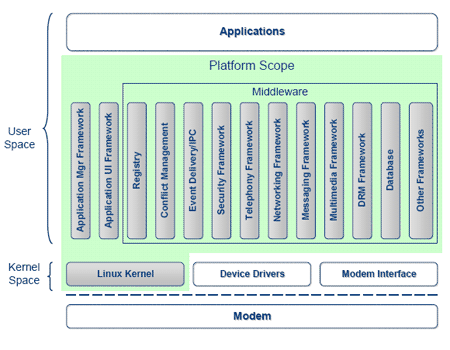
From its whitepaper, It seems that the goal of Foundation Platform is to develop a Linux-based Mobile Application framework similar to Sun MIDP/CLDP for its Java2ME platform.

linuxmobile.png

The Foundation Platform also define a standard way to represent GUI on mobile phone using GTK+ library. This is to encourage application interoperability between devices and to enhance mobile application user experience.

Hopefully in the future , we can develop a portable Linux application that can be compiled and run on any Linux mobile devices with little or no changes. This would encourage the FOSS to spread across mobile devices too.

[tags]mobile, mobile phone, motorola, foundation platform, linux, linux based, gtk+, j2me[/tags]

Mandrake Linux: My First Linux distro Experience

I started to use Linux around 2001, when I was advised to write a two pass assembler for SIC/XE machine using a unix-like operating system at that time back in my University.

It is not that I don’t have access to the university shell account, but the lecturer encourage us to try and install GNU/Linux operating system on our personal computer so we could learn more about the so called unix clone. The lecturer mentions that he uses Red Hat Linux 7.1 at that time, and shows a demo how the Linux works.

Intrigue, I went to local cd shop and bought Continue reading “Mandrake Linux: My First Linux distro Experience”

Linux 2.6.20 released with KVM support (Kernel Virual Machine)

Finally Linux kernel 2.6.20 is available! This release is interesting because it includes KVM (Kernel-based Virtual Machine), that enables you to run a virtualized computer with its own virtual memory, hard disks and other devices.

This means that you’re able to run other operating system under Linux using Virtual PC provided by KVM kernel driver. KVM has an advantage of being part of the Linux kernel and it uses processor extensions for virtualization compared to other virtual machine which uses emulation.

KVM uses modfied QEMU userland tools to manage its virtual machine and it has advantage over Xen because it can run unmodified operating system on its guest operating system. However, the current Linux release with KVM can’t be installed with Windows yet, due to a problem with the virtual APIC (bluescreen).

Although current benchmarks shows that KVM is still outperformed by Xen, Linux Kernel-based Virtual Machine seems to be a promising alternative to other virtulization solutions out there due to the use of CPU-level virtualization technology.

p/s: KVM requires you to have Intel and AMD CPUs that supports hardware-level virtualization.

Reference: KVM wiki

[tags]linux,kernel,kvm,virtual machine,virtualization[/tags]

Dreamhost – my best Linux-based web hosting provider

I’m with Dreamhost since July, 2005 hosting my other websites, and now I use Dreamhost to host this blog as well. I decided to move my blog after much consideration that I dont want to risk my blog from being accidently shut down due to ‘my experiments’ on the VPS.

I love using Dreamhost because it offers easily managed and richly-featured shared hosting compared to other competitors. I only ever had 2 downtime experience since using Dreamhost and all of them are handled professionally by Dreamhost team. To help users get updated with the service status, Dreamhost maintains an offsite Dreamhost status which is fully accessible even when there’s outage at dreamhost datacenter.

Dreamhost offers Linux web hosting service at a very affordable price versus the services it’s provides. At Level 1 plan, Dreamhost provides you with :

  • 185 GB Disk storage space
  • 1.85TB Data transfer
  • Free domain name
  • Unlimited MySQL database (MySQL 5/ Innodb)
  • Ruby On Rails 1.2.1
  • Jabber IM server hosting
  • Unlimited Add on Domains
  • Custom DNS management
  • PHP4/PHP5
  • SVN and CVS hosting
  • Shell Account (SSH)

and all of these only costs you USD 119.40/year! I know that It might costly for those that only wants to try out or skeptical, but the company has a 97-day tryout policy on which you will have your money back if you’re not satisfied by their services.

Wait, how about it’s reliability ?
You can find out about Dreamhost reputation of reliability and uptime yourself by looking for independent reviews through the internet.

If you’re planning to get a better web hosting company for your website expansions, I would surely recommend you into trying out Dreamhost, because they have the longest money back guarantee too (97 days).

Important : Use these discount code to grab Dreamhost hosting for only about USD29! – “FAKAPED”, “WANGCYBER”.

[tags]dreamhost, web hosting, hosting, shared hosting, linux hosting, ruby on rails, webhosting[/tags]

Spice up your Ubuntu Linux Desktop with Hot-Babe

Tired of spending hours in front of a dull and boring desktop? Then I suggest that you spice up your workspace by installing Hot-Babe.

Hot-Babe is a unique application which displays CPU utilization using images of a hot babe on your desktop, which is a nice addition to your desktop. Ubuntu Linux users can get Hot-babe application from GetDeb.net click and run software portal, however please read the disclaimer below before installing hot-babe.

hotbabe_small.gif

Disclaimer, Hot-Babe is NSFW !!
For starters, Hot babe is literally a ‘hot’ application. This may not suitable for your daily use if you’re easily offended by the way it displays CPU utilization status.

When the CPU is idle, Hot-Babe will display a fully dresed girl. As the system activity increases girl begins to undress bit by bit (to reflect the system getting hotter) until she become completely naked when your system reaches 100% CPU utilization. Hence the name, hot-babe!

So if you’re still interested to install and use Hot-babe, please make sure that you’re using it responsibly and make sure that there’s no children around especially when the computer is extremely busy!

[tags]hot babe, applications, system, linux, ubuntu, system monitoring, open source, nsfw[/tags]

GetDeb.net: Unofficial Click n Run Software Portal for Ubuntu

If you’re using Ubuntu then you must have been familiar with how you can easily install GNU/Linux software from one of its software repositories.
However there are times that the application that you are looking for isn’t available on repositories for various reasons or is outdated for quite some time.
Enter GetDeb, an unofficial software portal that provides additional software packages for Ubuntu Linux distributions. GetDeb compliments Ubuntu repositories by listing various software that is not available in official repo (main,multivers,universe).
What makes GetDeb different ?
For starters, you do not need to put GetDeb servers in your apt-get sources list. All you need to do is surf GetDeb website using the default Mozilla Firefox browser, and it will list software available for your current Ubuntu release.
Installing software from GetDeb is as easy as clicking your mouse button, after that the usual firefox dialog will appear and all you need to do is click ok to install the selected software package using GDebi.
GetDeb requires that you enable Ubuntu Extra Repositories as describe in Ubuntu Wiki.
Although it is not a new approach, GetDeb does provide choice for Ubuntu users to choose which software to install in their pc by merely using a web browser.

debian, ubuntu, click and run, dapper drake, edgy eft, deb, repositories, apt-get