LBRC – Control Linux PC with Bluetooth Device

I’ve got this link (LBRC) from TuxMobil. LBRC is a set of application which enables a Linux computer to be controlled from a mobile device using Bluetooth technology.

LBRC consists of two part, client and server. The server part uses dbus and python and the client part uses JavaME application on JSR-82 (Bluetooth) capable mobile devices.

My Thoughts about it ?
bluetooth-logo.jpg
I’ve a bluetooth receiver I bought for RM15 from lelong.com.my, I’ve a bluetooth capable phone, I can cook out a mobile phone application that can utilize bluetooth transceiver either in JavaME or Python.

A tempting thought, may be i’ll try out this stunt once I’ve *much* more time

[tags]phone,linux,j2me,bluetooth,j2me,dbus,javame,pys60,python[/tags]

5 Things I hate about Ubuntu

I believe some of you have already read my blog and will summarize that I’m an Ubuntu user and advocator.

However, having said that doesn’t mean that I dont have things that I hate about Ubuntu, and they are :

  1. Windows manager (GNOME) is damn too slow compared with other distro
  2. Eats a lot of memory in desktop mode
  3. It has defective or near unusable packages (ie ffmpeg, scribus)
  4. Depends too much on internet connection for package installations and management
  5. Default installation does not include applications and codecs that I use most. I had to rely to the *internet* to get those apps installed (read above) (a small issue but an issue nevertheless)

Those are the 5 things that crossed my mind when I switched on my computer and use Ubuntu everyday. What’s yours?

[tags]ubuntu,debian,linux,opensource,distro[/tags]

How to secure your SSH server

I came across this interesting post about how to secure your SSH without changing the SSH listening port.

Things that the post author suggested are :

  1. Enforce the use of secure and hard to guess password
  2. Disable login by password, use Public Key Authentication for greater security.
  3. Allow SSH connection from trusted network only.
  4. Implement Port Knockinghttp://www.linuxjournal.com/article/6811
  5. Use iptables RECENT match to filter SSH scanners

Personally I’ve enabled public-key authentication and SSH scanner filter to secure my server at the advice of my friend from a local security firm. Although, I haven’t tried the port knocking method yet, it seems interesting to know that ‘secret port knocking’ pattern also exists in computer security (remember ali baba?)

Hopefully this post will serve as a reminder to myself and those who read them, ah oh, most of this post content are lifted shamelessly from False sense of security

[tags]ssh,iptables,ubuntu,debian,security, port knocking,nmap, security scanners,exploit[/tags]

http://blog.drinsama.de/erich/en/linux/2007021502-false-sense-of-security

Ubuntu apt-get easter egg trick

We may have been familiar with the usual apt-get operations for installing, updating and removing application packages on your Debian-base Linux operating system (Ubuntu is one of it).

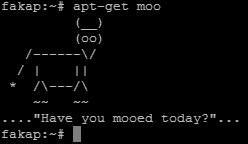
But do you know that you can trigger it to show a hidden easter egg?

try typing “apt-get moo” and see it for yourself :)

apt-get moo super cow powers

[tags]apt-get,debian,deb,ubuntu,knoppix[/tags]

LiVES – Linux Video Editing made easy

LiVES stands for Linux Video Editing System is (obviously!) an application that lets you do video editing under Linux.

Lives linux video editing

Among features supported by LiVES are :

  • Streaming input and output
  • Support editing multiple video format through mplayer decoder
  • Supports more than 50 output video formats
  • Real-time clip blending
  • Support loading tracks directly off CD to use with video (using cdda2wav)
  • Fade in/fade out feature for clips
  • Audio resampling
  • Supports multitrack
  • Full crash recovery
  • etc…

Please refer to LiVES project website for more information.

[tags]lives,linux,video editing,video,editing,multimedia, video editor,sound editor,audacity[/tags]

Collections of ffmpeg tips and usage

A quick post about ffmpeg, you can get the mini-ebook from HardyWeb, it has all the necessary ffmpeg usage examples to convert various video formats.

The ebook is written in Malay, but i trust most of you will have no problem understanding the examples outlined in the ebook.

The ebook has been written by adi, an experienced ffmpeg user. If you can understand malay, then visit his site, he has a lot of ffmpeg tips listed on his blog.

Ubuntu users might have to refer to this article, Enable mp3 and amr support in ffmpeg ( Ubuntu ) before you start using this tutorial.

That’s all for today!

About ffmpeg
ffmpeg is a general purpose audio and video stream convertor which enables you to convert one video file format to another.

[tags]ffmpeg,linux,multimedia,flv,convertor,ubuntu,howto,ebook[/tags]