How to Rip MP3 using Sound Juicer (Ubuntu Tips)

Ubuntu comes with a default CD ripping utility called Sound Juicer that lets you convert Audio CD tracks into digital music format. However Sound Juicer only able to rip Audio CDs into OGG format by default. Most people that familiar with MP3 format might find this as a drawback because MP3 ripping option is not available because of its patented status.

However in the spirit of ‘freedom’ in the free and open source, I’d like to show you how to enable MP3 ripping capability in Sound Juicer

Enable MP3 CD Ripping
This guide assume that you’re using the latest release of Ubuntu (Feisty Fawn).

  • Firstly you need to install and gstreamer0.10-plugins-ugly-multiverse
  • Then start Sound Juicer application, and select Edit->Preference
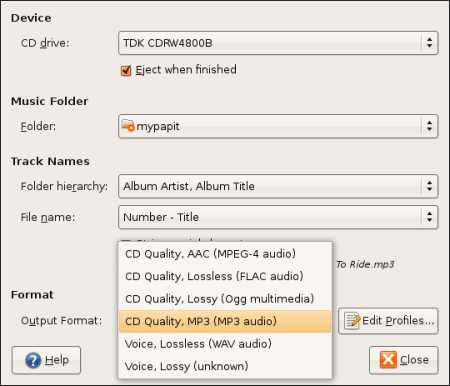
  • You should be able to see that MP3 option has been enabled in Sound Juicer
sj.jpg

The default bitrate setting for MP3 is 160Kbps, you can change MP3 encoding parameters by clicking “Edit Profiles” option in the application, and that’s it! You are ready to rip CDs to MP3 format!

[tags]mp3,ubuntu,feisty,feisty fawn,ripping,gstreamer,debian,encoder,cd ripper[/tags]

Inside My Linux DLink G-604T Broadband Modem/Router

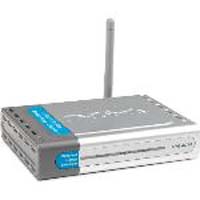
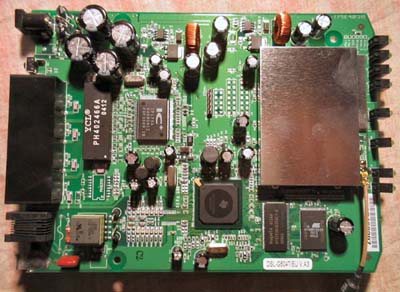
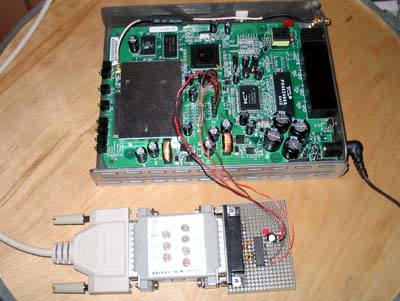
Here’s the interior of my DLink G-604T Broadband Router/Modem, I put here just for viewing after the modem stopped working last month.

dlink1.jpg
dlink31.jpg
dlink2.jpg

FYI, I can still telnet to the modem and play with its settings, the only thing that is not working is the DSL broadband connection to Streamyx. DSL G-604T runs MontaVista-based Linux operating system with kernel 2.4.17 and Busybox utilities. This makes G-604T a great choice for firmware hacking, which makes me want to keep this around for awhile for experimentation purpose.

Now I’m using the stock TM Kasda modem, not that fancy though, but it gets me online. I make a new mental note about broadband modems = they tend to overheat on a poorly ventilated areas.

p/s: I’ll probably will get a new modem next month, since the rest of the family is nagging me for wireless connection :p

[tags]dlink,modem,wireless,wifi,linux,kernel,hacking,broadband[/tags]

How to activate Debian GNU Linux Etch GUI Installer

Some of my friends aren’t aware that the latest Debian relese (Etch – 4.0) includes an optional GUI installer. This option can be activated at the CDROM boot prompt by entering ‘installgui’ option.

debianinstalltn1.png

debian3tn.png

While the GUI installer is not particularly impressive when compared with modern GNU/Linux distributions, it is nice to know that the Debian team has taken such effort to code one. For the time being, the new Debian gui Installer only available on x86 platform as is still marked as an experimental feature.

[tags]debian,opensource,open source, linux, livecd, installer, ubuntu, etch[/tags]

How to install Ubuntu Studio (7.04) Ardour Theme

Ubuntu Studio was finally out and you can see its screenshot from Howtoforge’s : Installing Ubuntu Studio 7.04 – Linux For The Creative. Ubuntu Studio features the new Ardour 2 dark theme which seems slick and stylish when combined with the applications available in the distribution.


However you don’t need to go through the hassle of obtaining Ubuntu Studio just to get its theme as Andi Darmawan has written an easy to follow guide to Install Ubuntu Studio Theme in your standard Feisty Fawn installation.

What is Ubuntu Studio ?
Ubuntu Studio (7.04) is a newly released Multimedia oriented GNU/Linux distribution based on the popular Ubuntu Linux distribution. It is targeted for audio,video and graphic professionals or enthusiasts. The Ubuntu Studio DVD iso (about 870MB) is available for download from the project’s official website which includes Multimedia content creation softwares along with specially compiled low-latency kernel suitable for audio/video editing tasks.

[tags]ubuntu,linux,debian,feisty fawn,gnome, theme,themes[/tags]

Ubuntu Feisty Fawn with Beryl 3D Effect

Here’s a video from Youtube demonstrating Feisty Fawn with Beryl

[coolplayer width=”425″ height=”350″ autoplay=”0″ loop=”0″ charset=”utf-8″ download=”1″ mediatype=””]

Feisty Fawn Beryl
[/coolplayer]

Refer to this guide on Installing Beryl On An Ubuntu Feisty Fawn Desktop with With An ATI Radeon Graphic Card

btw, a friend who was just using Linux at his workplace has asked me how much does it cost to buy the latest Ubuntu (Feisty Fawn). Seems there are people who still thinks Ubuntu costs as much as other proprietary Linux distro like Linspire.

He was even shocked when I told him that he an request as many as 10 Ubuntu (Feisty Fawn) CD for free from Ubuntu – Shipit. I told him to give Ubuntu a try by downloading the ISO, though I haven’t heard anything from him yet for a week..

So, lesson learned : There are GNU/Linux users who don’t know that those eye-popping Beryl effects is available for free.

[tags]ubuntu,linux,feisty fawn,feisty,beryl,compiz[/tags]

Ubuntu on Embedded and Mobile devices ?

Ubuntu project has announced their plan to develop Ubuntu Mobile and Embedded Edition

Acting on the popularity of mobile and embedded device, the new Ubuntu edition is going to be developed specifically for Internet-capable mobile devices powered by the latest Intel low-powered processor. Although details about the functionality is sketcy, I suspect the first Ubuntu Embedded edition will run on Internet tablet device similar to Nokia 770/N800, which uses WiFi as means for internet connection.

ubuntu_logo.gif

Ubuntu Mobile Developer Job Openings ?
In light of this event, Canonical is looking to recruit experienced Mobile Developer to develop mobile-oriented derivative of Ubuntu. Requirements to apply for this job is stated on Ubuntu Jobs website

ps: Although I’m an Ubuntu user and a mobile/embedded device fan, in my opinion it is still early for Ubuntu to produce its own Mobile and Embedded operating system suite for handheld device. Ubuntu should take its time to expand slowly and provide proper support for its current product, such as improving its 64-bit edition support and improving Xubuntu support for old and low-end machines. It is not to say that porting Ubuntu to embedded device is a bad idea, but it is a huge undertaking and the device itself might be too costly for others to own (the resulting operating system is closely tight to the mobile device)

[tags]ubuntu,linux,embedded,debian[/tags]