
It seems that the Tensorflow acceleration is broken with the latest RTX50 series GPU, especially with the most cost effective RTX5060Ti 16GB card.
This is a guide to install Tensorflow with RTX50 (Blackwell) card GPU acceleration with the python wheel.
First you need to download this python wheel. It is compiled for Ubuntu 24.04 or WSL2 with Ubuntu 24.04.
https://github.com/mypapit/tensorflowRTX50/releases
Then you may need to create a python virtual environment for the wheel.
sudo apt install python3-pip
sudo apt install python3-venv

# replace tensorflow220 with your preferred env name
python3 -m venv tensorflow220
Then you need to activate the environment.
source tensorflow220/bin/activateThen you may install the tensorflow wheel. To make it easier, you can also install it alongside other requirements.
pip install tensorflow-2.20.0dev0+selfbuild-cp312-cp312-linux_x86_64.whl seaborn pandas matplotlib opencv-python pillow imutils pydot graphviz librosaThen, you must install CUDA 12.8.1 and CUDNN 9.8.0, please refer to these links:
- https://developer.nvidia.com/cuda-12-8-1-download-archive
- https://developer.nvidia.com/cudnn-9-8-0-download-archive?target_os=Linux&target_arch=x86_64
Follow the instructions on the NVIDIA websites to install both cuda-12.8.1 and CUDNN 9.8.0
Install Nvidia Linux Driver (not required for WSL2)
Then you must install the latest NVIDIA Linux driver.
At the time of the writing, the latest driver is 570.169 (June 17, 2025)
The NVIDIA Linux driver is not required for Ubuntu 24.04 under WSL2. For that, you need to install Microsoft Windows NVIDIA driver available from NVIDIA App.
About the python wheel file:
The python wheel file is compiled in Ubuntu 24.04 with llvm and CUDA Toolkit 12.8.1. It supports compute_86, compute_89 and compute_120 cuda devices, which correspond to NVIDIA GPU card with Turing, Ada and Blackwell architectures (or in layman terms: RTX 30, RTX 40 and RTX 50) series.
The python wheel file also comes with AVX, AVX2 and FMA support for both Intel and AMD cpu acceleration.
The Tensorflow version installed is the Tensorflow 2.20dev edition, nightly from :
https://github.com/tensorflow/tensorflow
Finally you can test the Tensorflow binaries with the following command.
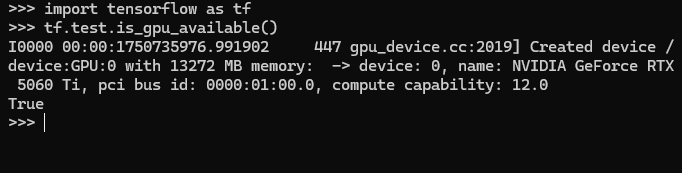
Eres mi salvador, estuve días intentando y tu post me solucionó la vida. Gracias!!!
Mis especificaciones:
NVIDIA-SMI 580.82.10
Driver Version: 581.29
CUDA Version: 13.0
NVIDIA GeForce RTX 5060 Ti
Tensorflow 2.20 seems to have been released this week. Did you need to do anything special to get your 2.20dev build to support RTX50 which is not in the release build?
I tried your solution in a WSL2 conda environment but tensorflow couldn’t find cuda when I installed the required cuda and cudnn versions separately in the same environment.
Then I tried installing them with:
pip install tensorflow-2.20.0dev0+selfbuild-cp312-cp312-linux_x86_64.whl[and-cuda]
– and this installed everything flawlessly; thank you!
Specs:
NVIDIA GeForce RTX 5080
NVIDIA-SMI 575.65
Driver version: 576.97
CUDA version: 12.9
Mohammad Hafiz mypapit Ismail,
Andrea from Italy, thx very much for ur work, you saved me days of work, you simplify my work by a ton. <3
Here are my specs:
NVIDIA GeForce RTX 5060 Ti
CUDA Version: 12.9
NVIDIA-SMI 575.64.01
Driver Version: 576.88
Thank you so much! I spent almost a week struggling with this. Just a heads-up: there’s a new version of the .whl file available.
Here are my specs:
* NVIDIA-SMI 575.64.03
Driver Version: 575.64.03
CUDA Version: 12.9
NVIDIA GeForce RTX 5060 Ti
I didn’t need to install CUDA 12.8.1 or cuDNN 9.8.0.
Glad that my little post can help you. Cheers!