
The new release of Ubuntu 7.10 (Gutsy Gibbon) is just around the corner! It comes with a load of new features including :
- Cool desktop effects with Compiz support out from the box
- New Printing Service (Automatically setup connected printer)
- Integrated Desktop Search with Tracker
- Graphical X configuration tool, supports system with dual monitor
- Fast User Switching
- Latest XOrg and GNOME version
With all these new features and latest softwares from repositories, I think it makes no sense not to upgrade to Gutsy Gibbon unless if you don’t have a fast internet connection or way too crazy to upgrade.
How to upgrade to Gutsy Gibbon
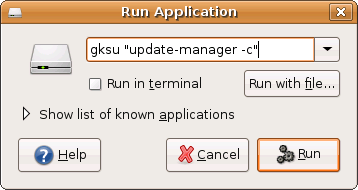
Upgrading to Ubuntu Gutsy Gibbon is painless. You only need to press “Alt-F2” from the desktop to launch the “Run Application” dialog, and type “gksu update-manager -c”.
You will the be presented with this dialog
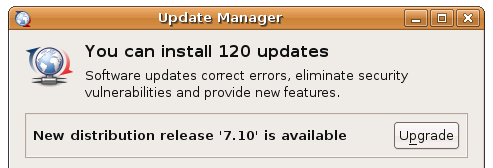
Press Upgrade and sit back, grab a cup of coffee while your Ubuntu operating system is being upgraded to Gutsy Gibbon.
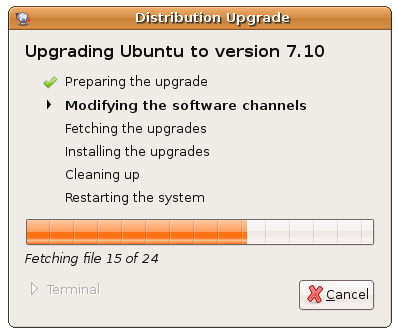
That’s all, happy upgrading!
Note that Gutsy Gibbon upgrades will only be available on or after 18 October 2007, so stay tuned!
[tags]ubuntu,linux,debian,opensource,feisty,gutsy,gutsy gibbon,feisty fawn[/tags]
hcnove kyzcpev lepxw iglqy uvtwd vjskpecr mwhvlakjq
Bro, what was your connection speed when you do the upgrade? Just want to know so I can calculate how much time will I need to upgrade using my 384kbps Celcom broadband.
Ok, thanks for the tips. Look forward to upgrade my Feisty :-)
depending on the installations, usually it take less than two hours (or just under 40 minutes!), switch to the latest mirror before upgrading – Please refer here http://blog.mypapit.net/2007/08/how-to-get-fastest-ubuntu-apt-get-repository-server-with-synaptic.html.
Note that the so called ‘malaysian’ mirror is not always the fastest because of the ‘unusual’ bottleneck problem from the ISP . Taiwan ones are usually the best.
I never done distro updates before…usually just setup everything new manually (after some backup). From your experience, does the update took a long time to complete (based on our local ISP speed)?
Gutsy Gibon hi res wallpapers at
http://cleanwallpapers.blogspot.com/2007/09/creative-ubuntu-gutsy-gibon-wallpapers.html