
In this post I’ll show you how to configure commercially available Skype USB phone to use with your Ekiga softphone.
What do you need
- a USB Skype phone
- Ekiga (with registered account)
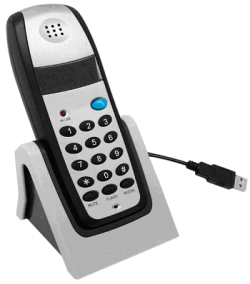
Some Explanation on Skype USB Phone
If you have spend your time doing surveying and window shopping, you may already come across one of these USB products which offers the ‘phone’ feeling to your Skype application.
What some people does not aware of – these ‘Skype’ phone is merely a generic USB audio device built to look like a phone set. These generic chipsets are readily supported under Linux operating system without additional hardware drivers.
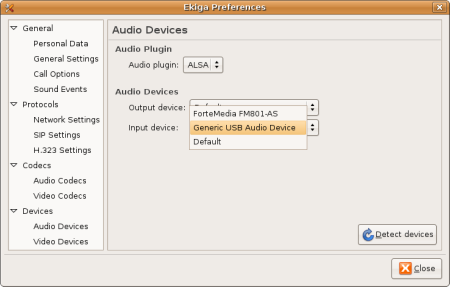
Instructions to use Skype USB phone in Ekiga
- Plug in the Skype USB phone and start Ekiga Softphone application.
- Go to Edit, Preferences.
- Under Devices -> Audio Devices, select the appropriate audio device for your USB phone. In my case, It was “Generic USB Audio Device”. Close the Preference Dialog
- Your should be able to use the Skype USB phone when calling using Ekiga!
p/s: Note that the keypad does not work with Ekiga in this case although through my inspection, 3 out of 3 USB phone keypad that I experimented on uses Microsoft Xbox xpad.c driver which can be use to interact with desktop application like Ekiga (it’s possible)
[tags]feisty fawn,ubuntu, ekiga, usb, skype, voip, gnome,open source, opensource[/tags]
I tried with with usb phone model HP-800. It works as you have explained, and the keypad does not work.