
How to Rip MP3 using Sound Juicer (Ubuntu Tips)

advertisement logo


Ubuntu comes with a default CD ripping utility called Sound Juicer that lets you convert Audio CD tracks into digital music format. However Sound Juicer only able to rip Audio CDs into OGG format by default. Most people that familiar with MP3 format might find this as a drawback because MP3 ripping option is not available because of its patented status.

However in the spirit of 'freedom' in the free and open source, I'd like to show you how to enable MP3 ripping capability in Sound Juicer

Enable MP3 CD Ripping
This guide assume that you're using the latest release of Ubuntu (Feisty Fawn).

  • Firstly you need to install and gstreamer0.10-plugins-ugly-multiverse
  • Then start Sound Juicer application, and select Edit->Preference
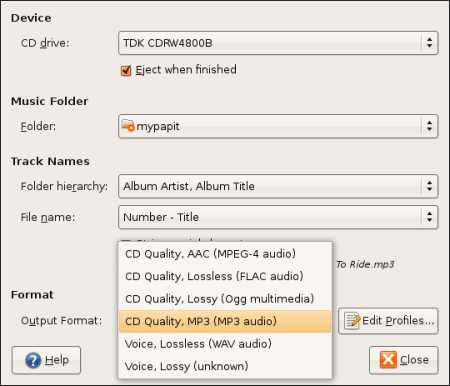
  • You should be able to see that MP3 option has been enabled in Sound Juicer
sj.jpg

The default bitrate setting for MP3 is 160Kbps, you can change MP3 encoding parameters by clicking "Edit Profiles" option in the application, and that's it! You are ready to rip CDs to MP3 format!

Tags: , , , , , , , ,

Bookmark this article
  • digg
  • YahooMyWeb
  • NewsVine
  • Netvouz
  • Reddit
  • Spurl
  • Furl
  • del.icio.us
  • StumbleUpon
  • Technorati
  • TwitThis

Keep updated with this website! : Subscribe to your email

Recommended Reading

11 smashing comments for this post.

  1. wahlau's online hut | collection of wahlau's what-so-ever online... Said:

    Mohd Irwan Jamaluddin: Debian-Administration.org Is Now IPv6-Enabled Mohammad Hafiz bin Ismail: How to Rip MP3 using Sound Juicer (Ubuntu Tips) Kenneth Wong: Spammers And Gated Communities On The Web Kenneth Wong: The Three Aspects of Management Wei Chong: My Debian Horror Story!

  2. The Malaysian Blogosphere » Blog Archive » MyPapit: How to Rip MP3 using Sound Juicer (Ubuntu Tips) Said:

    [...] Original post by mypapit and software by Elliott Back Bookmark to: [...]

  3. + escapedTitle + " Said:

    [...] common._load(); dh.control._load(); var escapedTitle = ‘Mohammad Hafiz bin Ismail: How to Rip MP3 using Sound Juicer (Ubuntu Tips)’; var escapedUrl = ‘http://blog.mypapit.net/2007/05/how-to-rip-mp3-cd-using-sound-juicer-ubuntu-tips.html’; function dhWriteFramesPage() { document.open(); document.write( “n” + “n” + ” ” + escapedTitle + “n” + ” n” + ” if (parent != self) {n” + ” // only look at the base parts of the urln” + ” var pLoc = parent.location.host + parent.location.pathname;n” + ” var sLoc = self.location.host + self.location.pathname;n” + ” if (pLoc == sLoc)n” + ” parent.location.href = self.location.href;n” + ” }n” + ” n” + “n” + “n” + ” n” + ” n” + “n” + “n” + ” Your browser does not support frames. Click here for page.n” + “n” + “n” ); document.close(); } function dhInit() { dh.control.createControl(); if (dh.control.control.haveBrowserBar()) { dh.control.control.openBrowserBar(); window.open(’http://blog.mypapit.net/2007/05/how-to-rip-mp3-cd-using-sound-juicer-ubuntu-tips.html’, “_self”, “”, true); return; } var embedObject = document.getElementById(”dhEmbedObject”); if (embedObject && embedObject.readyState && embedObject.readyState == 4) { embedObject.OpenBrowserBar(); window.open(’http://blog.mypapit.net/2007/05/how-to-rip-mp3-cd-using-sound-juicer-ubuntu-tips.html’, “_self”, “”, true); return; } dhWriteFramesPage(); } Mohammad Hafiz bin Ismail: How to Rip MP3 using Sound Juicer (Ubuntu Tips) [...]

  4. Ripping to MP3? - Ubuntu Forums Said:

    [...] Re: Ripping to MP3? Sound Juicer ! https://help.ubuntu.com/7.04/musicvi…diocds-ripping http://blog.mypapit.net/2007/05/how-…untu-tips.html __________________ [...]

  5. How to Rip MP3 using Sound Juicer (Ubuntu Tips) by Mp3 linux Said:

    [...] How to Rip MP3 using Sound Juicer (Ubuntu Tips) by Mp3 linux @ Tue, 29 May 2007 10:30:46 +0400 The default bitrate setting for MP3 is 160Kbps, you can change MP3 encoding parameters by clicking “Edit Profiles” option in the application, and that’s it! You are ready to rip CDs to MP3 format! Tags: mp3, ubuntu, feisty, feisty fawn, … Original post: How to Rip MP3 using Sound Juicer (Ubuntu Tips) by at Google Blog Search: mp3 linux [...]

  6. JohnC Said:

    read the how tos install apt-get gstreamer0.10 reports all done

    no probs there it has mp3 in list
    but still rip song 1 start song2
    error unable to start ripping pipeline

    using ubuntu 7.04 and all is up to date
    plays the cd OK but cant ripit

  7. mypapit Said:

    did you install gstreamer0.10-plugins-ugly-multiverse?

  8. Benno Said:

    Great, thx, got it working in a couple of minutes.

  9. GB Said:

    Thanks for the post. Been struggling all night to get a cd to rip in mp3 format. Once I’d installed gstreamer it worked a charm

    Many thanks again

    GB

  10. Dmitry Said:

    Thanks for your post. Now Juicer works well for me :)

  11. We Be Sharing Thoughts » Ubuntu CD Rip to MP3 Said:

    [...] How to Rip MP3 using Sound Juicer (Ubuntu Tips) : mypapit gnu/linux blog  This is the one place that worked for me. It was easy: when it tells you to install “gstreamer0.10-plugins-ugly-multiverse” just open the “Synaptic Package Manager” and do a search for that phrase. When it comes up, select it to install, and apply! Then re-open the Sound Juicer and under preferences you will find the option of ripping to MP3 available. Easy! [...]

Leave a Comment

Subscribe by email

Enter your Email