
Install Mozilla Flash Plugin in Ubuntu
|
|
I get questions about installing Flash plugin for Ubuntu some of the time, and here's a quick howto activate the plugin in any Linux distro. Assuming you use Ubuntu :
First, download the flash plugin from Adobe website, click the Download Now button
From Desktop, goto Applications->Accesories->Terminal, type
tar zxvf ~/Desktop/install_flash_player_7_linux.tar.gz
You'll see a list of files extracted. Then type,
install_flash_player_7_linux/flashplayer-installer
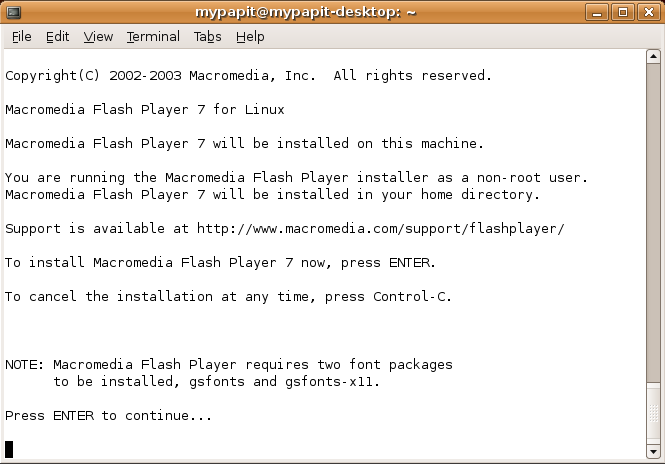
Answer a few questions, then the screen will tell you that the Installation was successful.
Close your browser, and start it again. You should have your Flash plugin support in Mozilla Firefox browser right now.
Tags: flash, firefox, mozilla, firefox plugins, macromedia, adobe, ubuntu, linux
Keep updated with this website! : Subscribe to your email
WP Cumulus Flash tag cloud by Roy Tanck requires Flash Player 9 or better.


August 23rd, 2006 at 10:52 am
[...] planetmyoss Meling Mudin: i pay to be called the boss 2006-08-22 Mohammad Hafiz bin Ismail: GetGnuLinux.org - Informational website about Linux 2006-08-22 Khairil Yusof: FOSS Licensing Primer out 2006-08-22 Mohammad Hafiz bin Ismail: Install Mozilla Flash Plugin in Ubuntu 2006-08-22 Mohammad Hafiz bin Ismail: owasp php filters - help sanitize php variables 2006-08-21 More… [...]
September 16th, 2006 at 5:28 am
[...] Ta en titt p? disse: http://smorgasbord.net/how_to_fix_flash_plugin_ubuntu_linux http://xubuntulinux.blogspot.com/2006/07/ubuntu-flash-player-plugin-install.html http://blog.mypapit.net/2006/08/install-mozilla-flash-plugin-in-ubuntu.html [...]
September 21st, 2006 at 6:44 am
[...] Re: Error with recent Flash 7 upgrade Jack_Sparrow in the chat pointed me to this which works http://blog.mypapit.net/2006/08/inst…in-ubuntu.html just make sure you Code: [...]