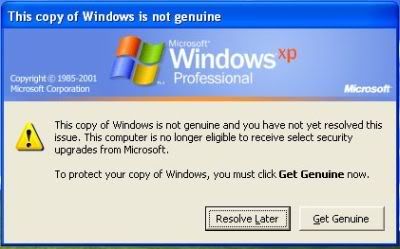
Solution to libctiny and wcrt – LNK2001 unresolved external symbol __chkstk

I’m not sure if any of you ever use libctiny or wcrt, they are both meant to be use with Microsoft Visual Studio so that your resulting binary won’t use the default Microsoft run-time library which slightly bloats the exe.

By using one of these libraries, you can greatly reduce your resulting binary from an average of 20KB to 7KB, depending on your application.

The chkstk problem

The problem arises when the application you just compiled fails to link with an error message: “LNK2001 : unresolved external symbol __chkstk” .
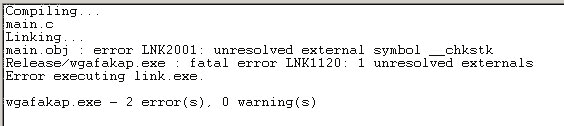

libctiny wcrt chkstk link error

This got to do with the “Ignore all default libraries” option which you’ve to check when using this library. Apparently one library which is required by a routine inserted by the Microsoft tools (chkstk) was excluded from linking as well.

Solution to the problem

Manually include the library! The routine/function is included in an object file named “chkstk.obj”, just put it in the link dialog box beside libctiny/wcrt, and the problem will be settled.
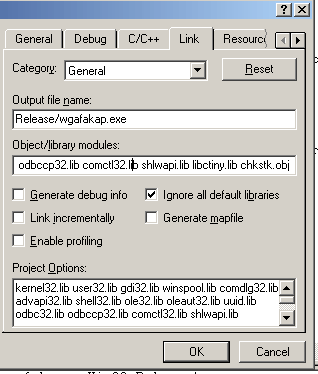
wga fakap #2 chkstk libctiny

I hope that this will solve your problem !
Windows Genuine Advantage tattoo cracks

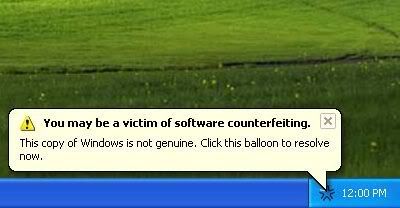
I’m sure by this time almost everybody is now familiar with Windows Genuine Advantage ‘tattoo’ that identifies your illegal copy of Microsoft Windows product. The annoying popup will nag you at login screen each time you boot up the computer.

wtf
wtf mypapit

To add to the shareware ‘look and feel’, a balloon popup will appear randomly when you use the computer, reminding the user that they may be a victim of (pirated) Microsoft Windows product.

However the windows tattoo is not without a flaw, few websites including The Inquirer has published ways to circumvent the Windows Genuine Advantage check by tampering with windows registry.

Presented here is an alternative way to remove those annoying popup

  1. Go to C:\Documents and Settings\All Users\Application Data\Windows Genuine Advantage\data
  2. go to Tools->Folder Option->View, select “Show Hidden Files and Folders”
  3. Uncheck “Hide Protected Operating System Files”, then click OK
  4. Delete everything in that folder
  5. Mark that folder as “Read-Only”, then you’re done!

The annoying windows popup won’t appear anymore! Simple solution without having to temper with Windows Registry.

Update – You can download WGAfakap

You can download an application that will automatically remove the annoying Windows Genuine Advantage Notification.

Read this for another solution : http://www.cobolhacker.com/

Docvert – Web Service software that converts MS Word files to OpenDocument (odf)

Like the title said, Docvert is a webservice software designed to convert Microsoft Word document files (*.doc) to OASIS OpenDocument format (*.odt). It uses a simple REST-style interface, and it’s released under the LGPL.

OpenDocument requires PHP 5.0 with ZLIB, XSL and GD extension with OpenOffice 2.0 or Abiword with OpenDocument export plugin. You might also need libwmf0.2-7+ and librsvg2-2+, to convert WMF and SVG files.

docvert

Finally, Docvert is easy to integrate into other project as it use a simple REST-style interface. This means that you can host Docvert webservice software and provide a service to convert Microsoft Word documents file to OpenDocument whether for free or otherwise.

Linux App Finder – Helps you find GNU/Linux apps for you

Have you been in this situation where you need to do something under GNU/Linux like ripping audio cd but don’t know the name of applications to use?

Then Linux App Finder might have the answer for you! The website lists Linux applications sorted in category according to its functionality. The list is frequently updated with new applications and new version information.

The Motivation

The author of the website started this project because he had problem of finding good programs to accomplish some of the same tasks he was already doing before he switched from Windows to Linux. So, he created Linux App Finder to help others to find suitable Linux applications to accomplish day-to-day task.

Helping the website

Linux App Finder is a nice project that can help people to find free and open source applications to accomplish tasks in free operating system. If you know of a good program that is not in Linux App Finder database, then you can send them the name and website of the program to be included in the website.

That’s all for now folks…

Visit : Linux App Finder

Linux App Finder

Burn DVD video using any video files (avi, mpg, etc) under Linux

Last week, I was thinking of burning my collections of avi (xvid encoded) files into DVD, but the problem is I don’t know how to do it under GNU/Linux and what kind of tools that I need (if any exists).

Fortunately, I found a nice well written article about converting video files to DVD format using open source tool at Linux.com. The task is accomplished by using Mplayer, mencoder and dvdauthor, which is common in various GNU/Linux distributions.

Enjoy the article ! – Convert any video file to DVD
with open source tools

How to Start a Business / Panduan Memulakan Perniagaan

Ever wonder how to register a small business in Malaysia? This e-book might give you some idea on that, including how to fill in the required form (Borang P.N.A 1, etc) and the fees, what you supposed to do after you formed a company. The only catch is, it is written in Malay.

Download : Panduan Memulakan Perniagaan

p/s: I found the guide in some free hosting website a while ago (i think it’s angelfire) and it seems to be abandoned, so I recompile it in PDF format in hopes it will be useful to others. Note that I’m not the writer of the book :p