Track Satellites in Real-Time on the Sky with GPredict

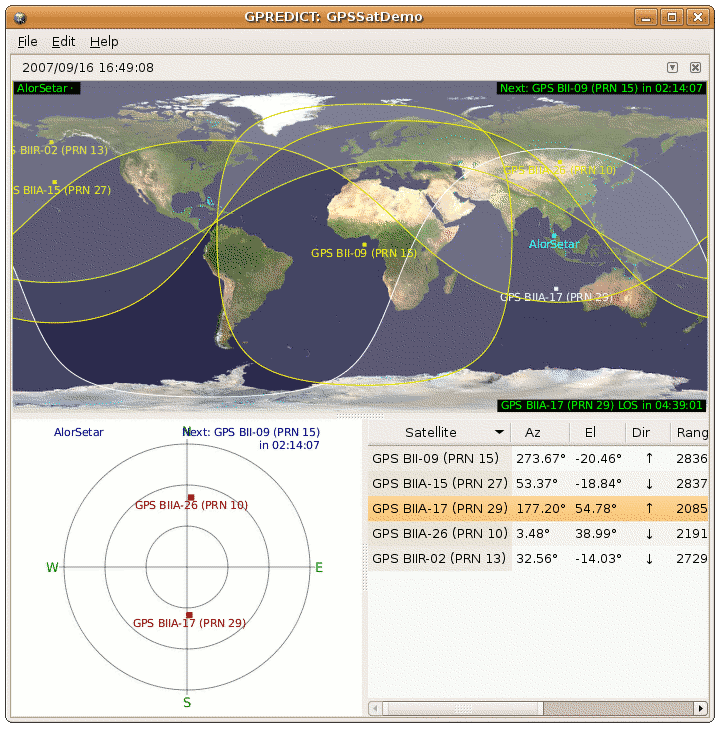
I found another great free and open source software (FOSS) which lets me track satellites location orbiting around earth. The software is named GPredict for its capability to predict satellites orbit and footprint on the sky.

My first impression of this software itself makes me go wow, as the software is able to track known satellites path around the earth which includes GPS satellites, Weather Satellites, Iridium satellites, geostationary,military and satellites used for scientific purpose.

GPredict-ing GPS Satellites
To test the accuracy of GPredict, I whipped out a GPS-capable device which runs Garmin Que navigation software. The Garmin device has an informative screen which represent GPS satellites visible on the sky according to their PRN id.

Then I created a module on GPredict which tracks those satellites. The GPredict results seems to tally with the Garmin Que results! Moreover GPredict is able to tell GPS satellites that Garmin Que has missed on its initial sweeps, which then appears on the Que screen shortly after.

Predicting Satellite Pass
GPredict also able to tell when certain satellites will pass over a designated area, it also able to estimate the satellite visibility duration — a valueable information if you’re into satellite hunting or are using satellites to communicate.

GPredict Screenshot

predictamateurmy.png

GPredict Downloads
GPredict is licensed under the GNU General Public License and can be downloaded from its official website : Groundstation GPredict.

A Microsoft Windows port is available from GPredict Sourceforge project page.

GPredict is also available in the Debian and Ubuntu Gutsy Gibbon / Feisty Fawn apt-get repository.

ps: You can also view the location of MEASAT-1, MEASAT-2 astro satellites, though it is rather pointless to track since both satellites are positioned in a geostationary orbit.

[tags]gps,satellites,linux,opensource,open source,feisty fawn,gutsy,ubuntu,debian,ham,hamradio,foss,gnu gpl[/tags]

Another Printer Manufacturer with Open Source Driver – Brother Industries

One of my blog readers posted a feedback on my previous post regarding Hewlett Packard open source printer driver.

brother.jpeg

I dug around a little bit and found that Brother Industries, one of consumer printer and fax machine manufacturer seems to support Linux drivers by releasing GNU GPL drivers of its product.

Though I haven’t use any of Brother’s product, I heard many great reviews regarding its lasetjet printer (one of the review is from LiewCF about Brother HL-2070N which are sold in Malaysia).

This is a good news for an average computer user like me as it broadens my choice. I might consider getting Brothers laserjet too should I expand my businesses later (since HP Laser Printer cost a bomb to maintain).

Hardware vendors and manufacturers that releases free and open source drivers are not just doing the community a favor, they can have an advantage of attracting consumers to use their products regardless of their operating system choice.

[tags]printer,printers,opensource,gnu,gnu gpl,open source,laserjet,hp,officejet,linux[/tags]

Software Freedom Day 2007 – KL Central Malaysia

Today is the third Saturday of September, and it is Software Freedom Day! SFD for short, is a day dedicated to educate public about software freedom and the benefits of Free and Open Source Software (FOSS).

sfd.png

The objectives of Software Freedom Day are :

  • to celebrate software freedom and the people behind it
  • to foster a general understanding of software freedom, and encourage adoption of free software and open standards
  • to promote constructive dialogue on responsibilities and rights in the information society
  • to create more equal access to opportunities through the use of participatory technologies
  • to be pragmatic, transparent, and responsible as an organisation
  • to be inclusive of organizations and individuals that share our Vision

Let’s celebrate Software Freedom Day in Malaysia
The SFD is going to be celebrated in two locations in Malaysia; Kuala Lumpur Where it will be held in KL Central.

There will be a lot of activities tomorrow, including Free and Open Source Software (FOSS) demonstration, CD giveaways and FOSS advocacy. You can also have your USB drive loaded with Open Source software for free at the SFD local booth.

Come and celebrate Software Freedom Day with our local Malaysian Team there!

[tags]open source,sfd,software freedom day,opensource,foss,linux,ubuntu[/tags]

How to open Microsoft OpenXML docx documents in OpenOffice

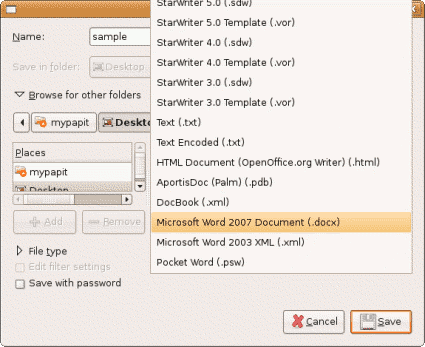
As of this time of this writing, the OpenOffice.org package included with Ubuntu Festy Fawn, Ubuntu Gutsy Gibbon and Debian Etch still does not support opening Microsoft Office OpenXML (docx) document format.

Though the use of docx files are HIGHLY DISCOURAGED, it is still important for us to be able to read document in this format in-case if somebody forwarded docx files to us.

Here are some easy steps to follow in order to enable OpenOffice.org to read OpenXML docx files :

  • Download odf_filter.tar.bz2 file, and unzip it
  • The archive contains 4 additional files, MOOXFilter_cpp.xcu, MOOXTypeDetection.xcu, OdfConverter and README.txt
  • Follow instructions in README.txt and copy the 3 files into Openoffice installation directory as outlined below


sudo cp OdfConverter /usr/lib/openoffice/program/

sudo cp MOOXFilter_cpp.xcu

  • usr/lib/openoffice/share/registry/modules/org/openoffice/TypeDetection/Filter/

    sudo cp MOOXTypeDetection.xcu /usr/lib/openoffice/share/registry/modules/org/openoffice/TypeDetection/Types/

  • openoffice_docx.png

    After that, your Openoffice.org installation should be able to read/open Microsoft Office 2007 OpenXML docx file without any problems.

    Drawbacks
    This trick only works on Document (docx) files but not on Presentation (pptx) and Spreadsheet files (xslx).

    Original source – OpenOffice. OpenXML Translator

    [tags]docx,openxml,openoffice,feisty,feisty fawn,gutsy,gutsy gibbon,openoffice.org,microsoft,office,microsoft office[/tags]

    Deluge Torrent – Another cool Linux GUI Torrent Client (supports protocol encryption)

    Deluge Torrent is yet another opensource GUI torrent client available for the Linux platform. What sets it apart from others is —- it is one of few GUI clients which supports the BitTorrent protocol encryption to avoid the traffic shaping effect policy set by the ISP.

    Written in python, Deluge-Torrent supports loads of feature comparable to Azureus, another popular bittorrent client use in Linux operating system.

    Among the features supported by Deluge-Torrent are :

    • DHT support
    • uTorrent Peer Exchange
    • Protocol Encryption
    • UPnP and NAT-PMP
    • Proxy support
    • Support for Private Torrents
    • Torrent creator
    • RSS Broadcatcher
    • Ability to minimize to system tray
    • Network Activity Graph

    The ability to access uTorrent Peer Exchange is a nice feature because Deluge can interact with thousands of utorrent users across the worlds and exchanging peer information effectively with them.

    Screenshot

    deluge1tn.png

    deluge2.png

    Resource-wise, Deluge-Torrent is more friendly in processor and memory consumptions compared to Azureus. Its clean and simple user interface makes it the easiest GUI Bittorrent client to use in Linux platform that supports protocol encryption.

    Deluge-Torrent can be downloaded from its official website – http://deluge-torrent.org/, Ubuntu users can obtain Deluge-Torrent from the unofficial Ubuntu One-Click Installation portal – GetDeb.net.

    [tags]utorrent,bittorrent,torrent,deluge,azureus,opensource,linux,ubuntu.debian[/tags]

    Ubuntu Gutsy Gibbon going to include GUI Xorg.conf configurator

    Great news for Ubuntu Linux users, now you don’t have to manually edit Xorg.conf file to change the graphic card and display driver perimeter.

    Ubuntu 7.10 (Gutsy Gibbon) is going to include a GUI configurator which aims to make it simpler for users to configure X Windows. The new configuration panel also has a ‘fallback’ feature which guards against X Windows failure to start after tweaking its config.

    Here are screenshots of Xorg.conf configurator running on Ubuntu Gutsy

    Xorg Ubuntu mypapit

    Xorg Ubuntu mypapit #2

    [tags]ubuntu,gutsy,gutsy gibbon,xorg,xwindows,opensource,linux,x11[/tags]