WordPress 2.0.9 (bugfix) release

WordPress 2.0.9 has been release for the 2.0 branch.

Among the bugfixes introduced in this release are :

  • Fixed RSS bug when %category% used in permalinks
  • Eliminate PHP 5.2 error in cache.php
  • fixed random bug in Comment code
  • Eliminate Vulnerability in nonce AYS

Should I upgrade to WordPress 2.0.9?

You should upgrade If you are using WordPress 2.0.7 and below. There are reasons why people wouldn’t upgrade to the latest stable branch WordPress 2.1. One thing is the plugins compatibility and the other thing is the technical restriction such as the the use of older mysql databases (3.23).

Users of WordPress 2.1 need not to worry about this as you use a different branch of stable release.

[tags]wordpress,blogging,opensource,open source[/tags]

Build your reader list with Zookoda

zookuda.gif

I’ve an opportunity to try Zookoda today, a service which lets you build your subscribers lists with minimal effort.

Built with bloggers in mind, Zookoda combines the power of blog marketing with email marketing by providing tools for bloggers to build and manage their own newsletters through their blog.

The Zookoda newsletter is a very convenient feature as most of us (bloggers) do not have enough time to maintain newsletters and blogging at the same time.

This is because besides of functioning as a normal Newsletter, Zookoda lets you send your post daily, weekly and monthly in a fashionable way.

A great tool for marketing blog, this feature will help you manage your blog subscribers and newsletters at the same time, thus saving your precious time of having different lists for your subscribers.

My Experience
I’ve tried Zookoda first hand for my blog email subscription, so far what I can tell is it surpasses all my expectations from a free service like this, because normally I would have to spend at least USD19.95/mo to get a service comparable to Zookoda and those paid service has no little to no integration with marketing blog that I own.

Now with Zookoda, I can easily coordinate my list building effort on my blog as well as my opt-in pages as opposed to have to have a separate subscribe button for each subscription.

In my calculation, this alone will triple my subscribers and will increase the chances of potential customers among my blog readers to each of my product offerings.

Anti-Spam Policy
As a note, Zookoda respects users privacy and strongly opposed spamming pratice, as a result, each of your email list has to be approved before it will go ‘live’ and you are required to affix your business address at the bottom of your newsletters. The subscribers will also receive subscription confirmation to deter the practice of email spamming.

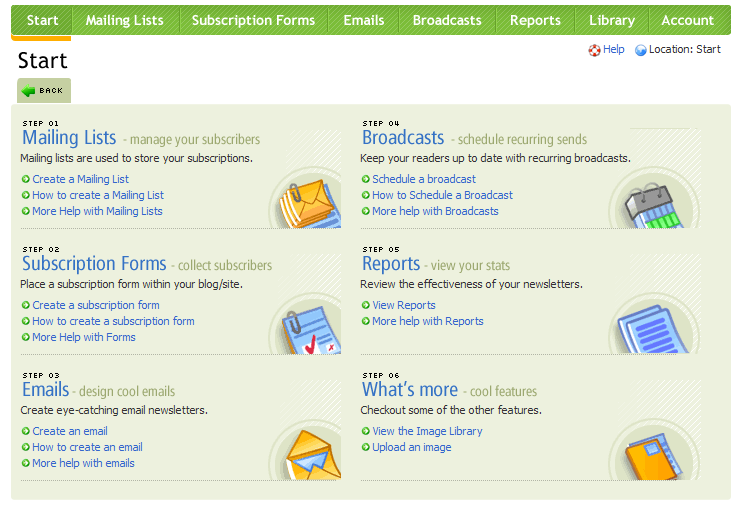
A Peek at Zookoda Control Panel
Finally, I’d like to share with you the Zookoda Control Panel screenshot, I think you can get a lot of great ideas just by looking at them :)

zookoda_tn.png

Try Zookoda, it’s free and convenient !


~paid post

Ubuntu apt-get easter egg trick

We may have been familiar with the usual apt-get operations for installing, updating and removing application packages on your Debian-base Linux operating system (Ubuntu is one of it).

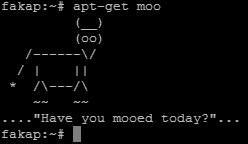
But do you know that you can trigger it to show a hidden easter egg?

try typing “apt-get moo” and see it for yourself :)

apt-get moo super cow powers

[tags]apt-get,debian,deb,ubuntu,knoppix[/tags]

LiVES – Linux Video Editing made easy

LiVES stands for Linux Video Editing System is (obviously!) an application that lets you do video editing under Linux.

Lives linux video editing

Among features supported by LiVES are :

  • Streaming input and output
  • Support editing multiple video format through mplayer decoder
  • Supports more than 50 output video formats
  • Real-time clip blending
  • Support loading tracks directly off CD to use with video (using cdda2wav)
  • Fade in/fade out feature for clips
  • Audio resampling
  • Supports multitrack
  • Full crash recovery
  • etc…

Please refer to LiVES project website for more information.

[tags]lives,linux,video editing,video,editing,multimedia, video editor,sound editor,audacity[/tags]

Collections of ffmpeg tips and usage

A quick post about ffmpeg, you can get the mini-ebook from HardyWeb, it has all the necessary ffmpeg usage examples to convert various video formats.

The ebook is written in Malay, but i trust most of you will have no problem understanding the examples outlined in the ebook.

The ebook has been written by adi, an experienced ffmpeg user. If you can understand malay, then visit his site, he has a lot of ffmpeg tips listed on his blog.

Ubuntu users might have to refer to this article, Enable mp3 and amr support in ffmpeg ( Ubuntu ) before you start using this tutorial.

That’s all for today!

About ffmpeg
ffmpeg is a general purpose audio and video stream convertor which enables you to convert one video file format to another.

[tags]ffmpeg,linux,multimedia,flv,convertor,ubuntu,howto,ebook[/tags]

Liferea – My Favorite Linux Feed Reader in Ubuntu

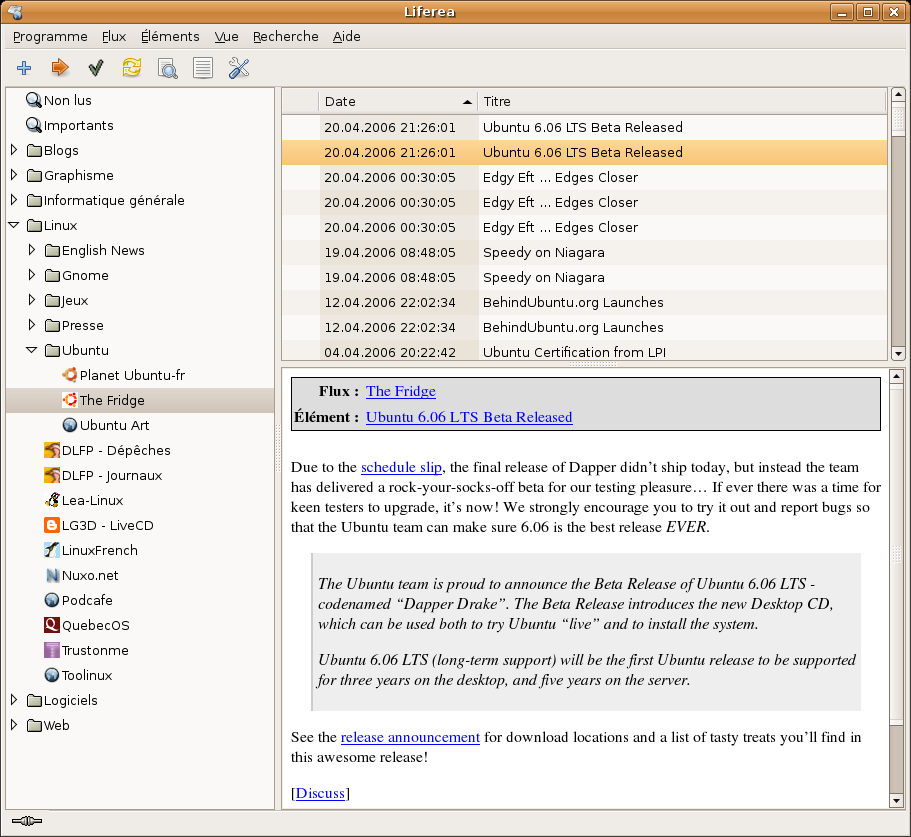
Liferea is currently my favorite feed reader for Linux. It has a simple interface, supports tray docking and is easy to use compared to other alternatives.

Liferea supports subscription from RSS and ATOM feeds for my favorite blogs and news site. It gives me the flexibility by letting I manage my feeds individually, or grouping it using the folder feature.

Podcast and Enclosure Support
Another feature that I appreciate the most is the enclosure support, which is also used primarily in podcasting.
liferea screenshot

Liferea can manage your podcast subscription as easily as dedicated podcast application. All you need to do is to configure Liferea to automatically download enclosures and you can listen to your podcast using your favorite audio player, provided you configured Liferea to launch your favorite audio player in its preference of course.

Screen Scraper: Web to RSS

Finally, Lifearea has one feature that most feed reader lacks…it has website screen scraper feature that lets you subscribe updates from your favorite website that do not provide syndication feeds for some reason. Here’s the list of user-made scraper scripts that you can use together with Liferea to ease up your feed subscriptions.

For Ubuntu users, Liferea is available in your repository, you just need to use Synaptic Package manager to install Liferea to your computer.

Liferea official website can be reached at liferea.sourceforge.net

[tags]linux,liferea,feed reader, rss reader, atom, rss, syndication[/tags]