WordPress 2.0.6 released!

I’d like to announced that WordPress 2.0.6 was finally released. I advised all of you to upgrade to this latest release to fix the HTML injection vulnerability that has been mentioned previously in this blog.

Upgrading WordPress is easy, all you need to do is to deactivate your plugins and overwrite all your previous wordpress files (except themes) with the files from latest WordPress release (currently 2.0.6).

Finally, go to http://your-wordpress/wp-admin/upgrade.php to finish off your upgrade process.

I guess that’s all you need to know about upgrading your wordpress installation :)

[tags]wordpress, upgrade,blog,blogging,blogs[/tags]

Search Ubuntu Edgy Eft package from Mozilla Firefox

Have you noticed that the Mozilla Firefox build of Ubuntu has an extra search plugin that lets you search for Ubuntu Package Repository? I have, and sometimes I miss the functionality much if for some reason I had to use other operating system to do my work.

I need the search plugin because sometime I want to quickly check the Ubuntu software repository for certain packages while surfing the internet.

So to make things easy for me, I extracted the search plugin directly from my Ubuntu Linux installation and made it available for download. Now everybody can use this plugin to search Ubuntu Edgy softwares even if they are not using Ubuntu.

Ubuntu Edgy Package search plugin

[tags]ubuntu,firefox,edgy eft, linux, apt-get, repositories,gnu/linux, open source, mozilla,plugins[/tags]

Ubuntu, Fedora Core, Opensuse, and Mandriva search trends

Yesterday I was curious about Google Trends service that I tried several search terms just to get the feel of it. This is one of the interesting trends that I like to share with you, it is about the search term of popular GNU Linux distribution based on Distrowatch.com list.

Popular Linux distro trends

While this is not an in depth analysis, we can see the relative search term popularity for the past 3 years base on the graph generated from Google Trends.

From there we can see that people started to search for Ubuntu more than Fedora Core around the end of the first quarter of 2005 (around the time of Ubuntu 5.04 Hoary Hedgehog release).

Similarly, people started to search for Mandriva after MandrakeSoft changed it’s name to Mandriva around April 2005 (second quarter), and the announcement of openSUSE project in August 2005 (3rd quarter).

The ‘surges’ on Fedora Core’s line indicates new releases made around the time (FC 2 – May 2005, FC 3 – Nov 2005, FC 4 – Jun 2005, FC 5 – Mar 2006, FC 6 – Oct 2006) [source].

Conclusion : When you see anomalies like sudden ‘surges’ in the trend, then there must be some even closely associated with it. Watch for surges that repeats itself, then you can establish a pattern and understand what causing the recurring trends.

[tags]search terms, search engine, linux, distro, ubuntu, fedora core, trends, search[/tags]

Fedora Legacy Project Going to End

Fedora Legacy Project – A community driven project that supports older releases of Fedora Core announced that it has stopped its support for Fedora Core 4 and earlier distros, much earlier than expected.

Currently, Fedora Core is one of the most popular Linux distro besides Ubuntu and OpenSuSE

The Project’s main objective is to provide critical and security bugs fix for end-of-life Fedora Core releases, effectively extending their support for a much longer time.

The Fedora Legacy Project however faces challenges to keep up with the relatively short support time provided by Fedora Core (around 6 to 9 months compared to 18 months from Ubuntu). What Fedora Core users need is longer support for the current release and the older release immediately after it.

It seems Fedora Core Legacy is unlikely to support older releases than Fedora Core 5 anymore, so it is advisable for users of older Fedora Core to upgrade their operating system to the latest release in order to receive critical patch and bugfix to avoid their system being exploited by malicious programs/crackers.

p/s: It is interesting to note that Ubuntu/Canonical is able provide such a relatively long support for their releases compared to average community supported GNU Linux distro.

It is still to be seen whether Ubuntu Dapper LTS is going to be supported up to 3-5 years after its release, but I’m confident that it will be supported.

[ Source ]
[tags]fedora core, fedora, red hat, linux, open source, distro, centos[/tags]

Update WordPress blog using Drivel in Ubuntu Linux

Today I want to introduce you to a wonderful desktop blog client in GNU Linux, Drivel.

Drivel is one of many desktop blogging clients available under GNU Linux. It started as a LiveJournal desktop blogging client and now has expanded to support other blogging platform as well such as Advogato, Blogger xmlrpc, Movabletype, Drupal,WordPress, and blog that uses ATOM (like the new Blogger).

Using Drivel to update your WordPress blog is easy, all you need to do is to start up your Drivel client, and choose MovableType as your blog platform.

drivel linux mypapit

From there, you put in your WordPress username and password. Put in your WordPress address in your “Server Address” field, and append it with /xmlrpc.php like this “http://your_wordpress.com/xmlrpc.php”.

After that, writing blog entry from Drivel is relatively easy. All you need to do is just type :)

Drivel is an easy blogging client to use and does not require you to know much about HTML to use it, it has a build in function to insert images, link and basic font formatting.

One interesting thing to note is, Drivel (through Movabletype protocol) supports category, this makes it different from other blogging client under Linux which is based on the older Blogger xml-rpc protocol which does not support category. However currently Drivel only support posting to one category per entry.

Why use a Desktop Blogging Client ?
Most people use desktop blogging client because it saves the time to actually log into your blogging client and selecting New Post before they can begin posting new entries.

Desktop blogging client saves you the time on the web interface, and let you concentrates on the writing the entry itself. Updating and Saving post is also faster when you use a desktop blogging client.

As a summary, Drivel is a nice Desktop blogging application to have around, it is small, easy to use and relatively fast. Simply put, Drivel does the job well for a simple blogging client.

[tags]livejournal, blogger, wordpress, drivel, linux, ubuntu, open source[/tags]

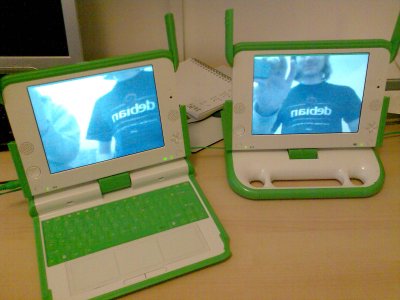
Video Conferencing on OLTP (USD100 laptop)

It seems that somebody has managed to get video conferencing working on the OLPC XO Laptop (the USD100 laptop).

OLPC video Conferencing

This was made possible by Robert McQueen, using telepathy-gabble’s Jingle implementation, telepathy-stream-engine, and Farsight GStreamer RTP library.

The early video conferencing experiment by Robert seems promising when he was able to get bidirectional voice/video call going pretty quickly on OLPC XO laptop.

This is interesting because video conferencing on the laptop may open a wide range of possibilities such as classroom conferencing, video chat and distant learning using the $100 laptop.

Please read the full article at OLPC news for more information about Video Conferencing in OLPC laptop

[tags]olpc,laptop,linux,webcam,video conferencing,open source,xo laptop[/tags]