How to open Microsoft OpenXML docx documents in OpenOffice

As of this time of this writing, the OpenOffice.org package included with Ubuntu Festy Fawn, Ubuntu Gutsy Gibbon and Debian Etch still does not support opening Microsoft Office OpenXML (docx) document format.

Though the use of docx files are HIGHLY DISCOURAGED, it is still important for us to be able to read document in this format in-case if somebody forwarded docx files to us.

Here are some easy steps to follow in order to enable OpenOffice.org to read OpenXML docx files :

  • Download odf_filter.tar.bz2 file, and unzip it
  • The archive contains 4 additional files, MOOXFilter_cpp.xcu, MOOXTypeDetection.xcu, OdfConverter and README.txt
  • Follow instructions in README.txt and copy the 3 files into Openoffice installation directory as outlined below


sudo cp OdfConverter /usr/lib/openoffice/program/

sudo cp MOOXFilter_cpp.xcu

  • usr/lib/openoffice/share/registry/modules/org/openoffice/TypeDetection/Filter/

    sudo cp MOOXTypeDetection.xcu /usr/lib/openoffice/share/registry/modules/org/openoffice/TypeDetection/Types/
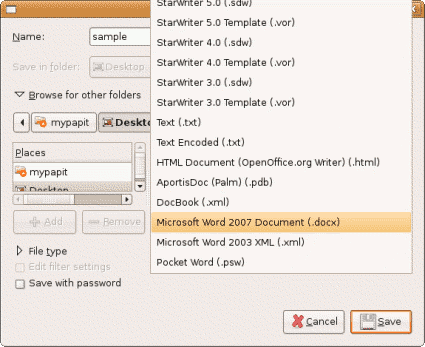
  • openoffice_docx.png

    After that, your Openoffice.org installation should be able to read/open Microsoft Office 2007 OpenXML docx file without any problems.

    Drawbacks
    This trick only works on Document (docx) files but not on Presentation (pptx) and Spreadsheet files (xslx).

    Original source – OpenOffice. OpenXML Translator

    [tags]docx,openxml,openoffice,feisty,feisty fawn,gutsy,gutsy gibbon,openoffice.org,microsoft,office,microsoft office[/tags]
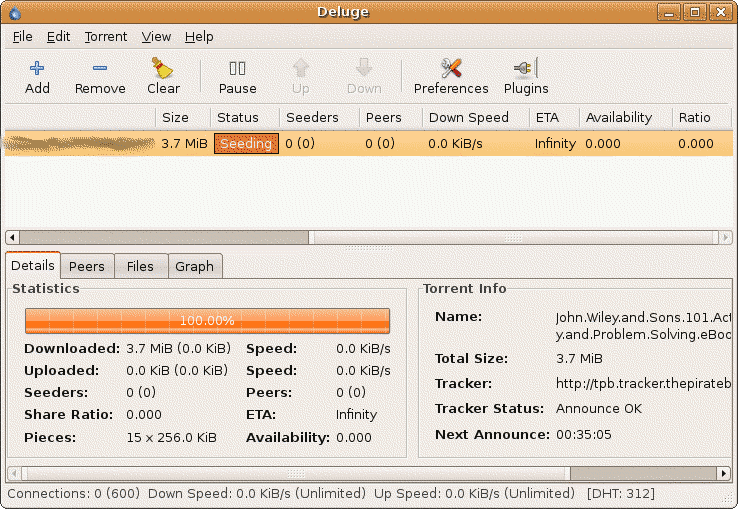
    Deluge Torrent – Another cool Linux GUI Torrent Client (supports protocol encryption)

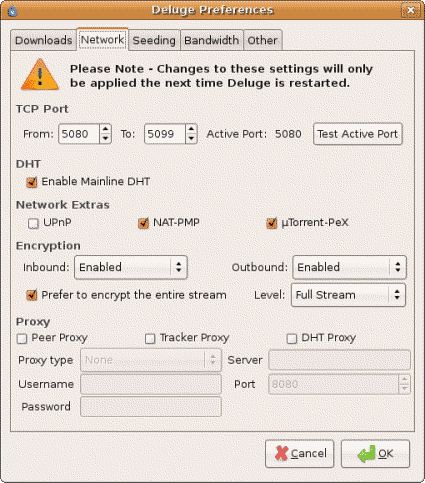
    Deluge Torrent is yet another opensource GUI torrent client available for the Linux platform. What sets it apart from others is —- it is one of few GUI clients which supports the BitTorrent protocol encryption to avoid the traffic shaping effect policy set by the ISP.

    Written in python, Deluge-Torrent supports loads of feature comparable to Azureus, another popular bittorrent client use in Linux operating system.

    Among the features supported by Deluge-Torrent are :

    • DHT support
    • uTorrent Peer Exchange
    • Protocol Encryption
    • UPnP and NAT-PMP
    • Proxy support
    • Support for Private Torrents
    • Torrent creator
    • RSS Broadcatcher
    • Ability to minimize to system tray
    • Network Activity Graph

    The ability to access uTorrent Peer Exchange is a nice feature because Deluge can interact with thousands of utorrent users across the worlds and exchanging peer information effectively with them.

    Screenshot

    deluge1tn.png

    deluge2.png

    Resource-wise, Deluge-Torrent is more friendly in processor and memory consumptions compared to Azureus. Its clean and simple user interface makes it the easiest GUI Bittorrent client to use in Linux platform that supports protocol encryption.

    Deluge-Torrent can be downloaded from its official website – http://deluge-torrent.org/, Ubuntu users can obtain Deluge-Torrent from the unofficial Ubuntu One-Click Installation portal – GetDeb.net.

    [tags]utorrent,bittorrent,torrent,deluge,azureus,opensource,linux,ubuntu.debian[/tags]

    Lanmap – handy tool to map your Local Area Network (LAN) automatically

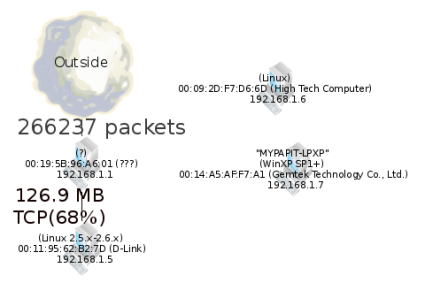
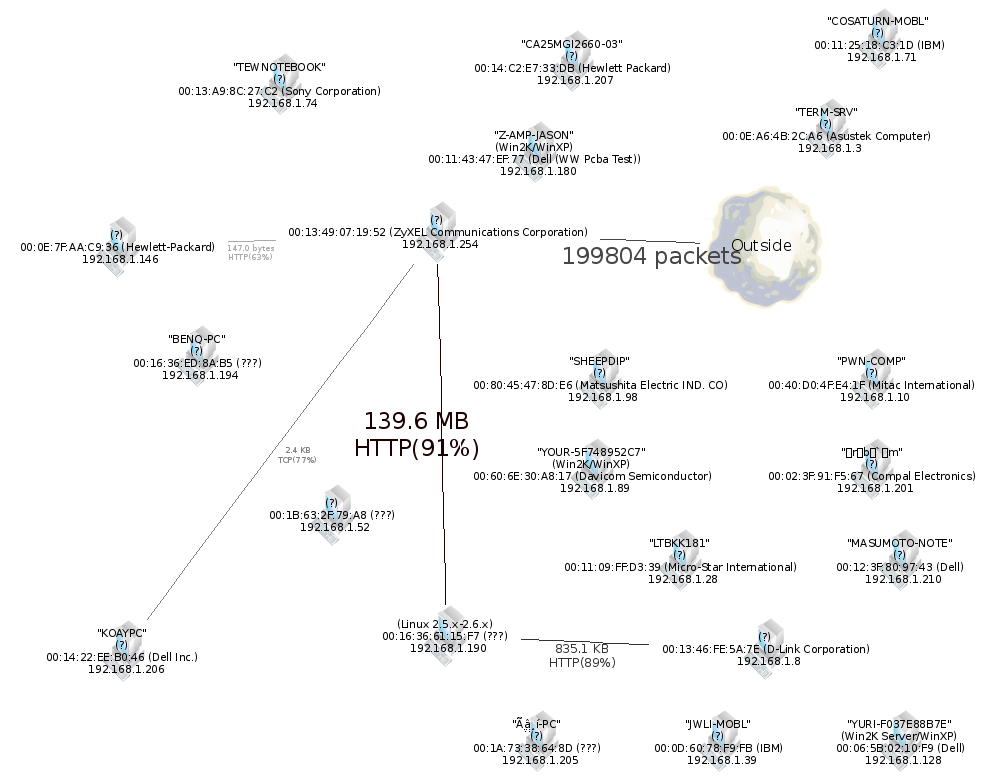
    I discovered lanmap during my stay in a hotel during the Merdeka holidays. This little handy tool can generate local area network map in PNG,SVG and GIF format by listening to network traffic from network interfaces.

    lanmap does this by putting network interface in promiscuous mode and representing the data its sees into a 2-d human-readable network graph. It has the advantage of identifying the network traffic being passed around the network along with the name and the operating system of the host which are represented on the graphical representation as well.

    My House Local Area Network

    lanmap2.png

    Local Area Network from a Hotel that I stayed in

    lanmap2.png

    lanmap works under Linux, BSD, Windows and OS X operating systems. It requires libpcap library for capturing packets and graphviz visualization library to generate 2-d network graphs.

    You can download lanmap from its official website. Lanmap is licensed under the GNU General Public License version 2.0.

    [tags]lanmap,network,nmap,ubuntu,ethernet,internet,ubuntu,linux,feisty[/tags]

    How to write into NTFS partition in Ubuntu

    As disk storage capacity increases over time, more and more Microsoft Windows user prefer to choose NTFS over FAT32 as their primary filesystem as the latter is inefficient in handling large storage capacity.

    Unfortunately by default, Ubuntu only mounts NTFS volume as read-only, preventing users from transferring files between their Linux and Windows partitions.

    How to mount writable NTFS partitions
    However now you can easily mount writable NTFS partitions easily with ntfs-3g filesystem driver. Here’s how to do it under Ubuntu.

    ntfs3gtn.png
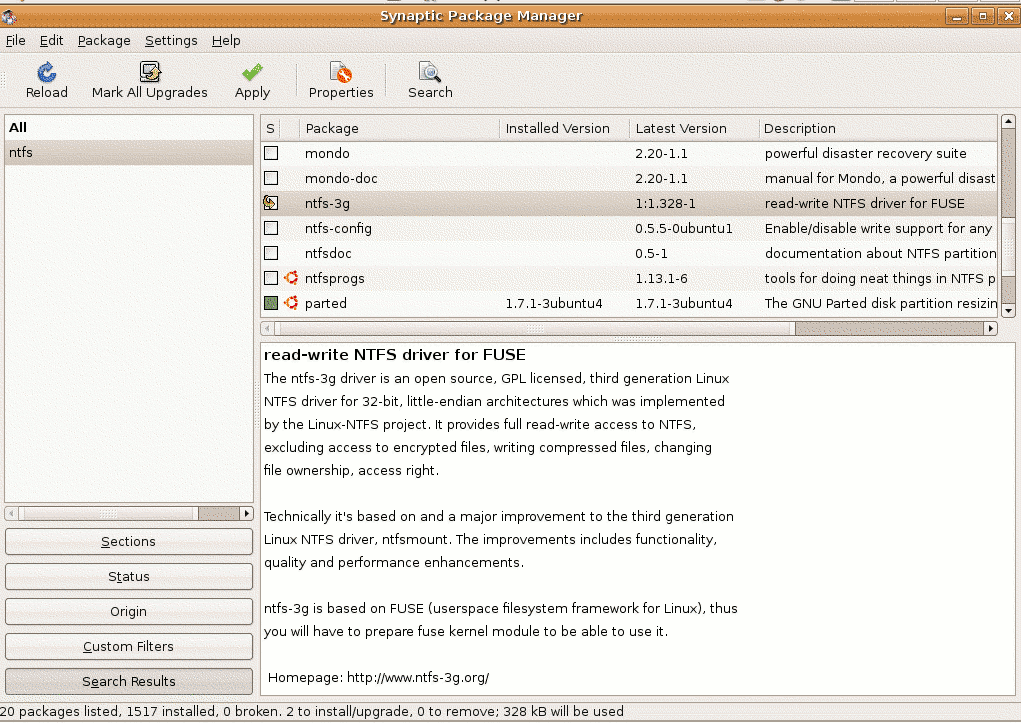
    1. First from the Desktop, go to System->Administration->Synaptic Package Manager. Search for ntfs-3g and install it. Close synaptic once it finished with installation.
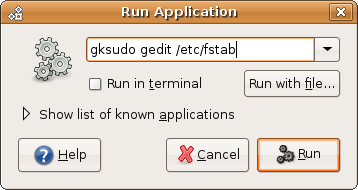
    2. The next step would involve editing /etc/fstab file to use ntfs-3g filesystem driver. From the Desktop, press ALT-F2, type “gksudo gedit /etc/fstab”
      runapp.png

    3. Find lines with ‘ntfs’ and replace it with ‘ntfs-3g’ and save the file
    4. Remount all ntfs partitions to test the modification, the easiest way to do it is to reboot the computer and try copying file into ntfs partition using the default Gnome file browser (Nautilus). You’re done!

    [tags]ntfs,filesystem,windows,opensource, linux, ubuntu, gutsy, feisty,feisty fawn, gutsy gibbon,open source[/tags]

    The Next Ubuntu 8.04 release announced, Hardy Heron

    The next Ubuntu release after the upcoming Gutsy Gibbon was announced in the Ubuntu Fridge yesterday.

    Schedule to be released sometimes next year, Ubuntu 8.04 (Hardy Heron) will be the next release with Long Term Support (LTS) after Dapper Drake. This means Hardy Heron server installations will be supported up to 2013 after it release date on April 2008.

    Please refer to the Ubuntu Wiki page for Ubuntu 8.04 (Hardy Heron) release schedule

    [tags]ubuntu,gutsy gibbon,dapper drake,dapper,linux,debian,open source[/tags]