
I found in my website log, apparently somebody trying to find out how to connect to Streamyx broadband using the latest DLink 2640T. Since I own one, I decided to share my settings to enable you to connect to Streamyx.
- First point your favorite browser to http://192.168.1.1/, enter your username and password (default: admin | admin)
- Web configuration user interface will be displayed, click WAN
- Change the VPI value from ‘8’ to ‘0’
- Enter your Streamyx username and password below
- Finally go to Tools->System. Click “Save and Reboot” there to save your changes.
Screenshot
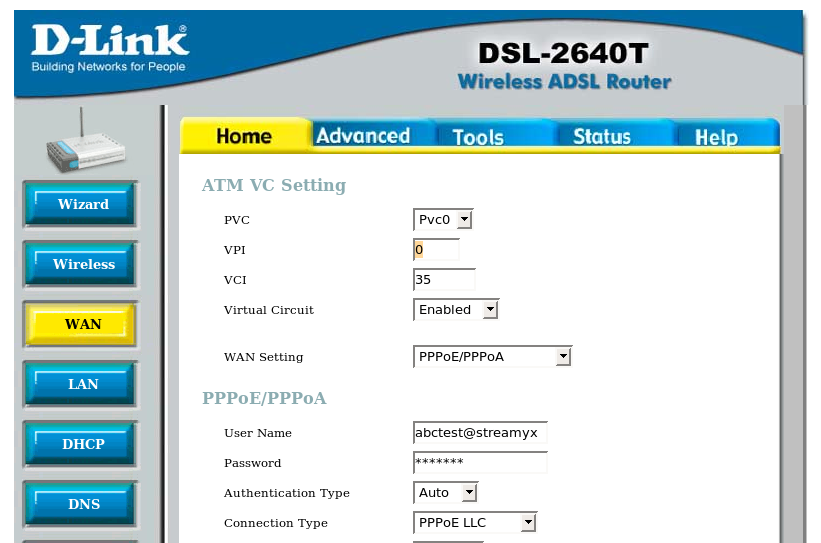
Your Dlink wireless router should be able to connect to Streamyx broadband services now.
[tags]streamyx,dlink,broadband,linux[/tags]
THANK YOU BRO! Saved my life! May you have a good life!
the username and password is tmadmin | tmadmin
Power bro! sukses!
I was having a very hard time logging into streamyx with this router. I instead went with a netgear router and it solved all my issues. Save your time and money.
VERY HELPFULL.. finally im back online after 2 weeks!!!
Yes, key in full email address.
Reply to:
——————————-
Yong Lim Said:
February 12th, 2009 at 11:45 am
Do we need to write full email address at the user name column after changing the VPI to 0.
I know how get in to D-Link 2460-T, http://192.168.1.1/, enter your username and password (default: admin | admin). But now my problem is i cant log in using admin/admin for username and passwords. so anyway to help me unblocked it?
hi there…..how to set up WPA2 encryption on my windows 7…….basically i just want to block others from intercept with my connection(streamyx)….but if they want to use my connection,i want them to have password which will be created by me like the passphares…how??? send me an e-mail….
tima kasih banyak2, berjaya…..:]
cd installation guide dlink 2640t only for xp and below. how about vista? thanks..
I just bought a wireless router and i can detect it when turn on. However, when I click on my Streamyx dialer, the message is “Phone line is busy”. Can anyone help me? I’m using TP-link router which have been configured by Low Yat boys. Thanks
can anyone help me to set password for my dlink 2640t to acess to my wifi??
thanks
hihi…. can anyone help me,,,,
i had install my streamyx modem yesterday…
everything is ok… n now i can log in to my msn msg,,,, but i cant log in to any website …..y?????
Bro~! This post is really2 helpful…dah pening mcm mana nak setting…nseb bek post bro ade~ thanx~ :D
hey guy, i wanted to know, is the website
http://192.168.1.1/
required the username and password of our streamyx log in username and password?
Thnx u helpd me a lot
Great help! many thanks.
I have spent a whole night still can’t figuring out what went wrong…
how do I wire a D link wireless router
Do we need to write full email address at the user name column after changing the VPI to 0.
zfpbn gcjxrb awfmxej sfkgeiuja fkls rdqnlv fxctslkeb
could you help please on the ‘wireless’ configuration of the DSL-2640T?
we have a few laptops in the house and the house and cables are a hassle, but i can’t seem to make it work..
much appreciated :)
Thanks god i find this post. Its very helpful. Just the silly VCI 8 make me can’t connect to the internet.
Thank you so much.. I can online at home tonite.
yup its always on but not for too long.. i guess its less than 10hrs.. however, i try the diagnostic test .. i think its under advanced or tools (on top of the router page).. i tested the connection.. LAN and ROuter connection : PASSED and then it showed FAILED for the last two test.. i think the last test was the connection to primary DNS server.. what do u think? now i should change the DNS IP ?
yes, its always on.. like more than 10hrs per day..if i still can’t connect to internet.. do you think that the only solution is to get a new one? the things is that i just bought it one month ago.. aiyoo how come the modem dies so quick .. what do you think?
lean, do you always switch on your modem on long hours? Like more than 10hours perday? If so, the you should read this Cooling your modem, because from my attention, some modem uses cheap stuff which makes it heats up easily, and that would cause the modem dies.
hello,
thanks for the info, but ive already changed the vpi to 0 but still cannot connect to streamyx.. normally i have no prob with my pw or anything.. when i click at status (top right), for the WAN settings, it shows ‘not connected’ and no IP is assigned for WAN settings.. i dont know why.. ive been using this router for one month and suddenly since last weekend got this prob.. cannot connect to internet
hello,
thanks for the info, but ive already changed the vpi to 0 but still cannot connect to streamyx.. normally i have no prob with my pw or anything.. when i click at status (top right), for the WAN settings, it shows ‘not connected’ and no IP is assigned for WAN settings.. i dont know why.. ive been using this router for one month and suddenly since last weekend got this prob.. cannot connect to internet
tq bro… nasib la aku terbaca camner setup dlink dsl 2640t. dah puas aku try tapi hati makin panas lak. lepas terbaca camner setu dlm blog ni setel masalah aku.thanks.
Thank for the info.
I have 1 issue here, after i connected to streamyx, my telephone cannot call out/receive.
I used the splitter provided as well, same issue.
Does that happen to yours?
Thank you.
@Ju Lian: Ya i agreed i also experience it earlier.but now i just set it up to default factory setting and just let the DCHP to assign my pcs.easy..and let the WEP on.that all.then everything is ok now
If I have bumped into your site earlier it would have saved me an hour of time -_-”
Btw I am experiencing strange when it comes to the wireless configuration, when I tried to setup both Access List for MAC address and the WEP key together, all the stations at my house couldn’t login to the wireless network, does that happen to yours?
Thanks.
ftw..ive been adjusting everything..tat simple ??
so u mean by default evrything factory setting except this vpi thing.damn
Very helpful
Default value VCI utk DLINK 2640T = VCI 8, kalau VCI 8 mmg takleh connect ke streamyx
Kenapa nak kena tukar VCI value drpd ‘8’ kepada ‘0’? Kalau biar ‘0’ tak boleh ke?