How to activate Debian GNU Linux Etch GUI Installer

advertisement logo


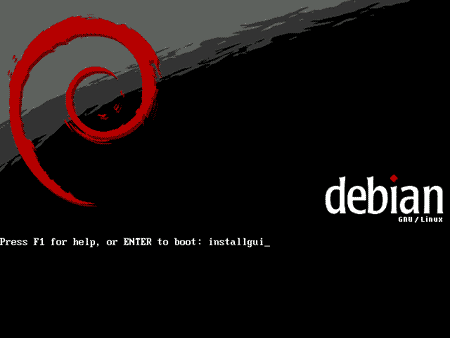
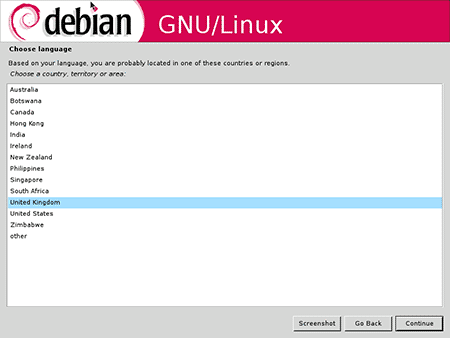
Some of my friends aren't aware that the latest Debian relese (Etch - 4.0) includes an optional GUI installer. This option can be activated at the CDROM boot prompt by entering 'installgui' option.

debianinstalltn1.png

debian3tn.png

While the GUI installer is not particularly impressive when compared with modern GNU/Linux distributions, it is nice to know that the Debian team has taken such effort to code one. For the time being, the new Debian gui Installer only available on x86 platform as is still marked as an experimental feature.

Tags: , , , , , , ,

Bookmark this article These icons link to social bookmarking sites where readers can share and discover new web pages.
  • digg
  • YahooMyWeb
  • NewsVine
  • Netvouz
  • Reddit
  • Spurl
  • Furl
  • del.icio.us
  • StumbleUpon
  • Technorati
  • TwitThis

Keep updated with this website! : Subscribe to your email

Recommended Reading

6 smashing comments for this post.

  1. wahlau's online hut | collection of wahlau's what-so-ever online... Said:

    Mohammad Hafiz bin Ismail: How to activate Debian GNU Linux Etch GUI Installer Aizat Faiz: Is Size Everything? Khairil Yusof: Sick Family Mohd Irwan Jamaluddin: Nice E-Shirt from Enlightenment Project Kevin Francis: Outlook IMAP Threading

  2. Irwan Said:

    Wahhh, hang pun dah jadi Debianista macam aku jugak ke?

  3. Faddy Said:

    Hi there! Thanks for the comment :) Very techy blog you have here… I’ll be sure to read the categories i can relate to!

  4. mypapit Said:

    irwan: haha aku mmg dulu tulis pasal Debian tapi lepas tu aku pakai Ubuntu, duk tulis pasal Ubuntu lak. :D

  5. addrick Said:

    fuyy0!

  6. Goa-india » Items by mypapit Said:

    [...] http://blog.mypapit.net/2007/05/how-to-activate-debian-etch-gui-installer.html [...]

Leave a Comment

Subscribe by email

Enter your Email