
How to Enable 3D Desktop Effects on Ubuntu Feisty Fawn 7.04

advertisement logo


Here's how to to enable the new spiffy Desktop Effects feature on Ubuntu 7.04 (Feisty Fawn).

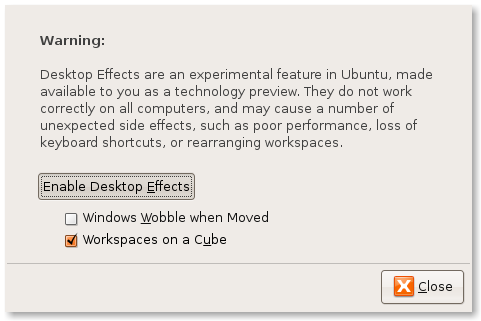
  1. First, from the Desktop, go to System->Preference. Click on Desktop Effect
  2. Select Enable Desktop Effect, Click OK
  3. Watch your Windows Wobbles as it being moved!

Desktop Effects
Desktop Effects

Note 1 : Some people reported this feature causes serious desktop bug when both 'Wobble' and 'Workspace on a cube' feature are enabled at the same time.

Note 2: This is not beryl, please refer to HowtoForge's article :Installing Beryl On An Ubuntu Feisty Fawn Desktop With An ATI Radeon Graphic Card for that.

Tags: , , , , ,

Bookmark this article
  • digg
  • YahooMyWeb
  • NewsVine
  • Netvouz
  • Reddit
  • Spurl
  • Furl
  • del.icio.us
  • StumbleUpon
  • Technorati
  • TwitThis

Keep updated with this website! : Subscribe to your email

Recommended Reading

11 smashing comments for this post.

  1. Xgl - SWiK Said:

    [...] How to Enable 3D Desktop Effects on Ubuntu Feisty Fawn 7.04 : mypapit gnu/linux blog [...]

  2. Feed24: Mohammad Hafiz bin Ismail: How to Enable 3D Desktop Effects on Ubuntu Feisty Fawn 7.04 Said:

    [...] Feed24: Mohammad Hafiz bin Ismail: How to Enable 3D Desktop Effects on Ubuntu Feisty Fawn 7.04 Preference. Click on Desktop Effect Select Enable Desktop Effect, Click OK Watch your Windows Wobbles as it being moved! Note 1 : Some people reported this feature causes serious desktop bug when both ‘Wobble’ and ‘Workspace on a cube’ feature are enabled at the same time. Note 2: This is not beryl, please refer to HowtoForge’s article :Installing Beryl On An Ubuntu Feisty Fawn Desktop With An ATI Radeon Graphic Card fo…”> Mohammad Hafiz bin Ismail: How to Enable 3D Desktop Effects on Ubuntu Feisty Fawn 7.04Here’s how to to enable the new spiffy Desktop Effects feature on Ubuntu 7.04 (Feisty Fawn). First, from the Desktop, go to System->Preference. Click on Desktop Effect Select Enable Desktop Effect, Click OK Watch your Windows Wobbles as it being moved! Note 1 : Some people reported this feature causes serious desktop bug when both ‘Wobble’ and ‘Workspace on a cube’ feature are enabled at the same time. Note 2: This is not beryl, please refer to HowtoForge’s article :Installing Beryl On An Ubuntu Feisty Fawn Desktop With An ATI Radeon Graphic Card fo… Suggested Links: Zero Creative 3d 3D Visualisatie & Presentatie Zero Creative Music – Dance Club Electro POP RSS Search News Nieuws Mohammad Hafiz bin Ismail: How to Enable 3D Desktop Effects on Ubuntu Feisty Fawn 7.04Here’s how to to enable the new spiffy Desktop Effects feature on Ubuntu 7.04 (Feisty Fawn). First, from the Desktop, go to System->Preference. Click on Desktop Effect Select Enable Desktop Effect, Click OK Watch your Windows Wobbles as it being moved! Note 1 : Some people reported this feature causes serious desktop bug when both ‘Wobble’ and ‘Workspace on a cube’ feature are enabled at the same time. Note 2: This is not beryl, please refer to HowtoForge’s article :Installing Beryl On An Ubuntu Feisty Fawn Desktop With An ATI Radeon Graphic Card fo… Suggested Links: Zero Creative 3d 3D Visualisatie & Presentatie Zero Creative Music – Dance Club Electro POP RSS Search News Nieuws [...]
  3. enabling desktop effects ubuntu feisty - Google Search Said:

    [...] [...]

  4. 30 days with Ubuntu 7.04 (feisty fawn) - linux-noob.com/forums Said:

    [...] Day 5.Enabling Desktop EffectsWell I'm back, and it's nice to read the replies to my posts, thanks for the info guys I'll be sure to look into it. Today I plan to enable desktop effects (compiz/xgl) in Ubuntu, to see what they'll look like (note: this is not Beryl). To do this, simply click on System, Preferences, then Desktop Effects, then click on 'Enable Desktop Effects'. This did work on my laptop (which is no surprise as I already had Beryl enabled just fine in Fedora Core release 6.Once enabled all looked good except I momentarily lost the ability to type, but once I came back to here (I was typing here) then I got focus back and all was good.Installing/Enabling BerylMaybe it's just me, but once you've tried Beryl, you'll want to do it again, so after playing around with XGL/compiz above, I decided to see what Beryl looked like in Ubuntu. installing it was easy.CODEsudo aptitude install beryl emerald-themes beryl-managerAnd then click on Applications, System Tools, Beryl Manager. Now you can do much more with your wobbly windows, stretch them, and see thumbnails of the app in the taskbar. Beryl is highly configurable with lots of nice themes (just right click on the beryl icon up in the top taskbar and choose 'Emerald Theme Manager'.Getting Help with UbuntuI clicked on the Blue help icon (third from left at top of the screen, a blue circle with a white question mark) and it opened an Ubuntu Help Center. It is pretty comprehensive too, and I like the idea, as it has help for Users migrating from Windows to Ubuntu, helping them to organise files, photos, settings and more. This is good and something similar should be present in all Linux distros if you ask me. ——————– anywebforums, tips, news, reviews and stuff :-)http://www.linux-noob.comWe are on IRC also ! check us out on the EFNET server, join #linux-noob [...]

  5. Nvidia 7600 and Ubuntu 7.04 - Ubuntu Forums Said:

    [...] Originally Posted by fossiili In my sons and sonsons computer I had Suse 10.2 installed and it worked well. Then the boys wanted to have WindowsXP also for the sake of games and they had spared money for a new hard disk and I installed WindowsXP in their (actually my…) computer. Unfortunately Suse 10.2 disappeared in that process so I installed the brand new Ubuntu 7.04 and in the beginning it seemed to work well. An unpleasent surprice was that it ones frozed completely (Ctrl+Alt+F7 did not help), but that event has not been repeted. My displaycard is PALIT Nvidia GeForce 7600 and in Suse 3D acceleration and the modern desktop effects worked well after installing Nvidia proprietary driver. As a pleasant surprice I found from Ubuntu 7.04 an easy to use tool to get Nvidia’s driver in work. Everything seemed go well and I started Ubuntu again. But now the X-server could not work, no graphical desktop at all After some efforts and other hash the graphical desktop started and I could even get the Beryl-effects to work! But again, when shutting the computer and starting it again X did not start for the sake of some errors The 3D acceleration is a must, becouse without it the childrens can not play the nice Ppracer-game they like verry much. Also my sonson hopes he can present the fine Beryl effects he has in "his Linux" to his frends. Is there anything I could try to get 7.04 to work? Is there any hope that this error would be solved by system uppdates later? ——————— Later: Nothing seems to help. Also http://ubuntuforums.org/showthread.p…=Will+now+halt First you would have to install drivers for Nvidia on your Ubuntu install, have you installed the Nvidia Drivers on Ubuntu. In case you haven’t use "Restricted Drivers Manager", the path to go there is by System->Administration->Restricted Drivers Manager. And once the drivers are installed, goto the "Desktop Effects" via System->Preferences->Desktop Effects. Click on "Windows Wobble when Moved" and also mark "Workspace on a Cube"thing. In case I confused you , you can also have a look here . Hope this helps you. Last edited by vikramsharma : 11 Hours Ago at 02:30 AM. [...]

  6. AdBrite - Advertise on Free Software and Open Source Tips Said:

    [...] http://blog.mypapit.net/…sia-tak-bogel-tapi-lucah.htmlhttp://blog.mypapit.net/…ft-word-55-free-download.htmlhttp://blog.mypapit.net/…roxy-server-ubuntudebian.htmlhttp://blog.mypapit.net/…n-ubuntu-feisty-fawn-704.htmlhttp://blog.mypapit.net/…sound-juicer-ubuntu-tips.htmlhttp://blog.mypapit.net/…-advantage-tattoo-cracks.html [...]

  7. mousapasandi Said:

    Hi
    If You can help me for installing graphic card (ATI) on the ubounto 6 .
    if you can send me mail for this big problem
    thanks alot.

  8. HSchick Said:

    Desktop effects gives the error “the composite extension does not exist”

    Can anybody help with that error message?

    also see https://answers.launchpad.net/ubuntu/+source/yelp/+question/5913

  9. Mavtech Said:

    For the “Composite extension not available” error, this worked for me. Make sure the “Extenstion” section in your xorg.conf looks like this:

    Section “Extensions”
    Option “Composite” “Enable”
    EndSection

  10. srinivas.Kandagatla Said:

    Good Info I applied it on my T60.
    Its Rokng

  11. Waynenoobiewantlinux Said:

    Loaded Envy NG Drivers for my Geforce 8800gt.
    When rebooted screen was fine.
    Then when I enabled 3d drivers and then rebooted screen became pixelated.Multiple screens distorted(recieved the same erro when fedora 8 was loaded but this did it on live cd)
    Any advice would be appreciated

Leave a Comment

Subscribe by email

Enter your Email