Here’s an easy way to generate a new uuid:
# uuidgen

550e8400-e29b-41d4-a716-446655440000
Here’s how to change uuid of a block device / hard drive partitions.
tune2fs -U 550e8400-e29b-41d4-a716-446655440000 /dev/sd**

Free and Open Source blogger with an attitude
Here’s an easy way to generate a new uuid:
# uuidgen
550e8400-e29b-41d4-a716-446655440000
Here’s how to change uuid of a block device / hard drive partitions.
tune2fs -U 550e8400-e29b-41d4-a716-446655440000 /dev/sd**
By this time, I’ve already received dozens of question regarding why I’ve not applied to be an Ubuntu Member.
First and foremost, being an Ubuntu Member is cool. It is about being part of the greater Ubuntu Community officially. Being an Ubuntu members grants certain privileges such as username@ubuntu.com email address and the privilege of having personal blog featured in the Ubuntu Planet.
However, I still have not applied or planned to apply to become an Ubuntu Member anytime soon, as I felt that being an Ubuntu Member carries great weight and responsibility towards the community, something that I felt in my current state would be difficult to do, since I hardly have extra spare time nowadays (so does the hiatus).
Secondly, as the Ubuntu Membership page have cleared out, Membership is not required for contribution, but contribution is required for membership. While I did contribute towards the Ubuntu community, I still thinks that Ubuntu community comes second place than my day-to-day responsibilities. I still felt that I couldn’t do much to deserves being an Ubuntu Member, therefore I elect to be an ordinary user who occasionally contributes back to the Free Software community.
Finally, all of you should note that this is my personal opinion and I still think being an Ubuntu Member is a good thing, I even encourage you to apply for it! However, as for me, I’m still going to hold off my thoughts of becoming one until I can find a valid reason to do so.
Cheers!
Canonical has decided on reduces the official support for non-LTS Ubuntu releases to NINE(9) months starting with the upcoming Ubuntu 13.04 release
As for my personal opinion, this changes is long overdue since 18 month support time for a SIX(6)-month cycle release can be considered as long, thus it is better to invest those precious time and effort into producing newer Ubuntu release.
These changes has been voted with presence of Ubuntu Technical Board and will be effective starting with Ubuntu 13.04 Raring Ringtail onwards.
Here is the video showing Ubuntu 13.04 Raring Ringtail (still in development at this time of writing) running on Nexus 7, a 7.81″ tablet which runs Android Jelly Bean by default.
It is expected that more announcement will be made regarding Ubuntu tablet at the upcoming Ubuntu Developer Summit (UDS) in Denmark, which Mark Shuttleworth himself drop a hint that future Ubuntu development will focused on mobile platform. He even encouraged attendees to bring Nexus 7 to the summit.
My Thoughts
Its refreshing to see Ubuntu can be ported on tablets. It open up several opportunities to integrate Ubuntu operating system with mobile platform and together with the possibility of cloud computing, it will be able to unify the way people use their computers in their daily life. However, a new GUI has to be designed in order to make Ubuntu usable and convenient to be used on tablets.
All in all, it is a bold move from Canonical.
Unity 6.x (included by default in Ubuntu 12.10 Quantal) features performance improvements and new features on the Unity 3D user-interface as several bug fixes which enhances user experience while using Ubuntu desktop. Besides that, the backport also improve the performance of low-end 3d cards when rendering unity animations.
Use these command to install Unity 6.x backports into Ubuntu 12.04 LTS:
[bash]
sudo add-apt-repository ppa:benkai/precise-unity-backport
sudo apt-get update
sudo aptitude remove unity-lens-applications
sudo aptitude install unity
wget http://ppa.launchpad.net/benkai/precise-unity-backport/ubuntu/pool/main/u/unity-lens-applications/unity-lens-applications_6.4.0-0ubuntu2_amd64.deb or
wget http://ppa.launchpad.net/benkai/precise-unity-backport/ubuntu/pool/main/u/unity-lens-applications/unity-lens-applications_6.4.0-0ubuntu2_i386.deb
sudo dpkg -i unity-lens-applications_6.4.0-0ubuntu2_*.deb
[/bash]
Note:
The unity backport may cause stability issues with Nouveau (nVidia Accelerated Open Source video driver). Those who are using nVidia cards are advised to use nVidia blob binary drivers.
It has been known that the X86 64bit architecture outperform 32bit architecture. However, little is known whether 64-bit Ubuntu installation outperforms its 32-bit counterpart significantly as the latter is marked as recommended download from Ubuntu website.
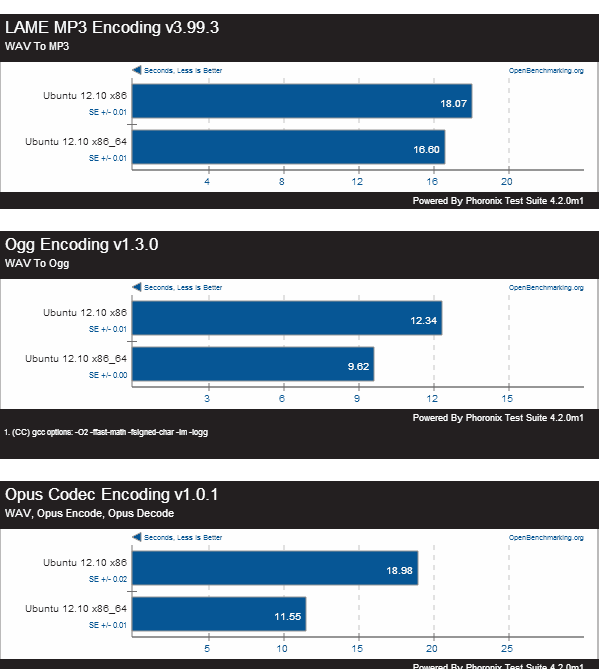
Luckily [Phoronix] had answered these questions for us. In its latest article, [Phoronix] compares the performance between 64-bit Ubuntu installation and 32-bit Ubuntu installation on a Intel Core i5 2520 (4 cores) with 4GB RAM.
Audio File Encoding Performance (less is better)
Server Workload Performance (more is better)
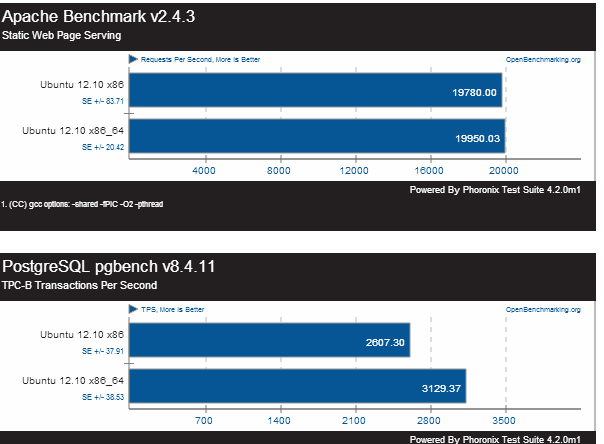
The result concludes that Ubuntu 12.10 64-bit performs better on overall compared to 32-bit, especially on video/audio encoding/decoding tasks. Ubuntu 12.10 also performs better with server workloads.
My thoughts:
Although Canonical still marks Ubuntu 12.10 32-bit as the recommended download. It seems that 64-bit installation offers greater performance even without the advantage of having greater memory. Some might argue that PAE still allows 32-bit Ubuntu to access more than 4GB RAM, PAE access on 32-bit is still significantly slower when compared to 64-bit memory access. Personally, I use Ubuntu 64bit for my development machine as all of my hardware has opensource drivers.