
I once posted a harddisk layout for my pc to boot 5 operating systems, but this guy is way cooler! He posted a guide to install and boot 145 operating system in his computer…. check it out. Moreoever, he use GRUB!
Pingness.com: Free service to monitor website uptime
It is undeniable that uptime is important for business and personal websites. For example, a website with low uptime may mean that the host is having technical problem or the web server is overwhelmed by client requests (serving web pages may incur a lot of overhead)
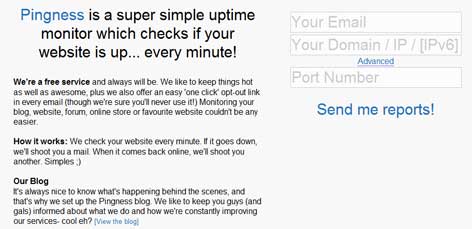
Pingness.com service does not require sign-up, you need to submit your email address and website url, and pingness will send reports of your site downtime (if any) and when the website is back-online.
RadioPlay – an online radio streaming Player that runs on Linux system tray
RadioPlay is an only radio streaming player that runs on compatible Linux Desktop system tray. It feature an easy to use interface and only targets online streaming radio listener. The application sits on the system tray and features a simple interface which allows the user to quickly select Radio station based on its genre.
RadioTray supports customized playlist in the popular PLS (shoutcast/icecast) format, M3U as well as ASX, WAX and WVX.


Radiotray is available from the Ubuntu and Debian repository and can be installed using the Ubuntu Software Center, Synaptic or by running command “sudo apt-get install radiotray“
Rant: GNOME should stop trying to mimic others

GNOME should stop trying to mimic other desktop environment and should concentrate building its own identity, because it has been driving people away…
John Goerzen: Please. Stop. Removing. Features.
Linus Torvalds Ditches GNOME For Xfce
After two weeks of using GNOME 3, I officially hate it
How to add contrib and non-free repository in Debian GNU/Linux
Debian GNU/Linux is probably the only Linux distro that has the largest software repository. However the default installation for Debian only includes the ‘main’ repository which is directly maintained by the Debian community and fulfills the Debian Free Software Guidelines (DFSG).
The two other repositories ‘contrib’ and ‘non-free’ are not enabled by default as it contains software that either does not meet DFSG requirements or depends on library or packages which does not meet DFSG requiments.
How to enable contrib and non-free repo in Debian
As ‘root’ you need to edit /etc/apt/sources.lst
Then add ‘contrib’ and ‘non free’ at the end of each line that begins with “deb” and “deb-src” just like the example:
deb http://http.us.debian.org/debian jessie main contrib non-free

deb http://security.debian.org jessie/updates main contrib non-free
Save the file, and run ‘apt-get update‘ and optionally ‘apt-get upgrade‘ to activate the changes.
Recommended Reading


Linux Package Manager Cheat Sheet Reference Chart
Linux comes in many flavors or distros, and each distro handles software installation differently from one another. Most GNU/Linux distro uses a package management system to manage software updates/instalation/removal in order to help users administer their Linux systems.
However, many of these package management system has different interface and commands, as such users from Ubuntu (or Debian based) might only be familiar with ‘apt’ or dpkg while Fedora (Red Hat based) users might only familiar with yum and rpm, which may create confusion when users from either distro were to exchange environments.
Luckily, somebody was kind enough to provide these users with Linux Package Manager Cheat Sheet which act as a reference point whenever a user had to switch to another distro which uses package management that are not familiar with them.
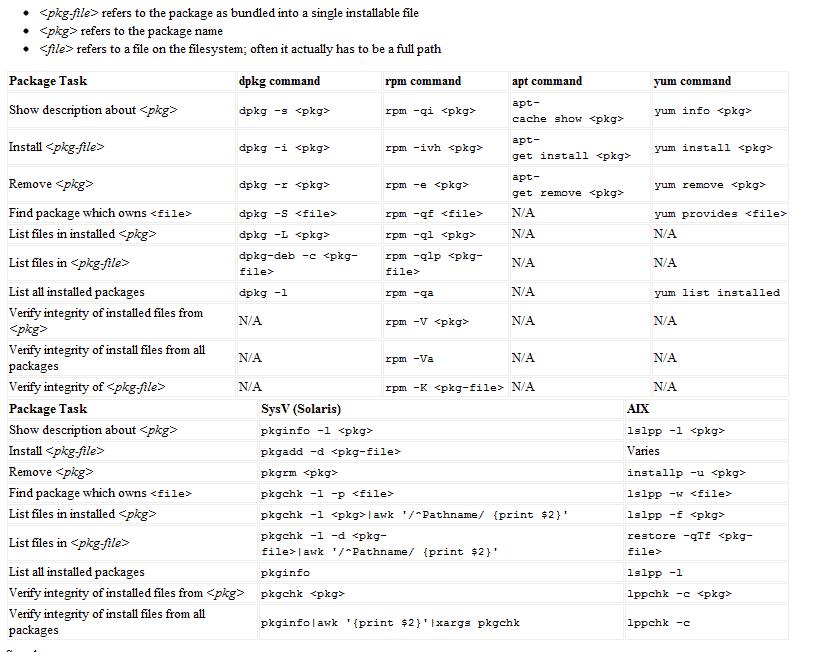
The package management software listed are for: apt,dpkg,yum, rpm, pkg* (slackware based) and AIX-based lsl**.
[ Source ]