youtube-dl – handy for downloading youtube videos in Linux

Every once a while you may come across youtube videos on the internet, this service enable easy? video sharing among internet users. However, youtube seems to discourage it users from downloading the videos to their computer.

This? is rather annoying because you’ve to bookmark the video url in your browser in case if you want to watch it again, plus having to wait for the video to download to your computer. The video will be in Flash Video format FLV, which can be played using Mplayer or any compatible Flash Video Player you can find in the internet
Thank god there’s youtube-dl , a small utility written in python which ease up downloading youtube videos. The tool is easy to use with the only requirement is only the python interpreter which can be immediately found in any modern GNU/Linux distro.

Once you downloaded? youtube-dl, all you need to do is run it :

python youtube-dl http://youtube.com/watch?v=yEiML_9NNYA

Of course there’s some video’s in youtube meant for 13 years and above users, so youtube-dl has an option to specify username and password too.

python youtube-dl -u yourname -p mypasswd http://youtube.com/watch?v=yEiML_9NNYA

Because youtube-dl was written in python, it can be used in any operating system platform provided the platform has python interpreter installed including Windows, Mac OS X or any Unix-based platform for that matter.

You can download youtube-dl from it’s creator website.

[tags]youtube,flash,flash videos,flash video,video,sharing,linux, flv,windows[/tags]

GetGnuLinux.org – Informational website about Linux

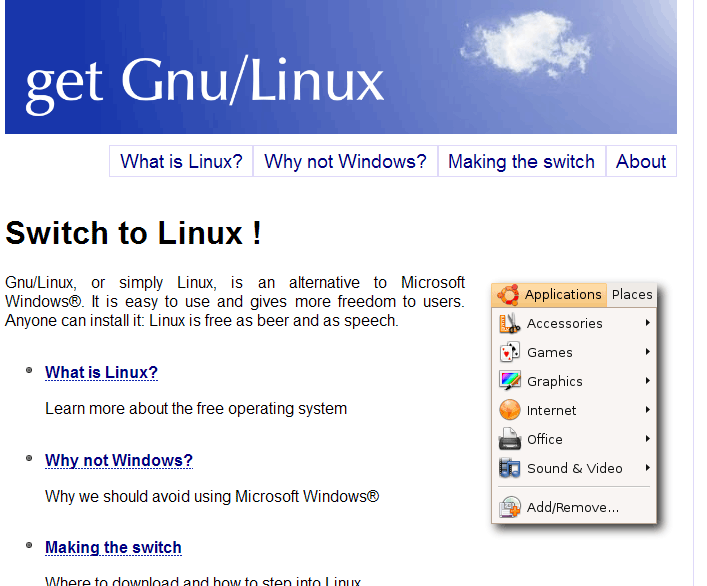
GetGnuLinux.org is an informational website about GNU/Linux operating system. The website is simple and easy to navigate and written to accomodate non-technical people. The website answer questions such as “What is Linux?”, “Why not Windows?” and how to switch from Windows to Linux in “Making the Switch”.

The website explains the advantages and disadvantages of using GNU/Linux operating system in in layman terms to help people make decisions whether GNU/Linux operating system is right for them or not. The website also has an FAQ section which answers common questions about GNU/Linux operating system and free software.

I like the way GetGnuLinux.org website was organised with simple layout and theme,it emphasis simplicity to the web users.

[tags]linux,gnu/linux,advocate,free software, open source,opensource[/tags]

Install Mozilla Flash Plugin in Ubuntu

I get questions about installing Flash plugin for Ubuntu some of the time, and here’s a quick howto activate the plugin in any Linux distro. Assuming you use Ubuntu :
First, download the flash plugin from Adobe website, click the Download Now button

From Desktop, goto Applications->Accesories->Terminal, type

tar zxvf ~/Desktop/install_flash_player_7_linux.tar.gz

You’ll see a list of files extracted. Then type,

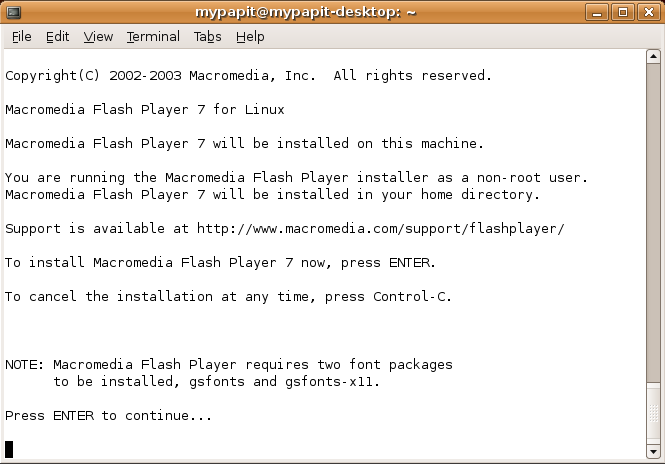
install_flash_player_7_linux/flashplayer-installer

Answer a few questions, then the screen will tell you that the Installation was successful.

Close your browser, and start it again. You should have your Flash plugin support in Mozilla Firefox browser right now.

[tags]flash,firefox,mozilla, firefox plugins, macromedia, adobe,ubuntu,linux[/tags]

Spanish Ubuntu wiki

Ubuntu Portada

I found a Spanish Ubuntu Wiki on the internet today, which I find it quite useful. The wiki contains info and guides about how to use Ubuntu in Spanish language. Among the guide in the wiki are:

How to install Ubuntu from downloading images/burning iso

  • Customising desktop
  • Introduction to Linux
  • How to use GRUB
  • Understanding processes
  • How to configure network
  • Installing application
  • How to do programming in Ubuntu

Currently there’s 114 articles that span over 1,800 pages on the wiki, the numbers of contribution ar growing each day as it being updated by the community. Wish we have a lot more localised wiki like this, because free software is about freedom of choice.

[tags]ubuntu,debian,linux,spanish,wiki,mediawiki,community,gnu/linux,portada,guide[/tags]

Install Opera 9, Realplayer 10 on Ubuntu Dapper

Greetings fellow Ubuntu users, I’ve brought some good news to you for those who prefer to use Opera over Firefox. Now you can get your favorite browser running in your Ubuntu Dapper without much hassle.

Canonical ( independently from Ubuntu community ) has announced the ubuntu dapper commercial repository which houses Opera web browser, among other softwares. Interested? Here’s how to setup canonical repository in Ubuntu :

  1. From Desktop, go to System->Administration, select Synaptic Package Manager
  2. Select Setting->Repositories from Synaptic, a dialog appears
  3. Click Add then Custom, another dialog appears with a textbox that reads APT line:
  4. put “deb http://archive.canonical.com/ubuntu dapper-commercial main"
  5. Click Add Channel, then Close
  6. Click Reload at the top left corner of the Synaptic application.
  7. Now you can install Opera to Ubuntu from synaptic

Note : you can also install Opera from command line by entering the following line from the terminal.

sudo apt-get install opera

Did I mention that Real Player 10 is also included in the repository?

Have fun !

[tags]opera,ubuntu,realplayer, real player, debian, linux, repository, canonical,repositories[/tags]

Get Powered by Ubuntu stickers for free!


Are you running Ubuntu in your machines? Want to publicise it? Then good news everyone, because now you can get free “Powered by Ubuntu” stickers to put on your machine.

All you need to do is send a self addressed stamped envelope to:

System76, Inc. (Free Sticker)
875 S. Colorado Blvd. #765
Denver, Colorado 80246

Currently the free stickers are for US resident only, however a spokeperson for System76 states that they will add instructions to get free stickers for international users too.