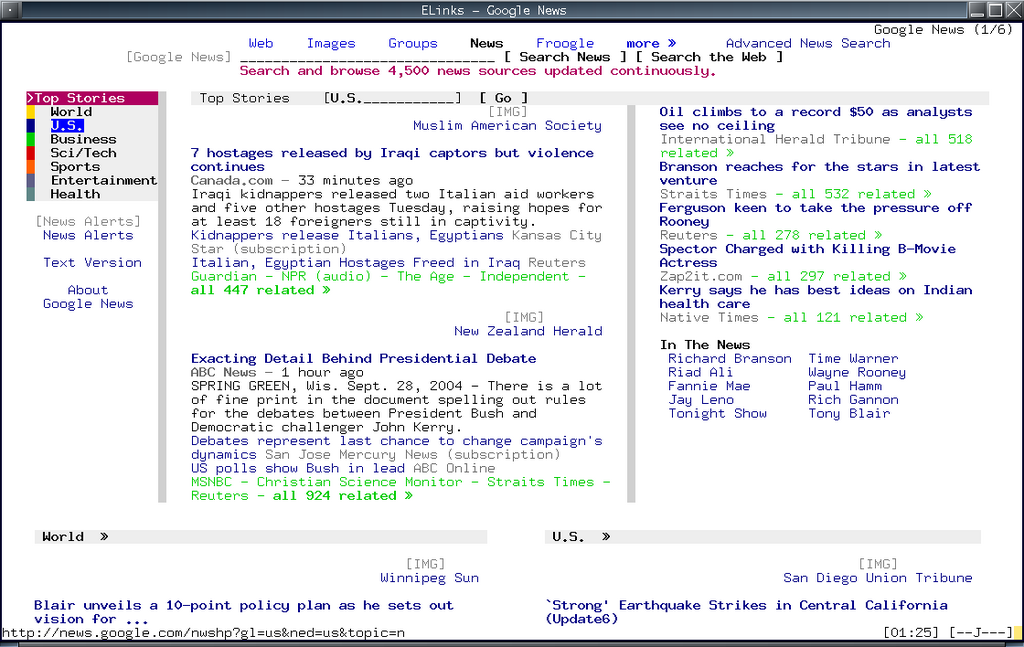
Elinks : the best text-based web browser

If you like to browse the internet, and suddenly have to work in a text-based only environment, then I suggest that you use the Elinks web browser.

It is the best text-based web browser i ever used besides the infamous lynx. I has features that can be found in other GUI-based popular browser like :

  • Table and frames rendering
  • Tabbed Browsing
  • IPV6 support
  • CSS support
  • Javascript support
  • Colour support
  • Support http, https, ftp and smb protocol
  • History browsing

With these kind of features, I dont think you will miss browsing from a GUI based browser much. In Ubuntu, Elinks also available as a lite or normal package, the normal package is part of the Ubuntu main repository while the lite package without extra scripting support is available in the Universe repo.

I recommend Elinks for hardcore internet surfers that have to work under text-based environment, because I’m sure they’ll appreciate every bit that elinks has to offer.
[tags]browser,internet browser,elinks,linux,ubuntu,internet,surf[/tags]

Ubuntu 6.10 Edgy Eft unavailable for Ship It

With the release of Ubuntu Edgy Eft is approaching (October 26, 2006), I’ve a not so great news to those who are used to get free Ubuntu CDs from ShipIt. Canonical has no plan to make Edgy Eft available on Ship It as Dapper Drake is a long supported release.

So for those who wanted to get Ubuntu Edgy Eft, you can always try the old fashion way by downloading the ISO from Ubuntu Download website and/or buy it from your local cd store.

[Source]

[tags]ubuntu,edgy eft, dapper drake, debian, linux, distro, gnu/linux [/tags]

Ubuntu 7.04 Feisty Fawn Announced

With the official release date of Ubuntu 6.10 (Edgy Eft) approching, Mark Shuttleworth announced the name of the next release of Ubuntu due in April. The release will be named Feisty Fawn “in the spirit of a young deer that sets out to explore a world that is new and exciting”.

Unlike Edgy Eft which have a slightly short development cycle, the Feisty Fawn returned to its six-month development cycle with focussed improvement on multimedia application and desktop effects, improved laptop support and and aggressive adoption of emerging desktop technologies.

Meanwhile, stay tuned for the final release? of Ubuntu Edgy Eft due on 26th October 2006, with faster startup process!

[source]

[tags]ubuntu,debian,linux,edgy eft,distro,shuttleworth[/tags]

Linux Command by Examples

Today I want to introduce you to another excellent website from a bunch of nice people that I know, Linux by Examples. Unlike other GNU/Linux related site, this blog teaches you on how to use common Linux command by giving simple, practical example that are easy to follow.

The GNU/Linux commands are also grouped by categories according its functionalities such as :

  • Administration
  • Archive
  • Developer
  • Network
  • Text Manipulation

and other common commands.

The examples presented in the blog itself are easy and simple to follow, and is accompanied by step-by-step explanations from writer.

I suggest that you have a look at Linux By Examples website and bookmark it for future reference, because it can be a handy in the future :)

[tags]linux,tutorial,guides,example, command-line, linux howto, howto[/tags]

Read and Write NTFS filesystem with Ubuntu Linux

This is one of the most popular questions that, previously i would suggest using the native NTFS linux kernel driver, but the driver itself only has a limited write support.

The best way to enable writing to NTFS partition is with the ntfs-3g userland driver. It uses the fuse driver and although still in BETA, tests proven that the driver really works for writing into ntfs partition.

For Ubuntu users, all you need to do is follow the instruction given in this website : https://wiki.ubuntu.com/ntfs-3g

I’ve tried it, and it worked perfectly with my machine, no need to depend to intermediate FAT32 partitions to transfer files from Linux. But one? word of advice, although it seems to work, you still need to keep in my that the developers of ntfs-3g driver still consider it in BETA release, so be advice and don’t rough it up too much :p

[tags]linux,ubuntu,debian,ntfs,fuse,kernel,linux kernel,filesystem,filesystems[/tags]

Install Java 5 SDK and Java JRE in Ubuntu

Installing Java Runtime and SDK has been made easier with Ubuntu Linux. Here’s a quick tip to install Java 5 SDK or Runtime in Ubuntu Linux.

1. First, go to System->Administration->Software Properties,

Check all options/channels

2. Close the dialog, and go to System->Administration->Synaptic Package Manager

Search for Java package,

Select sun-java-sdk, and install the package,

Continue reading “Install Java 5 SDK and Java JRE in Ubuntu”