How to add contrib and non-free repository in Debian GNU/Linux

Debian GNU/Linux is probably the only Linux distro that has the largest software repository. However the default installation for Debian only includes the ‘main’ repository which is directly maintained by the Debian community and fulfills the Debian Free Software Guidelines (DFSG).

The two other repositories ‘contrib’ and ‘non-free’ are not enabled by default as it contains software that either does not meet DFSG requirements or depends on library or packages which does not meet DFSG requiments.

How to enable contrib and non-free repo in Debian
As ‘root’ you need to edit /etc/apt/sources.lst

Then add ‘contrib’ and ‘non free’ at the end of each line that begins with “deb” and “deb-src” just like the example:


deb http://http.us.debian.org/debian jessie main contrib non-free

deb http://security.debian.org jessie/updates main contrib non-free

Save the file, and run ‘apt-get update‘ and optionally ‘apt-get upgrade‘ to activate the changes.

Recommended Reading

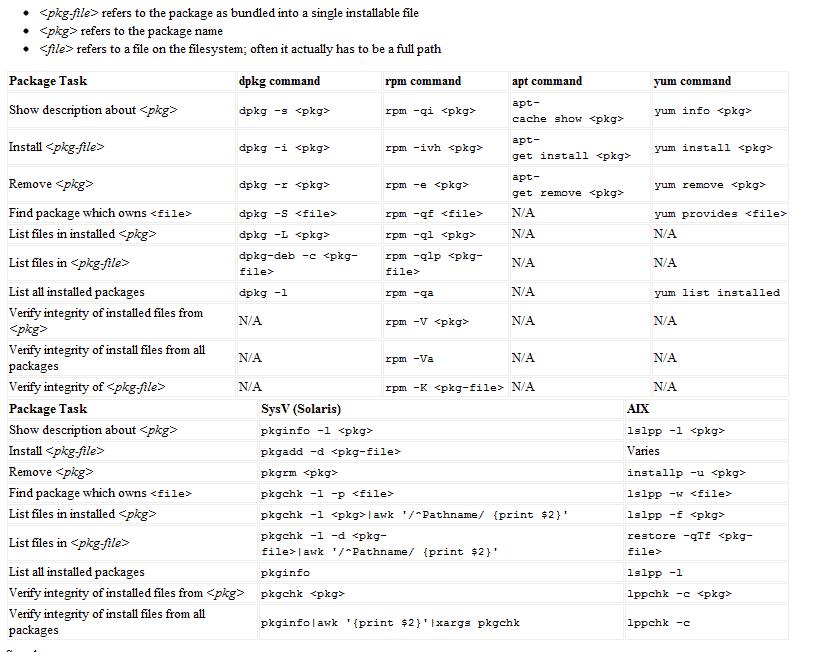
Linux Package Manager Cheat Sheet Reference Chart

Linux comes in many flavors or distros, and each distro handles software installation differently from one another. Most GNU/Linux distro uses a package management system to manage software updates/instalation/removal in order to help users administer their Linux systems.

However, many of these package management system has different interface and commands, as such users from Ubuntu (or Debian based) might only be familiar with ‘apt’ or dpkg while Fedora (Red Hat based) users might only familiar with yum and rpm, which may create confusion when users from either distro were to exchange environments.

Luckily, somebody was kind enough to provide these users with Linux Package Manager Cheat Sheet which act as a reference point whenever a user had to switch to another distro which uses package management that are not familiar with them.

The package management software listed are for: apt,dpkg,yum, rpm, pkg* (slackware based) and AIX-based lsl**.

[ Source ]

How to optimize MySQL tables automatically using cron

Busy websites which has a lot of insert/delete transactions may introduce fragmentation in MySQL tables. Fortunately, users and optimize mysql tables with ‘OPTIMIZE TABLE’ command, but how to execute it automatically?

Here’s how:
The mysql-client package in Ubuntu installation comes with a tool called mysqlcheck which is handy for optimizing table in mysql. This command can be executed from bash and can be executed using cron.

to do that, just run this command.

[bash]
cron -e

#in the crontab file– add this line
59 23 * * * /usr/bin/mysqlcheck -o -v -u <mysql username> -h localhost <database_name> -p <password>
[/bash]

This will tell cron to execute mysqlcheck and optimize mysql table of the specified database exactly on 11:59pm, every day. You can change the setting to suit your need.

How to secure server from SYN-flood attack using iptables

SYN-flood attack is commonly utilized as a mean to disrupt network communication and it is a form of (Distributed Denial-of-Service) DDOS attack. RFC4987 details common mitigation to deal with SYN-flood attack.

However in this post, I’m going to share you the method that I use to reduce the risk of SYN-flood attack from my department computers, with iptables
[bash]
/sbin/iptables -N syn-flood
/sbin/iptables -A syn-flood -m limit –limit 100/second –limit-burst 100 -j RETURN
/sbin/iptables -A syn-flood -j LOG –log-prefix "SYN-flood attempt: "
/sbin/iptables -A syn-flood -j DROP
[/bash]

RFC4987 suggests the use of SYN-cookie for added protection. You can enable SYN-cookie protection in Linux by running this command (as root):
[bash]
echo 1 > /proc/sys/net/ipv4/tcp_syncookies
[/bash]

hope that helps…

Note: I’m not a full-time sysadmin as I’ve a different dayjob, but I was put incharged in securing part of my school’s computer network, so there.

Please update/patch and secure Litespeed web server

Due to the widespread of Litespeed 0-day attack which has affected local websites, it’s imperative for all sysadmin and website operator to patch/update and upgrade the security of the Litespeed web server.

This attack is dangerous particularly because the attacker can gain shell access with the same privileges of the web server or the user that runs the web server. Usually this allow the attacker to peek into database content and downloads it.

Patch now!, the security and privacy of your users are at the stake!