My wishlist: PHP Development in the Cloud

I’m not a PHP developer by profession, nor I’m very good at it, there are times where I was required to write PHP web application for my daytime job. While it is still a simple application, nevertheless I grew fond of the simplicity of PHP application development and deployment (though some aspects of the language still confuses me, and sometimes the maintenance is a PITA).

I haven’t developed any PHP application for the masses yet, but if I do, I imagine it would benefit from the use of Cloud, therefore my latest wishlist is this book: PHP Development in the Cloud

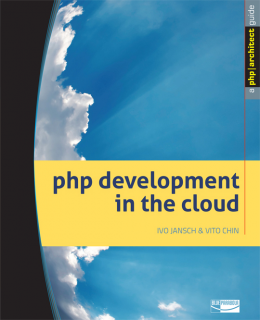
php development in the cloud

The book is written by Ivo Jansch and Vito Chin, and it covers Cloud Computing Characteristics and Models, Cloud Computing Architecture and Scalability and how to prevent bottlenecks, Working with Popular Cloud Infrastructures and Platform (covers Amazon, Google and Rackspace) and Working with Popular Cloud Software and Services (OpenID, OAuth, CRM, Maps and Storage).

The book is available from in paperback format from online bookstore (Amazon, Barnes & Nobile, etc) or in digital form from PHP Architect website
How to save (or mirror) an entire website with httrack in Debian and Ubuntu

Httrack is a tool for copying and saving an entire website in Debian and Ubuntu. Httrack can crawl an online website save each of the pages (including graphic and other downloadable files).

Among httrack features are:

  • Able to continue interrupted downloads
  • Selective download
  • Customizable user-agent
  • Customizable Scan-rules, can exclude files from being crawled
  • Accept cookies
  • URL hacks
  • Tolerant requests support
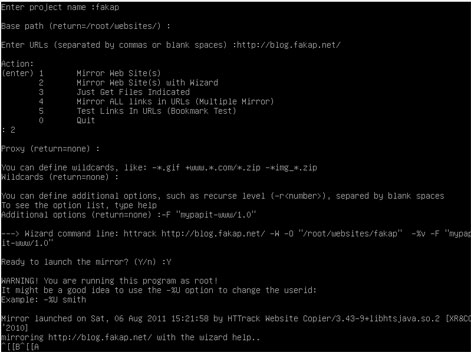
httrack screenshot

Using ‘httrack‘ is easy, as it has built-in wizard that can guide you through the process of mirroring web sites. The user will be asked a series of question about the URL to be mirrored, the location where the files will be saved, proxy server and the user-agent to be used.

p/s: httrack perhaps is the only open-source website copier/downloader tool available for GNU/Linux operating system. It is efficient and easy to use. The only gripe that I’ve when using ‘httrack‘ is that it does not provide progress feedback (unlike its counterpart in Microsoft Windows) like ‘wget

How to add contrib and non-free repository in Debian GNU/Linux

Debian GNU/Linux is probably the only Linux distro that has the largest software repository. However the default installation for Debian only includes the ‘main’ repository which is directly maintained by the Debian community and fulfills the Debian Free Software Guidelines (DFSG).

The two other repositories ‘contrib’ and ‘non-free’ are not enabled by default as it contains software that either does not meet DFSG requirements or depends on library or packages which does not meet DFSG requiments.

How to enable contrib and non-free repo in Debian
As ‘root’ you need to edit /etc/apt/sources.lst

Then add ‘contrib’ and ‘non free’ at the end of each line that begins with “deb” and “deb-src” just like the example:


deb http://http.us.debian.org/debian jessie main contrib non-free

deb http://security.debian.org jessie/updates main contrib non-free

Save the file, and run ‘apt-get update‘ and optionally ‘apt-get upgrade‘ to activate the changes.

Recommended Reading

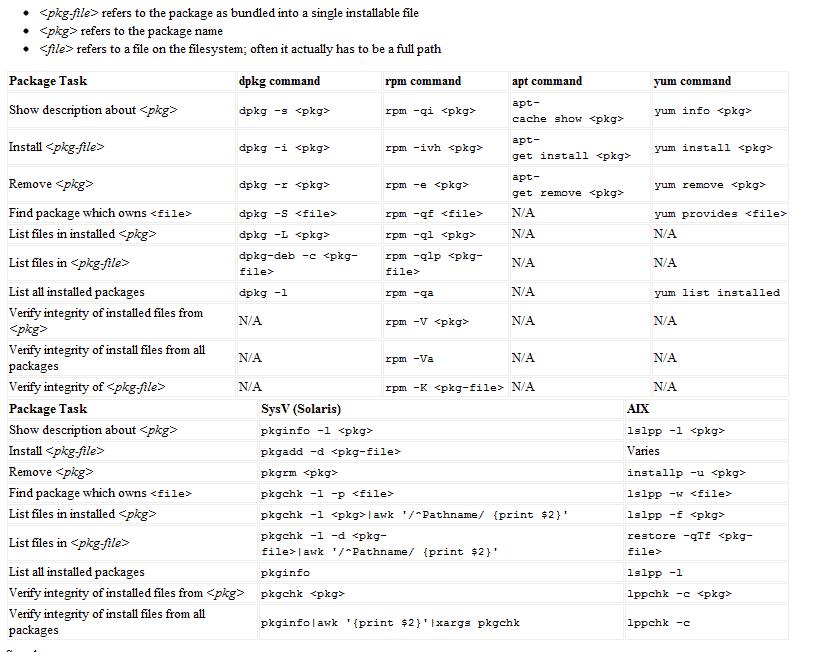
Linux Package Manager Cheat Sheet Reference Chart

Linux comes in many flavors or distros, and each distro handles software installation differently from one another. Most GNU/Linux distro uses a package management system to manage software updates/instalation/removal in order to help users administer their Linux systems.

However, many of these package management system has different interface and commands, as such users from Ubuntu (or Debian based) might only be familiar with ‘apt’ or dpkg while Fedora (Red Hat based) users might only familiar with yum and rpm, which may create confusion when users from either distro were to exchange environments.

Luckily, somebody was kind enough to provide these users with Linux Package Manager Cheat Sheet which act as a reference point whenever a user had to switch to another distro which uses package management that are not familiar with them.

The package management software listed are for: apt,dpkg,yum, rpm, pkg* (slackware based) and AIX-based lsl**.

[ Source ]

Bitcoin spending and transaction can be traceable

It seems that Bitcoin is only designed to eliminate the need for centralized issuer and central authority, but not anonymity, which is a common misconception among internet users as according to one of its developers (Jeff Garzik), transaction is recorded in public log and although the identity of the parties involved can’t be directly identified, the transaction can be easily traced and linked to other accounts through data mining and statistical analysis.

So it is harder to stay anonymous in transactions that involve large currency value.

bitcoinBitcoin is not anonymous

  • The Battle Is On – Silk Road vs Government, and Bitcoin Anonymity