LiVES – Linux Video Editing made easy

LiVES stands for Linux Video Editing System is (obviously!) an application that lets you do video editing under Linux.

Lives linux video editing

Among features supported by LiVES are :

  • Streaming input and output
  • Support editing multiple video format through mplayer decoder
  • Supports more than 50 output video formats
  • Real-time clip blending
  • Support loading tracks directly off CD to use with video (using cdda2wav)
  • Fade in/fade out feature for clips
  • Audio resampling
  • Supports multitrack
  • Full crash recovery
  • etc…

Please refer to LiVES project website for more information.

[tags]lives,linux,video editing,video,editing,multimedia, video editor,sound editor,audacity[/tags]

Collections of ffmpeg tips and usage

A quick post about ffmpeg, you can get the mini-ebook from HardyWeb, it has all the necessary ffmpeg usage examples to convert various video formats.

The ebook is written in Malay, but i trust most of you will have no problem understanding the examples outlined in the ebook.

The ebook has been written by adi, an experienced ffmpeg user. If you can understand malay, then visit his site, he has a lot of ffmpeg tips listed on his blog.

Ubuntu users might have to refer to this article, Enable mp3 and amr support in ffmpeg ( Ubuntu ) before you start using this tutorial.

That’s all for today!

About ffmpeg
ffmpeg is a general purpose audio and video stream convertor which enables you to convert one video file format to another.

[tags]ffmpeg,linux,multimedia,flv,convertor,ubuntu,howto,ebook[/tags]

Liferea – My Favorite Linux Feed Reader in Ubuntu

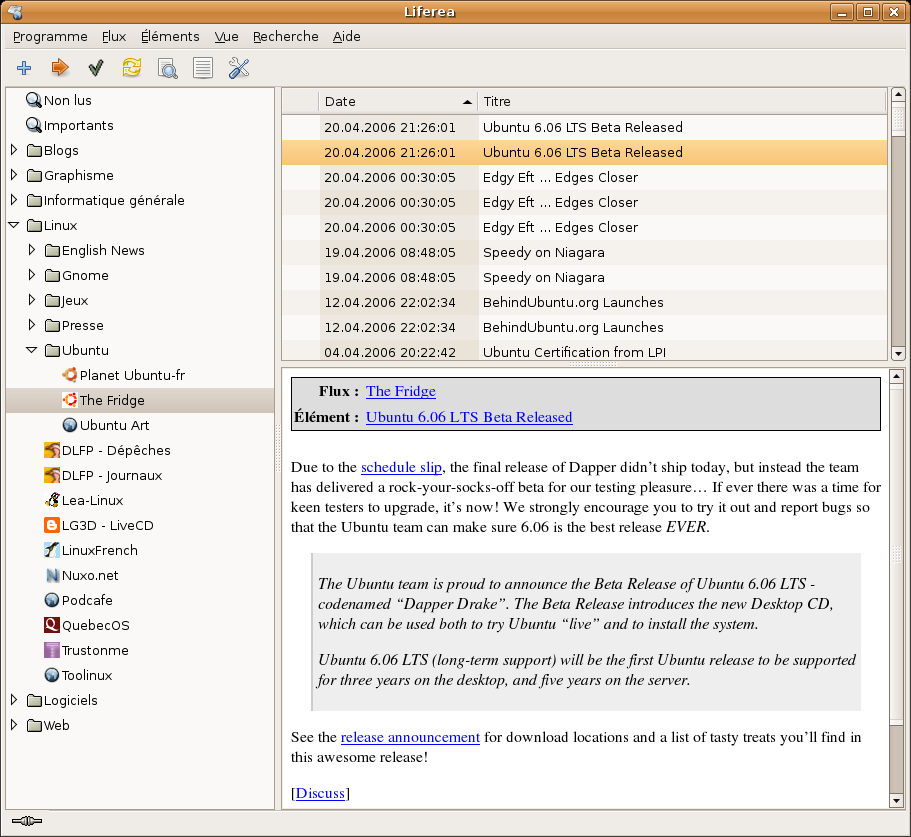
Liferea is currently my favorite feed reader for Linux. It has a simple interface, supports tray docking and is easy to use compared to other alternatives.

Liferea supports subscription from RSS and ATOM feeds for my favorite blogs and news site. It gives me the flexibility by letting I manage my feeds individually, or grouping it using the folder feature.

Podcast and Enclosure Support
Another feature that I appreciate the most is the enclosure support, which is also used primarily in podcasting.
liferea screenshot

Liferea can manage your podcast subscription as easily as dedicated podcast application. All you need to do is to configure Liferea to automatically download enclosures and you can listen to your podcast using your favorite audio player, provided you configured Liferea to launch your favorite audio player in its preference of course.

Screen Scraper: Web to RSS

Finally, Lifearea has one feature that most feed reader lacks…it has website screen scraper feature that lets you subscribe updates from your favorite website that do not provide syndication feeds for some reason. Here’s the list of user-made scraper scripts that you can use together with Liferea to ease up your feed subscriptions.

For Ubuntu users, Liferea is available in your repository, you just need to use Synaptic Package manager to install Liferea to your computer.

Liferea official website can be reached at liferea.sourceforge.net

[tags]linux,liferea,feed reader, rss reader, atom, rss, syndication[/tags]

Howto Manage Successful Open Source Software Projects Books

I’d like to share with you two great books I’ve read which motivates me in managing open source software projects.

These two books has taught me all the things I need to know about starting up a successful Free and Open Source Software project, best practices and how to handle the project properly.

Most importantly the books taught me how to use essential tools that helps me in the development of collaborative open source projects development.

Among the thing explained in the books are:

  • Guide on starting Open Source Software Project
  • Source Code Control (SVN,CVS)
  • How to manage bug tracker and feature request
  • Choosing an Open Source License
  • How to setup discussion channel (mailing lists, IRC channel)
  • Funding your project
  • Managing Volunteers
  • Managing Documentations effectively
  • Sharing management and technical tasks
  • Choosing Project Committers

For those who are interested to read these two great books, you can get them from here :

  1. Producting Open Source Software
  2. Producing Open Source Software (Mirror 1) f
  3. Open Source Messaging Application Development: Building and Extending Gaim (Expert’s Voice in Open Source)

[tags]open source, free software, foss, gpl, fsf,e-book,ebook[/tags]

Linux GTK+ 1337-generator : Text to Leetspeak converter

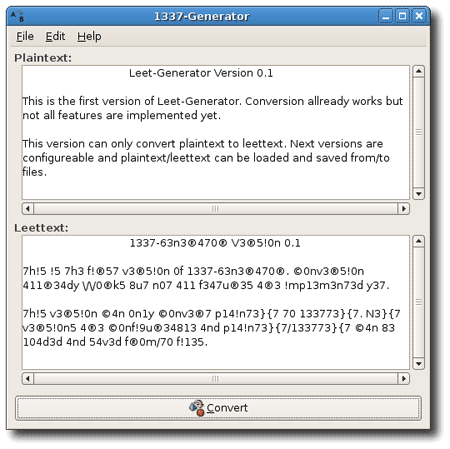
I found out about this application from GnomeFiles. Not particularly useful, but entertaining. The basic operation of the program is to convert plain text into leetspeak writing system.

Future releases may provide functionality to reverse leetspeak text back to plaintext for greater readability.

leet-generator-tn.png

1337 generator requires GTK+ 2.x and can be downloaded from http://leet-generator.sourceforge.net/

[tags]gtk+,1337,leet,ubuntu,linux[/tags]

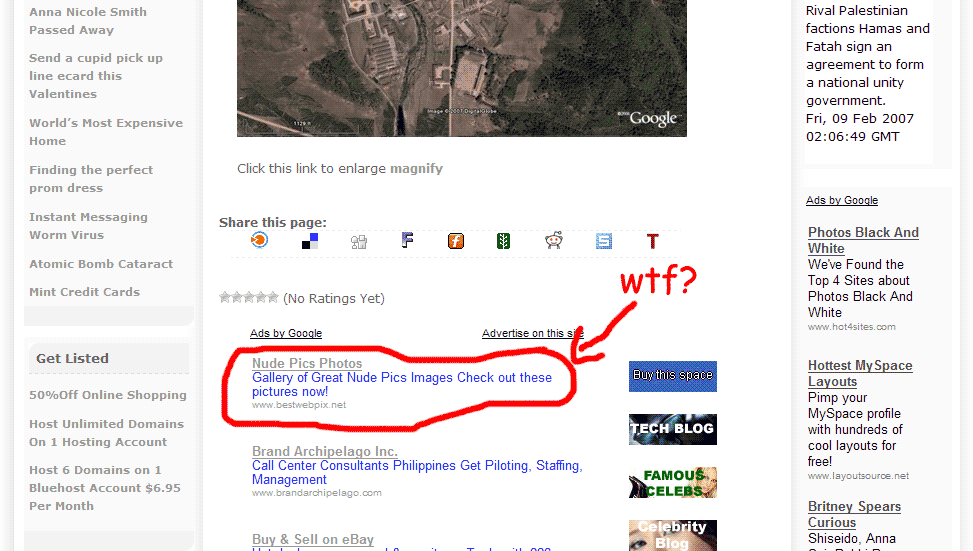
Google Adwords and Adsense allows nude pics ads?

I found this Google ads from Pinoyhack blog via fakapster

google_ads_nude.png

I know some people consider nude pics and nudity as an art, but does this means that you are safe to put your google ads on the same page as those pics? Sounds like a grey area to me.

Wonder if anybody ever advertised or put google ads on website filled with nude pics that might borders to pornography?

[tags]adsense, google, google adwords,adwords,internet[/tags]