
Those who are keeping up with the updates knows that Ubuntu 12.10 Quantal Quetzal has been released yesterday!
However now I’m going to share two great features that I like about Ubuntu 12.10 Quantal Quetzal.
#1. New GRUB menu that hides old kernel after updates!
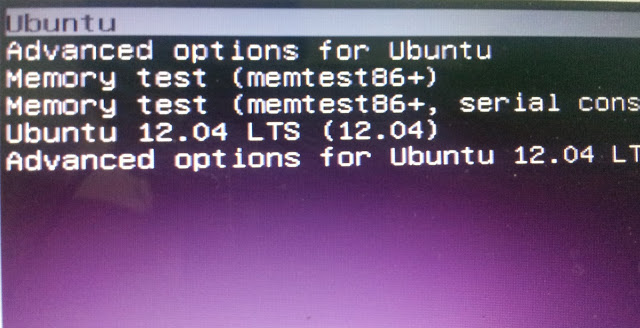
Now, GRUB menu always display “Ubuntu” with each kernel update. All previous kernels are grouped together under the “Advanced options for Ubuntu”.
So you get:
Instead of:
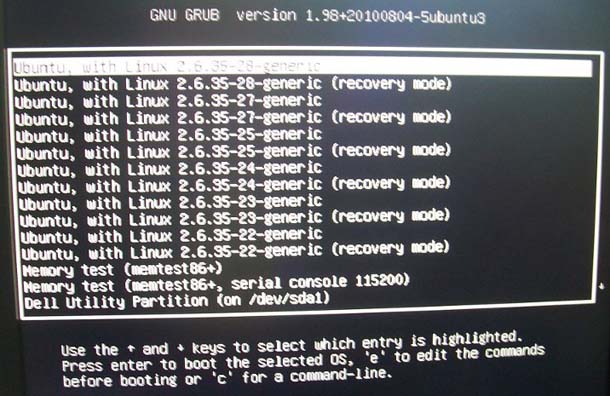
This will keep the computer from listing too many kernels on the boot menu, which is messy in itself.
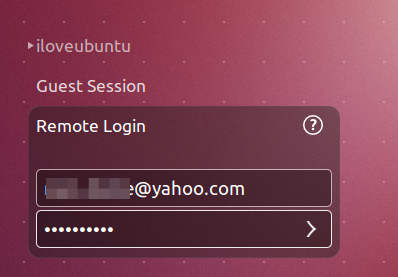
#2. Remote Login option!
Ubuntu Quantal Quetzal allows users to login remotely to Remote Desktop Protocol (RDP) server right from Ubuntu Greeter.
Other Features worth mentioning
- Linux kernel 3.5
- LibreOffice 3.6.1.2, featuring menu that can be integrated to Unity menu.